Ana içeriğe geç
Onarım Topluluğuna Katılın - Hesap Oluşturun

Lenovo ThinkPad X100e Screen Replacement

Neye ihtiyacın var

  1. Lenovo ThinkPad X100e Screen Replacement, Screen: adım 1, 2 resimden 1. Lenovo ThinkPad X100e Screen Replacement, Screen: adım 1, 2 resimden 2.
    Bu adımda kullanılan alet:
    Spudger
    $2.99
    • Use a Spudger tool to remove the screw covers on each side of the screen.

    • Be sure not to lose screw covers.

    FixBot'a Sor
  2. Lenovo ThinkPad X100e Screen Replacement: adım 2, 1 resimden 1.
    • Using a magnetic screwdriver fit with a PH0 Bit, unscrew the two screws and carefully set the aside.

    FixBot'a Sor
  3. Lenovo ThinkPad X100e Screen Replacement: adım 3, 1 resimden 1.
    • Pry open the bezel carefully with the spudger tool.

    • You will want to do this until the frame is completely off.

    FixBot'a Sor
  4. Lenovo ThinkPad X100e Screen Replacement: adım 4, 1 resimden 1.
    • Remove all exposed screws and carefully set them aside. There should be 6 visible screws.

    • Be sure to set the screws aside on the magnetic mat.

    FixBot'a Sor
  5. Lenovo ThinkPad X100e Screen Replacement: adım 5, 1 resimden 1.
    • Lift the screen up carefully, and remove the screws on both sides of the panel. There should be 4 screws.

    • The other two screws are located in the exact place on the other side.

    • Don't forget to place the screws on the magnetic mat, separate from other screws.

    FixBot'a Sor
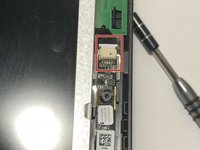
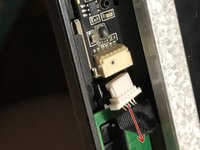
  6. Lenovo ThinkPad X100e Screen Replacement: adım 6, 2 resimden 1. Lenovo ThinkPad X100e Screen Replacement: adım 6, 2 resimden 2.
    • Remove the connector located at the very top of the screen beside the webcam.

    • To remove the connector, simply pull the connector out.

    FixBot'a Sor
  7. Lenovo ThinkPad X100e Screen Replacement: adım 7, 1 resimden 1.
    • Fold the panel over until a strip of black tape is visible.

    • Peel the tape down until you get to the base.

    FixBot'a Sor
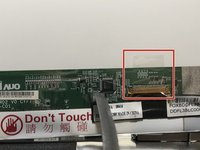
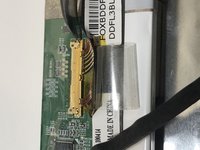
  8. Lenovo ThinkPad X100e Screen Replacement: adım 8, 2 resimden 1. Lenovo ThinkPad X100e Screen Replacement: adım 8, 2 resimden 2.
    • Peel the piece of transparent tape back.

    • At this point there should be some exposed wires underneath the tape.

    FixBot'a Sor
  9. Lenovo ThinkPad X100e Screen Replacement: adım 9, 1 resimden 1.
    • Remove the connector carefully with the spudger tool.

    FixBot'a Sor
  10. Lenovo ThinkPad X100e Screen Replacement: adım 10, 1 resimden 1.
    • Remove the black tape fully.

    • Now your device is ready for a new panel.

    FixBot'a Sor
Sonuç

To reassemble your device, follow these instructions in reverse order.

Bir başkası bu kılavuzu tamamladı.

Orly Guerra

Üyelik tarihi: 02/08/18

448 İtibar

2 adet Kılavuz yazıldı

1Rehber Yorum

What can be used as a replacement screen, as it's listed not for sale?

Keith Bowe - Yanıt Paylaş

Yorum Ekle

İstatistikleri Görüntüle:

Son 24 Saat: 1

Son 7 gün: 3

Son 30 gün: 54

Her zaman: 1,263