Ana içeriğe geç
Onarım Topluluğuna Katılın - Hesap Oluşturun

Lenovo ThinkPad Yoga Keyboard Replacement

Neye ihtiyacın var

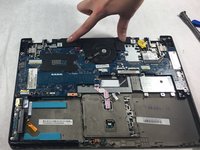
    1. Lenovo ThinkPad Yoga Keyboard Replacement, Battery: adım 1, 3 resimden 1. Lenovo ThinkPad Yoga Keyboard Replacement, Battery: adım 1, 3 resimden 2. Lenovo ThinkPad Yoga Keyboard Replacement, Battery: adım 1, 3 resimden 3.
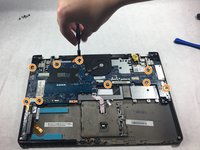
      • Flip the laptop over so the bottom is facing you.

      • Remove the ten screws using a Phillips #1 screwdriver.

      • Using the plastic opening tool, pry the bottom cover off the laptop.

      FixBot'a Sor

      Yorum Ekle

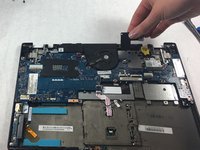
    2. Lenovo ThinkPad Yoga Keyboard Replacement: adım 2, 3 resimden 1. Lenovo ThinkPad Yoga Keyboard Replacement: adım 2, 3 resimden 2. Lenovo ThinkPad Yoga Keyboard Replacement: adım 2, 3 resimden 3.
      • Remove two screws from the battery using a Phillips #1 screwdriver.

      • Disconnect the battery connector from the motherboard.

      • Remove the battery from the laptop.

      FixBot'a Sor

      Yorum Ekle

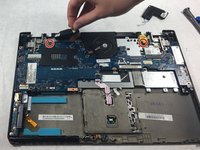
    1. Lenovo ThinkPad Yoga Keyboard Replacement, Speakers: adım 3, 3 resimden 1. Lenovo ThinkPad Yoga Keyboard Replacement, Speakers: adım 3, 3 resimden 2. Lenovo ThinkPad Yoga Keyboard Replacement, Speakers: adım 3, 3 resimden 3.
      • Disconnect connectors. Use fingers to pinch and pull the connector out.

      FixBot'a Sor

      Yorum Ekle

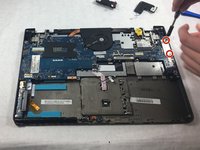
    1. Lenovo ThinkPad Yoga Keyboard Replacement, Fan: adım 4, 3 resimden 1. Lenovo ThinkPad Yoga Keyboard Replacement, Fan: adım 4, 3 resimden 2. Lenovo ThinkPad Yoga Keyboard Replacement, Fan: adım 4, 3 resimden 3.
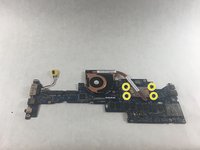
      • Remove the two screws from the retainer for the ports using a Phillips #1 screwdriver.

      • Remove the nine screws from the motherboard using a Phillips #1 screwdriver.

      • Remove the four screws from the fan under the motherboard using a Phillips #1 screwdriver.

      • Remove the fan from the motherboard.

      FixBot'a Sor

      Yorum Ekle

    1. Lenovo ThinkPad Yoga Keyboard Replacement, Keyboard: adım 5, 1 resimden 1.
      • Remove twelve screws from the midframe using a Phillips #1 screwdriver.

      FixBot'a Sor

      Yorum Ekle

    2. Lenovo ThinkPad Yoga Keyboard Replacement: adım 6, 1 resimden 1.
      • Use a spudger to pry open the keyboard panel.

      • Continue to pry until the panel is loose enough to take off.

      FixBot'a Sor

      Yorum Ekle

    3. Lenovo ThinkPad Yoga Keyboard Replacement: adım 7, 1 resimden 1.
      • Remove the keyboard from the laptop.

      FixBot'a Sor

      Yorum Ekle

Sonuç

To reassemble your device, follow these instructions in reverse order.

İptal et: Bu kılavuzu tamamlamadım.

2 farklı kişi bu kılavuzu tamamladı.

Felicia McCarey

Üyelik tarihi: 10/28/21

299 İtibar

2 adet Kılavuz yazıldı

Ekip

UMass Dartmouth, Team 4-4, Gulbrandsen Fall 2021 UMass Dartmouth, Team 4-4, Gulbrandsen Fall 2021 üyesi

UMASSD-GULBRANDSEN-F21S4G4

3 Üyeler

30 adet Kılavuz yazıldı

0Kılavuz Yorumları

Yorum Ekle

İstatistikleri Görüntüle:

Son 24 Saat: 5

Son 7 gün: 30

Son 30 gün: 145

Her zaman: 11,698