Ana içeriğe geç
Onarım Topluluğuna Katılın - Hesap Oluşturun

Lenovo Thinkpad T450s RAM Replacement

Neye ihtiyacın var

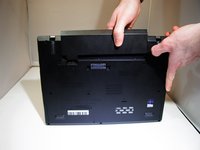
    1. Lenovo Thinkpad T450s RAM Replacement, Battery: adım 1, 2 resimden 1. Lenovo Thinkpad T450s RAM Replacement, Battery: adım 1, 2 resimden 2.
      • Turn off device before starting

      • Flip the laptop upside down so you have access to the battery.

      FixBot'a Sor

      Yorum Ekle

    2. Lenovo Thinkpad T450s RAM Replacement: adım 2, 1 resimden 1.
      • Slide lock button 1 to the unlock position and gently slide away from your body.

      FixBot'a Sor

      Yorum Ekle

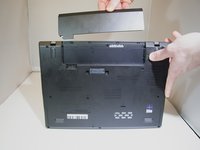
    3. Lenovo Thinkpad T450s RAM Replacement: adım 3, 2 resimden 1. Lenovo Thinkpad T450s RAM Replacement: adım 3, 2 resimden 2.
      • Slide lock button 2 to the unlock position and continue gently sliding until the battery is removed.

      FixBot'a Sor

      Yorum Ekle

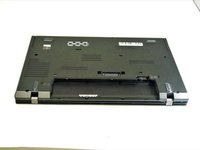
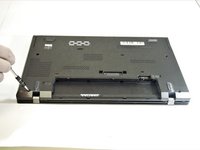
    1. Lenovo Thinkpad T450s RAM Replacement, Lenovo Thinkpad T450s Bottom Panel Removal: adım 4, 3 resimden 1. Lenovo Thinkpad T450s RAM Replacement, Lenovo Thinkpad T450s Bottom Panel Removal: adım 4, 3 resimden 2. Lenovo Thinkpad T450s RAM Replacement, Lenovo Thinkpad T450s Bottom Panel Removal: adım 4, 3 resimden 3.
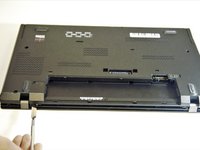
      • Flip the device over and lay it down with the underside facing upwards.

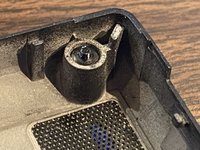
      • Unscrew all 8 screws. While they should not come out completely, in some cases, the plastic retaining washers may come off of one or more of the screws, allowing them to come out completely. - should this happen, look for a loose, tiny black plastic washer once the case is open. It's possible, in some cases, to reattach the retaining washer.

      FixBot'a Sor

      Yorum Ekle

    2. Lenovo Thinkpad T450s RAM Replacement: adım 5, 2 resimden 1. Lenovo Thinkpad T450s RAM Replacement: adım 5, 2 resimden 2.
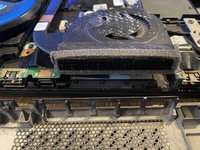
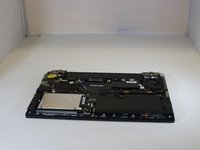
      • Pry the bottom from the computer until it pops out.

      • In some cases, the vented side of the case may cling to the heat sink; appears to be adhesive. Take care when separating.

      FixBot'a Sor

      Yorum Ekle

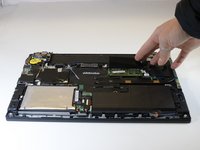
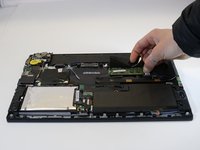
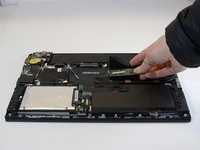
    1. Lenovo Thinkpad T450s RAM Replacement, RAM: adım 6, 3 resimden 1. Lenovo Thinkpad T450s RAM Replacement, RAM: adım 6, 3 resimden 2. Lenovo Thinkpad T450s RAM Replacement, RAM: adım 6, 3 resimden 3.
      • Pull one side of the prong that is holding the RAM in place

      FixBot'a Sor

      Yorum Ekle

    2. Lenovo Thinkpad T450s RAM Replacement: adım 7, 1 resimden 1.
      • Pull the other side prong until the RAM pops up.

      FixBot'a Sor

      Yorum Ekle

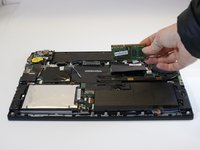
    3. Lenovo Thinkpad T450s RAM Replacement: adım 8, 2 resimden 1. Lenovo Thinkpad T450s RAM Replacement: adım 8, 2 resimden 2.
      • Pull the RAM out of the device

      FixBot'a Sor

      Yorum Ekle

Sonuç

To reassemble your device, follow these instructions in reverse order.

İptal et: Bu kılavuzu tamamlamadım.

Bir başkası bu kılavuzu tamamladı.

1Rehber Yorum

My t450s comes with an internal battery. The comment on this guide records the process for disabling the internal battery temporarily.

I also used this guide from Lenovo as I found removing the back plate rather difficult.

ray beats - Yanıt Paylaş

Yorum Ekle

İstatistikleri Görüntüle:

Son 24 Saat: 4

Son 7 gün: 8

Son 30 gün: 49

Her zaman: 5,801