Ana içeriğe geç
Onarım Topluluğuna Katılın - Hesap Oluşturun
Lenovo Y570 Disassembly for Chassis Replacement

Neye ihtiyacın var

  1. Lenovo Y570 Disassembly for Chassis Replacement, Disassembly of everything but the LCD panel.: adım 1, 2 resimden 1. Lenovo Y570 Disassembly for Chassis Replacement, Disassembly of everything but the LCD panel.: adım 1, 2 resimden 2.
    • From the bottom of the unit: Slide the 2 latches to the outer edges and remove the battery.

    FixBot'a Sor

    Yorum Ekle

  2. Lenovo Y570 Disassembly for Chassis Replacement: adım 2, 3 resimden 1. Lenovo Y570 Disassembly for Chassis Replacement: adım 2, 3 resimden 2. Lenovo Y570 Disassembly for Chassis Replacement: adım 2, 3 resimden 3.
    • Completely loosen the 6 captive screws from the rear access panel, unsnap and remove the panel.

    • Completely loosen the 1 captive screw from the cable TV card cover, unsnap and remove the cover.

    FixBot'a Sor

    Yorum Ekle

  3. Lenovo Y570 Disassembly for Chassis Replacement: adım 3, 3 resimden 1. Lenovo Y570 Disassembly for Chassis Replacement: adım 3, 3 resimden 2. Lenovo Y570 Disassembly for Chassis Replacement: adım 3, 3 resimden 3.
    • Remove the 2 retaining screws from the magnetic hard drive, slide the drive out of the socket and remove from the unit.

    • Remove the 1 retaining screw from the solid state hard drive, slide the drive out of the socket and remove from the unit.

    FixBot'a Sor

    Yorum Ekle

  4. Lenovo Y570 Disassembly for Chassis Replacement: adım 4, 2 resimden 1. Lenovo Y570 Disassembly for Chassis Replacement: adım 4, 2 resimden 2.
    • Remove the 1 retaining screw from the optical drive and slide it out of the unit.

    FixBot'a Sor

    Yorum Ekle

  5. Lenovo Y570 Disassembly for Chassis Replacement: adım 5, 2 resimden 1. Lenovo Y570 Disassembly for Chassis Replacement: adım 5, 2 resimden 2.
    • Push the retaining clips on both sides of the DIMM memory cards to release and remove them from the unit.

    FixBot'a Sor

    Yorum Ekle

  6. Lenovo Y570 Disassembly for Chassis Replacement: adım 6, 2 resimden 1. Lenovo Y570 Disassembly for Chassis Replacement: adım 6, 2 resimden 2.
    • Gently pry upward on the 2 antenna wires with a plastic pry tool or guitar pick to unsnap them from the wireless LAN card.

    • Remove the 1 retaining screw from the wireless LAN card and remove it from the unit.

    FixBot'a Sor

    Yorum Ekle

  7. Lenovo Y570 Disassembly for Chassis Replacement: adım 7, 1 resimden 1.
    • Remove the single keyboard retaining screw. This screw and the screw that held the optical drive in place also attach to the back of the keyboard.

    FixBot'a Sor

    Yorum Ekle

  8. Lenovo Y570 Disassembly for Chassis Replacement: adım 8, 3 resimden 1. Lenovo Y570 Disassembly for Chassis Replacement: adım 8, 3 resimden 2. Lenovo Y570 Disassembly for Chassis Replacement: adım 8, 3 resimden 3.
    • Using a plastic pry tool or guitar pick, carefully lift and unsnap the top of the keyboard starting from one of the top corners. Unsnap the sides of the keyboard and carefully move it forward to expose the attached ribbon cable.

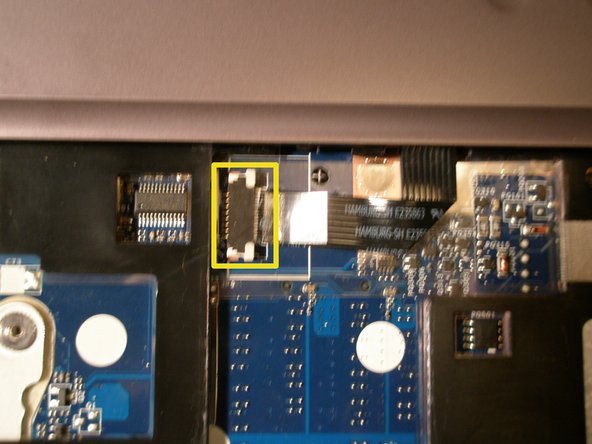
    • Push the ribbon cable fastener forward to release the cable, then slide the cable from the socket and remove the keyboard from the unit.

    FixBot'a Sor

    Yorum Ekle

  9. Lenovo Y570 Disassembly for Chassis Replacement: adım 9, 1 resimden 1.
    • From the bottom of the unit: Remove the 8 retaining screws on the hinge side of the chassis.

    FixBot'a Sor

    Yorum Ekle

  10. Lenovo Y570 Disassembly for Chassis Replacement: adım 10, 2 resimden 1. Lenovo Y570 Disassembly for Chassis Replacement: adım 10, 2 resimden 2.
    • Move the ribbon cable fastener forward and disconnect the power button cable from the system board.

    • Move the ribbon cable fastener forward and disconnect the status LED cable from system board.

    FixBot'a Sor

    Yorum Ekle

  11. Lenovo Y570 Disassembly for Chassis Replacement: adım 11, 2 resimden 1. Lenovo Y570 Disassembly for Chassis Replacement: adım 11, 2 resimden 2.
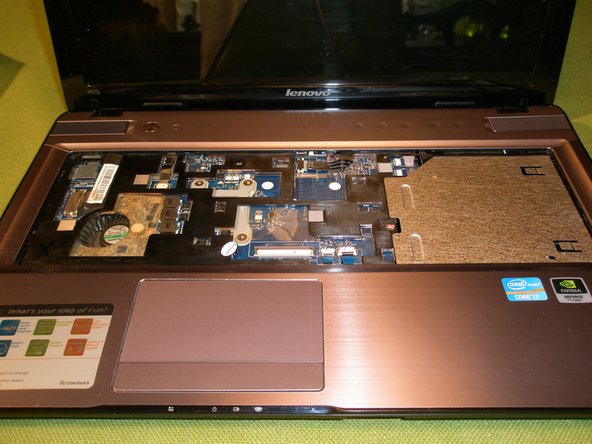
    • Using a plastic pry tool or guitar pick, carefully unsnap and lift the power button/status LED cover and remove it.

    FixBot'a Sor

    Yorum Ekle

  12. Lenovo Y570 Disassembly for Chassis Replacement: adım 12, 1 resimden 1.
    • Remove the remaining 12 retaining screws from the bottom of the chassis.

    FixBot'a Sor

    Yorum Ekle

  13. Lenovo Y570 Disassembly for Chassis Replacement: adım 13, 3 resimden 1. Lenovo Y570 Disassembly for Chassis Replacement: adım 13, 3 resimden 2. Lenovo Y570 Disassembly for Chassis Replacement: adım 13, 3 resimden 3.
    • Remove the 2 retaining screws from the top bezel (located where the keyboard used to be).

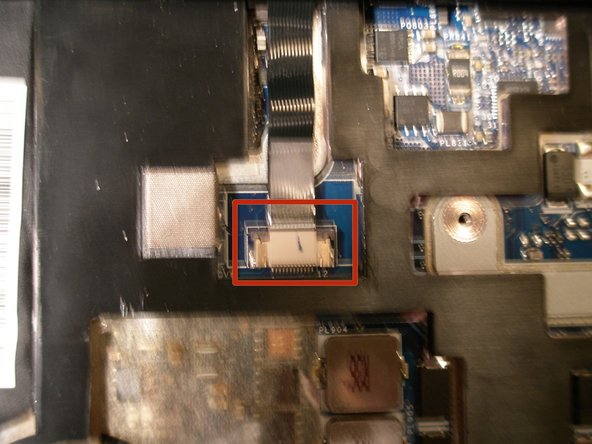
    • Detach the touchpad and touch inductive panel cables from the system board (there are no fasteners on these cables, just pull them free from the sockets).

    • Detach the LVDS cable from the system board by gently lifting the tape and pulling to the right to unplug the cable.

    FixBot'a Sor

    Yorum Ekle

  14. Lenovo Y570 Disassembly for Chassis Replacement: adım 14, 2 resimden 1. Lenovo Y570 Disassembly for Chassis Replacement: adım 14, 2 resimden 2.
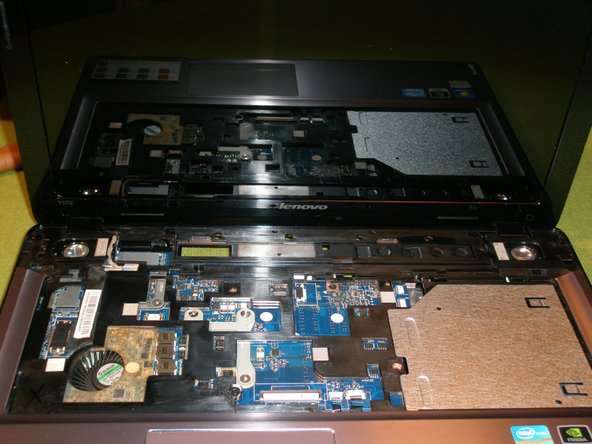
    • Using a plastic pry tool or guitar pick, carefully unsnap the top bezel and remove it.

    FixBot'a Sor

    Yorum Ekle

  15. Lenovo Y570 Disassembly for Chassis Replacement: adım 15, 3 resimden 1. Lenovo Y570 Disassembly for Chassis Replacement: adım 15, 3 resimden 2. Lenovo Y570 Disassembly for Chassis Replacement: adım 15, 3 resimden 3.
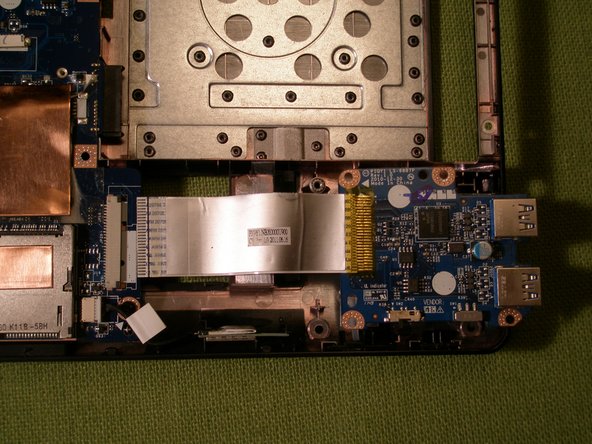
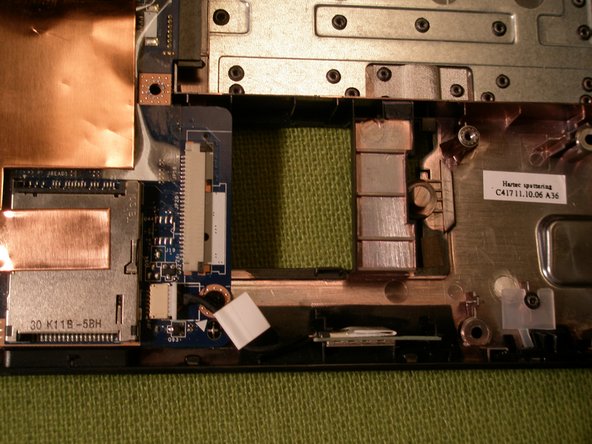
    • Move the ribbon cable fastener forward and disconnect the USB board cable from the system board.

    • Remove the single retaining screw and lift the USB board from the chassis to remove it.

    FixBot'a Sor

    Yorum Ekle

  16. Lenovo Y570 Disassembly for Chassis Replacement: adım 16, 1 resimden 1.
    • Unplug the Bluetooth cable from the system board and lift the module from the chassis to remove it.

    FixBot'a Sor

    Yorum Ekle

  17. Lenovo Y570 Disassembly for Chassis Replacement: adım 17, 1 resimden 1.
    • From the bottom of the unit: Unplug the DC power and Speaker cables from the system board.

    FixBot'a Sor

    Yorum Ekle

  18. Lenovo Y570 Disassembly for Chassis Replacement: adım 18, 3 resimden 1. Lenovo Y570 Disassembly for Chassis Replacement: adım 18, 3 resimden 2. Lenovo Y570 Disassembly for Chassis Replacement: adım 18, 3 resimden 3.
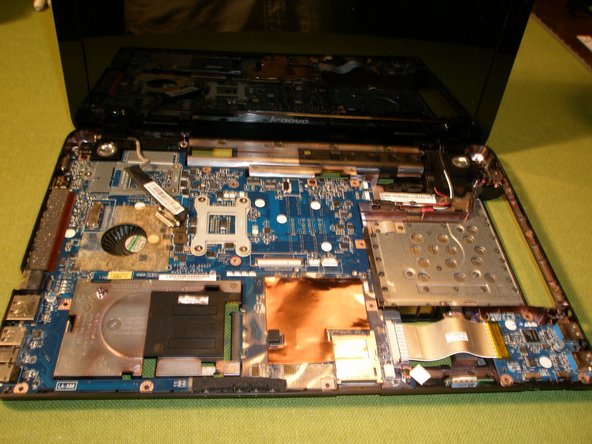
    • From the top of the unit: Remove the 3 retaining screws on the Motherboard.

    • Loosen the screw on the left LCD hinge and carefully lift the Motherboard from the chassis.

    FixBot'a Sor

    Yorum Ekle

  19. Lenovo Y570 Disassembly for Chassis Replacement: adım 19, 1 resimden 1.
    • From the bottom of the unit, release the antennae cables from the guides.

    FixBot'a Sor

    Yorum Ekle

  20. Lenovo Y570 Disassembly for Chassis Replacement: adım 20, 2 resimden 1. Lenovo Y570 Disassembly for Chassis Replacement: adım 20, 2 resimden 2.
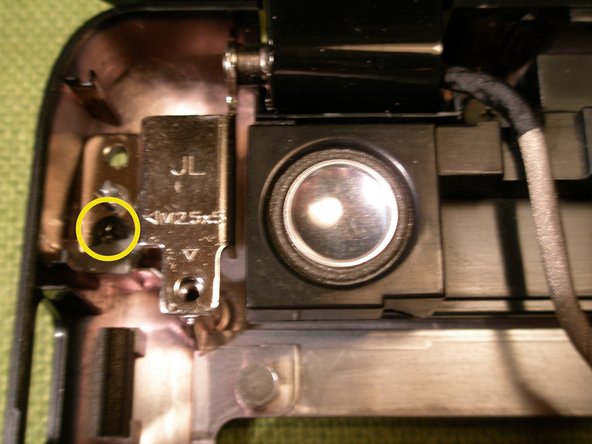
    • Remove the 3 remaining screws on the LCD hinges and carefully lift the LCD unit from the chassis.

    FixBot'a Sor

    Yorum Ekle

  21. Lenovo Y570 Disassembly for Chassis Replacement: adım 21, 3 resimden 1. Lenovo Y570 Disassembly for Chassis Replacement: adım 21, 3 resimden 2. Lenovo Y570 Disassembly for Chassis Replacement: adım 21, 3 resimden 3.
    • Unplug the fan cable from the Motherboard.

    • Remove the 7 retaining screws and springs on the Heatsink assembly in the order stamped on the Heatsink and lift the assembly free from the system board.

    • Clean the old thermal compound from the CPU and the GPU. Apply a thin film of a quality thermal paste such as "Arctic Silver" when reassembling the unit. Leave all thermal pads in place for reassembly.

    FixBot'a Sor

    Yorum Ekle

  22. Lenovo Y570 Disassembly for Chassis Replacement: adım 22, 3 resimden 1. Lenovo Y570 Disassembly for Chassis Replacement: adım 22, 3 resimden 2. Lenovo Y570 Disassembly for Chassis Replacement: adım 22, 3 resimden 3.
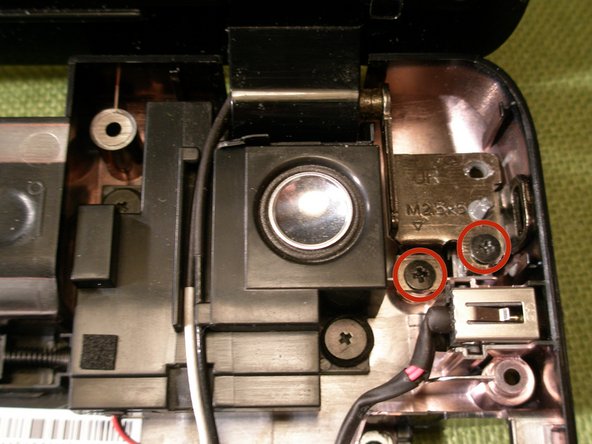
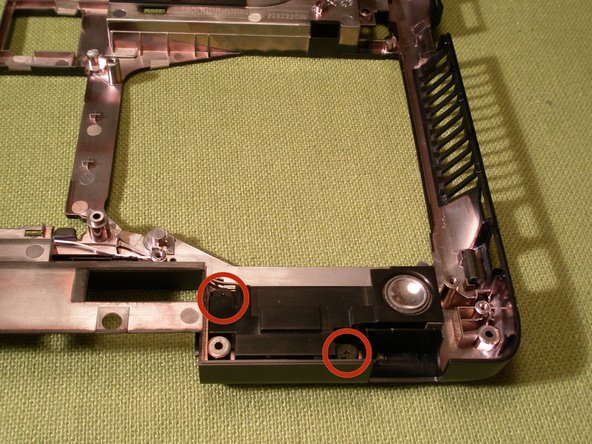
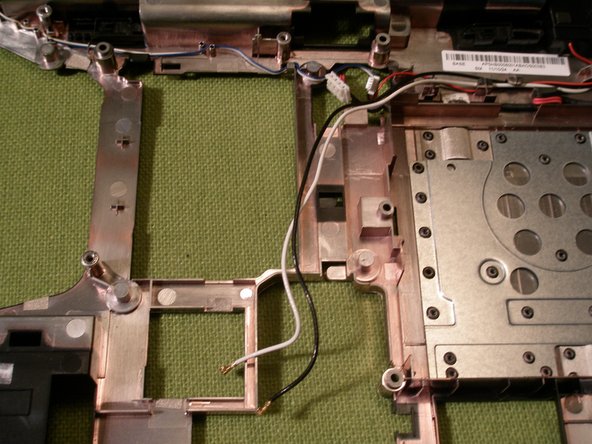
    • Remove the 4 retaining screws from the speakers, release the speaker cables from the guides and carefully lift the speakers from the chassis to remove them.

    FixBot'a Sor

    Yorum Ekle

  23. Lenovo Y570 Disassembly for Chassis Replacement: adım 23, 2 resimden 1. Lenovo Y570 Disassembly for Chassis Replacement: adım 23, 2 resimden 2.
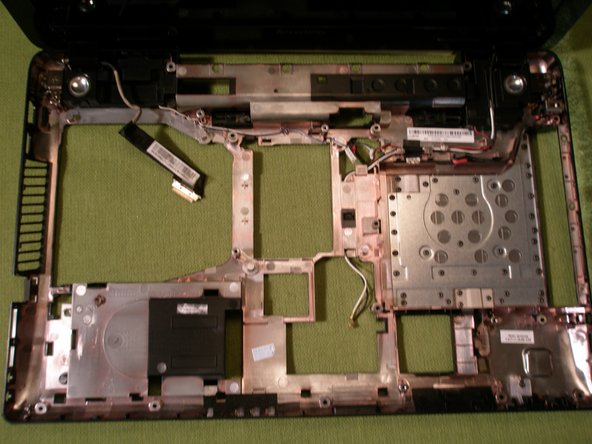
    • Release the DC Power cable from the guides and carefully lift the DC connector from the chassis to remove it.

    FixBot'a Sor

    Yorum Ekle

Sonuç

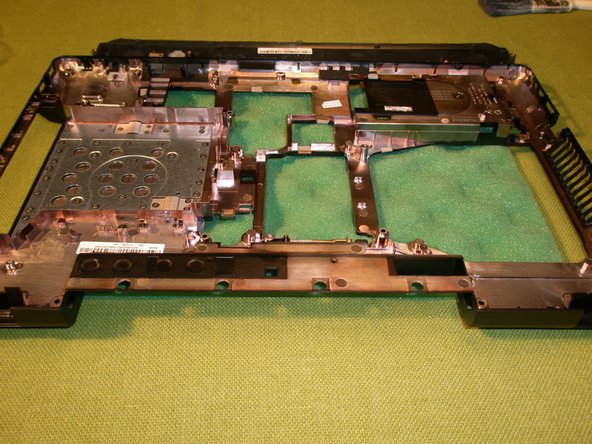
To reassemble your device, follow these instructions in reverse order.

İptal et: Bu kılavuzu tamamlamadım.

18 farklı kişi bu kılavuzu tamamladı.

Randy Johnson

Üyelik tarihi: 03/18/14

563 İtibar

1 Kılavuz yazıldı

3Kılavuz Yorumları

excellent guide - y570 back up and running. thanks.
ger doolan - Yanıt Paylaş

Can someone list the screws and their sizes? I seem to have put some in the wrong spot/lost a few.

Brandon Piper - Yanıt Paylaş

Great Tutorial! Brute force not recommended. Task Failed Successfully!

Arm Phawadee - Yanıt Paylaş

Yorum Ekle

İstatistikleri Görüntüle:

Son 24 Saat: 0

Son 7 gün: 12

Son 30 gün: 81

Her zaman: 13,718