Giriş
Without a working reset button, users will not be able to default the router to factory settings. Resetting the router allows users to access the router in case they forget the password to the router administrator settings page or Wi-Fi network.
This guide will show users step by step instructions on accessing the router motherboard to replace the router reset button.
Neye ihtiyacın var
-
-
Bu adımda kullanılan alet:Tweezers$4.99
-
Remove the antennas by unscrewing them from the base.
-
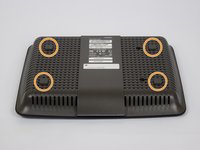
Flip over the device and locate the four rubber feet on the bottom.
-
Remove the rubber feet with tweezers
 FixBot'a Sor
-
-
-
Remove the 0.4cm head screws from each slot with the #1 Phillips head Screwdriver.
-
-
-
-
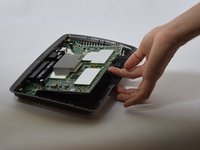
Use a blue plastic opening tool to remove the top cover.
-
Move the blue plastic opening tool gently underneath the top cover from side to side.
-
-
-
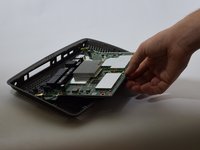
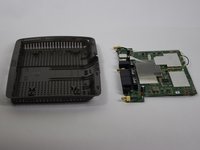
Gently lift the motherboard and remove it from the case
-
Put the motherboard over a (preferably white) surface.
-
-
-
-
-
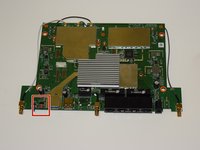
Make sure to correctly identify the red router reset button.
-
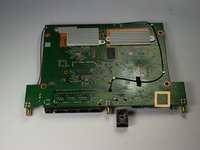
Locate the four solder points on the other side of the motherboard.
-
-
-
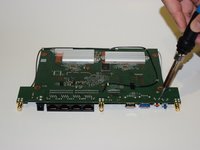
Carefully apply the soldering iron to the four solders. Avoid touching the motherboard with the soldering iron, this could damage the circuits.
-
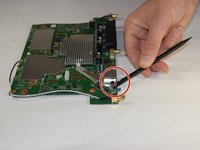
Use a spudger to gently pry and remove the reset button once the solder has melted.
-
-








To reassemble your device, follow these instructions in reverse order.
İptal et: Bu kılavuzu tamamlamadım.
4 farklı kişi bu kılavuzu tamamladı.

Ekip

USF Tampa, Team 11-1, Blackwell Fall 2016 USF Tampa, Team 11-1, Blackwell Fall 2016 üyesi
USFT-BLACKWELL-F16S11G1
4 Üyeler
12 adet Kılavuz yazıldı
