Giriş
If your joysticks are cracked, old, or broken, you may want to replace them. Joysticks are key for any game you might play. Follow this guide to replace your joysticks. The joystick are used to move around in games on pc.
No special tools or skills are required.
Neye ihtiyacın var
-
-
Use a Phillips #1 screwdriver to remove all seven 3 mm screws that secure the rear case.
 FixBot'a Sor
-
-
-
Press along the seams of the controller and gently pull the front and rear case apart.
-
-
-
-
Pull the joystick covers straight up and off the modules.
-


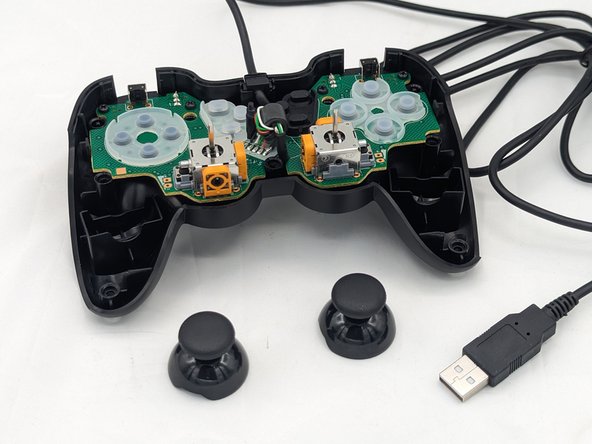
You're finished! To reassemble your device, follow these instructions in reverse order.
İptal et: Bu kılavuzu tamamlamadım.
Bir başkası bu kılavuzu tamamladı.

Ekip

University of North Texas, Team 2-6, Kilpatrick Spring 2024 University of North Texas, Team 2-6, Kilpatrick Spring 2024 üyesi
UNT-KILPATRICK-S24S2G6
4 Üyeler
6 adet Kılavuz yazıldı
