Giriş
Use this guide to replace the battery in a Logitech UE Hyperboom Bluetooth Speaker. The battery is what supplies power to every component of the speaker. Batteries generally are the first component to fail in a device, so it is likely that the battery is the source of an issue. If your speaker shuts down unexpectedly, refuses to power on without being plugged in, or shows extremely reduced playtime, a battery replacement might be necessary.
Before beginning this guide, be sure to power off your speaker.
Neye ihtiyacın var
-
-
Unscrew the two black flat-top screws that attach the handle to the speaker with your hands.
 FixBot'a Sor
-
-
-
Use your hands to carefully pry the plastic cover off of the speaker.
-
-
-
-
Use a Phillips #0 screwdriver to remove the ten 11.7mm screws on the top panel.
-
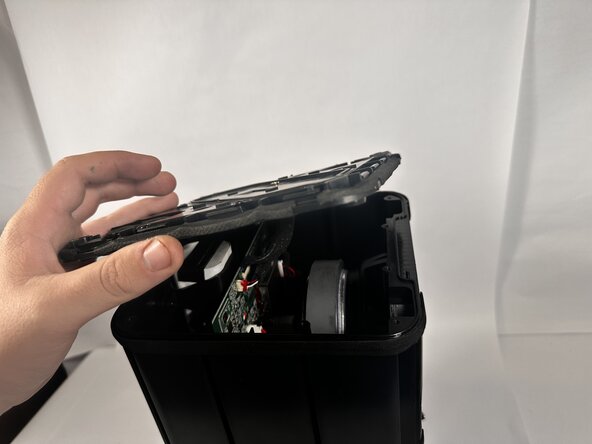
Remove the top panel to access the internal components.
-
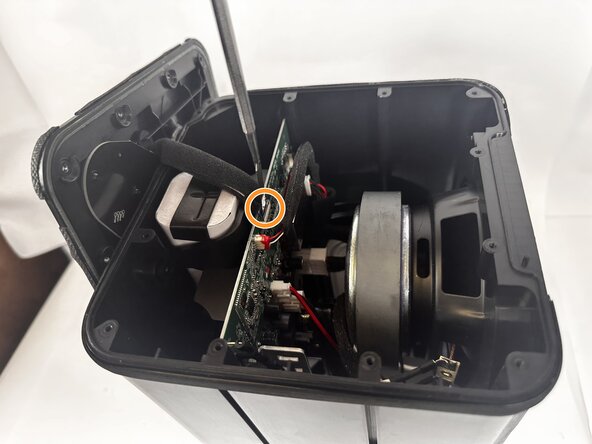
Use a metal spudger to completely disconnect the top panel.
-
-
-
Unplug the battery cord from the motherboard.
-
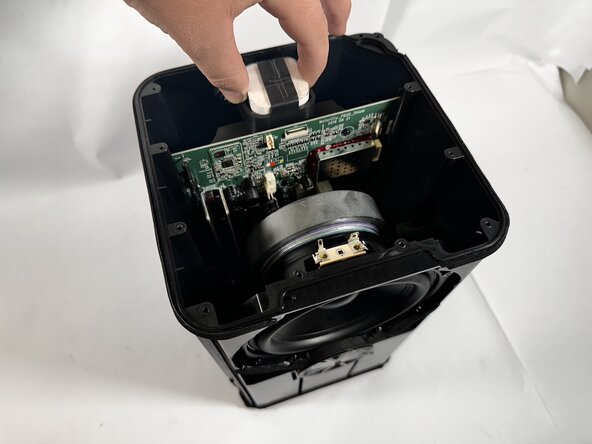
Remove the battery from the battery compartment.
-






To reassemble your device, follow these instructions in reverse order.

Ekip

Idaho State University, Team 1-2, Watkins Spring 2026 Idaho State University, Team 1-2, Watkins Spring 2026 üyesi
ISU-WATKINS-S26S1G2
3 Üyeler
8 adet Kılavuz yazıldı
