Ana içeriğe geç

MSI GE70 2PE Apache Pro Keyboard Replacement

Neye ihtiyacın var

  1. MSI GE70 2PE Apache Pro Keyboard Replacement, Keyboard: adım 1, 3 resimden 1. MSI GE70 2PE Apache Pro Keyboard Replacement, Keyboard: adım 1, 3 resimden 2. MSI GE70 2PE Apache Pro Keyboard Replacement, Keyboard: adım 1, 3 resimden 3.
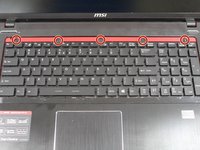
    • Insert iFixit opening tool as shown in the picture to pry up on the keyboard guard.

    • Remove the keyboard guard.

  2. MSI GE70 2PE Apache Pro Keyboard Replacement: adım 2, 3 resimden 1. MSI GE70 2PE Apache Pro Keyboard Replacement: adım 2, 3 resimden 2. MSI GE70 2PE Apache Pro Keyboard Replacement: adım 2, 3 resimden 3.
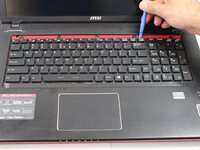
    • Insert the iFixit tool under the plastic screw cover.

    • Grab the plastic part with your hand and lift it off the casing.

    • Remove the plastic part to reveal the screws holding the keyboard in place.

  3. MSI GE70 2PE Apache Pro Keyboard Replacement: adım 3, 3 resimden 1. MSI GE70 2PE Apache Pro Keyboard Replacement: adım 3, 3 resimden 2. MSI GE70 2PE Apache Pro Keyboard Replacement: adım 3, 3 resimden 3.
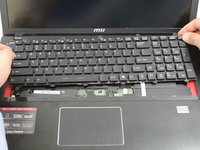
    • Unscrew the five screws located at the top of the keyboard.

    • Use the opening tool to lift the keyboard from its position

    • Be mindful of the ribbon cables when lifting the keyboard from the palmrest.

Sonuç

To reassemble your device, follow these instructions in reverse order.

2 farklı kişi bu kılavuzu tamamladı.

2Kılavuz Yorumları

What about step 4 detaching the ribbon cable?

russell89000 - Yanıt

yes missing the part of the 2 ribbon cables, one of them (the lighting) is not reachable like this..

you have to take out the battery, and then remove the back cover to reach the ribbon for the lighting

Kim Van Hoeck - Yanıt

Yorum Ekle

İstatistikleri Görüntüle:

Son 24 Saat: 0

Son 7 gün: 12

Son 30 gün: 44

Her zaman: 4,217