Ana içeriğe geç
Onarım Topluluğuna Katılın - Hesap Oluşturun

MSI GP60 2PE Leopard RAM Replacement

Neye ihtiyacın var

  1. MSI GP60 2PE Leopard RAM Replacement, Battery: adım 1, 1 resimden 1.
    • Flip MSI GP60 2PE Leopard, so that the back is facing up.

    FixBot'a Sor

    Yorum Ekle

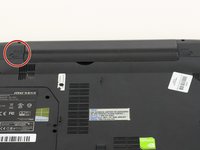
  2. MSI GP60 2PE Leopard RAM Replacement: adım 2, 1 resimden 1.
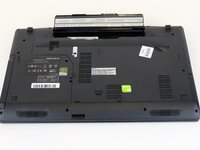
    • Find the unlock tab located on the upper right side of the device, then slide it to the right.

    FixBot'a Sor

    Yorum Ekle

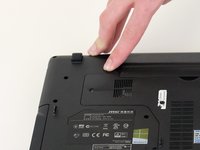
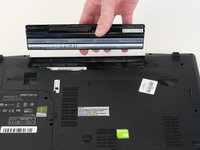
  3. MSI GP60 2PE Leopard RAM Replacement: adım 3, 3 resimden 1. MSI GP60 2PE Leopard RAM Replacement: adım 3, 3 resimden 2. MSI GP60 2PE Leopard RAM Replacement: adım 3, 3 resimden 3.
    • Slide and hold the release tab on the left side of the battery, so that you can remove the battery.

    FixBot'a Sor

    Yorum Ekle

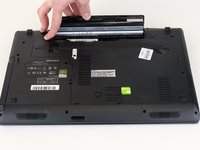
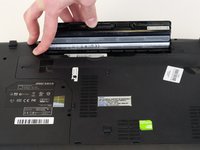
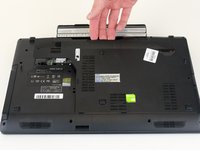
  4. MSI GP60 2PE Leopard RAM Replacement: adım 4, 3 resimden 1. MSI GP60 2PE Leopard RAM Replacement: adım 4, 3 resimden 2. MSI GP60 2PE Leopard RAM Replacement: adım 4, 3 resimden 3.
    • While holding the release tab, remove the battery slowly.

    FixBot'a Sor

    Yorum Ekle

  5. MSI GP60 2PE Leopard RAM Replacement, Back Panel: adım 5, 1 resimden 1.
    • Flip the device over so the back is facing up.

    FixBot'a Sor

    Yorum Ekle

  6. MSI GP60 2PE Leopard RAM Replacement: adım 6, 2 resimden 1. MSI GP60 2PE Leopard RAM Replacement: adım 6, 2 resimden 2.
    • Remove the four 5mm screws from the back of the device using a Phillips #00 screwdriver.

    • There is a screw located under the battery; lift the battery up to access it.

    FixBot'a Sor

    Yorum Ekle

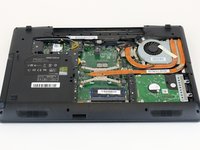
  7. MSI GP60 2PE Leopard RAM Replacement: adım 7, 2 resimden 1. MSI GP60 2PE Leopard RAM Replacement: adım 7, 2 resimden 2.
    • Once all four screws are removed, lift the back off.

    FixBot'a Sor

    Yorum Ekle

  8. MSI GP60 2PE Leopard RAM Replacement, RAM: adım 8, 1 resimden 1.
    • Press the tabs on the side of the RAM to remove it.

    FixBot'a Sor

    Yorum Ekle

  9. MSI GP60 2PE Leopard RAM Replacement: adım 9, 1 resimden 1.
    • Slide the RAM out of the slot carefully.

    FixBot'a Sor

    Yorum Ekle

Sonuç

To reassemble your device, follow these instructions in reverse order.

İptal et: Bu kılavuzu tamamlamadım.

3 farklı kişi bu kılavuzu tamamladı.

0Kılavuz Yorumları

Yorum Ekle

İstatistikleri Görüntüle:

Son 24 Saat: 0

Son 7 gün: 5

Son 30 gün: 37

Her zaman: 1,704