Bu çeviri bir makine tarafından oluşturulmuştur ve henüz bir kişi tarafından incelenmemiştir. Bu dili konuşuyor musunuz? İnceleme için.
Giriş
RAM'i çıkarmak, herhangi bir alet gerektirmeyen kolay bir işlemdir.
Neye ihtiyacın var
-
-
-
Başparmaklarınızı alt kapaktaki girintilere yerleştirin.
-
Alt kapak üzerindeki beyaz nokta, dış kasa üzerine işlenmiş halka ile hizalanana kadar alt kapağı saat yönünün tersine döndürün.
 FixBot'a Sor
-
-
-
-
Mini'yi, alt kapağın dış kasadan ayrılıp düşmesini sağlayacak kadar eğin.
-
Alt kapağı çıkarın ve bir kenara koyun.
-
-
-
-
-
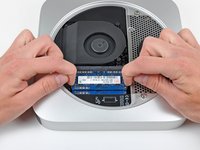
Her iki kilitleme tırnağını aynı anda çipten uzağa doğru iterek RAM çipinin kenarlarındaki tırnakları serbest bırakın.
-
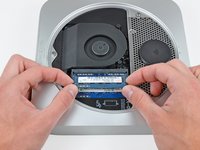
RAM çipi yukarı fırladıktan sonra, onu düz bir şekilde soketinden çekip çıkarın.
-
-


Cihazınızı tekrar toplamak için bu talimatları tersten izleyin.
İptal et: Bu kılavuzu tamamlamadım.
186 farklı kişi bu kılavuzu tamamladı.


7Kılavuz Yorumları
Dear everyone,
Does this mac mini accept :
KINGSTON DDR3 PC3-12800 - 2 x 4 Go (8 Go) 1600 MHZ - CAS 10 - HyperX Fury Black Series
Thank you.
I always consult Crucial's memory configuration tool. For a late-2012 Mac mini, see http://www.crucial.com/usa/en/compatible....
According to them, this Mac can go up to 16GB (2 SO-DIMMs of 8GB each). The SO-DIMMs should be DDRL3L-1600 (DDR3L PC3L-12800, CL=11, unbuffered, non-ECC, DDR3L-1600, 1.35v)
The SO-DIMMs you mentioned seem like they should be compatible (CL=10 should work fine in a computer that can accept CL=11). But I would only buy from a vendor that has a compatibility guarantee. If there's a problem, I would want to be able to return them for a refund.
The SODIMMs don't need to be low voltage DDR3L (i.e. 1.35 volt). In fact Apple recommends (https://support.apple.com/en-gb/HT202593) regular 1.5 volt DDR3 and most late 2012 Mac Minis were shipped with it. So is Crucial wrong? The truth is that either will work.
