Ana içeriğe geç
Onarım Topluluğuna Katılın - Hesap Oluşturun

Mac mini Late 2014 Antenna Plate Replacement

Neye ihtiyacın var

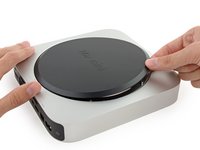
    1. Mac mini Late 2014 Antenna Plate Replacement, Bottom Cover: adım 1, 1 resimden 1.
      • The bottom cover is clipped onto three screw posts.

      • Pry near, but not right on the screw posts.

      FixBot'a Sor

      Yorum Ekle

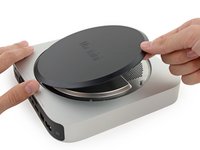
    2. Mac mini Late 2014 Antenna Plate Replacement: adım 2, 3 resimden 1. Mac mini Late 2014 Antenna Plate Replacement: adım 2, 3 resimden 2. Mac mini Late 2014 Antenna Plate Replacement: adım 2, 3 resimden 3.
      • Use the plastic opening tool to pry the bottom cover up off of the Mac mini.

      FixBot'a Sor

      Yorum Ekle

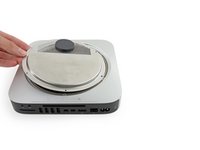
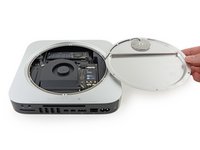
    3. Mac mini Late 2014 Antenna Plate Replacement: adım 3, 2 resimden 1. Mac mini Late 2014 Antenna Plate Replacement: adım 3, 2 resimden 2.
      • Lift and remove the bottom cover.

      FixBot'a Sor

      Yorum Ekle

    1. Mac mini Late 2014 Antenna Plate Replacement, Antenna Plate: adım 4, 1 resimden 1.
      • Remove the following TR6 screws from the antenna plate:

      • Three 4.1 mm screws

      • Three 1.9 mm screws

      FixBot'a Sor

      Yorum Ekle

    2. Mac mini Late 2014 Antenna Plate Replacement: adım 5, 2 resimden 1. Mac mini Late 2014 Antenna Plate Replacement: adım 5, 2 resimden 2.
      • Do not completely remove the antenna plate; it is still connected to the Mac mini by an antenna cable.

      • With the I/O ports facing you, flip the antenna plate to the right to allow access to the antenna cable connector.

      FixBot'a Sor

      Yorum Ekle

    3. Mac mini Late 2014 Antenna Plate Replacement: adım 6, 1 resimden 1.
      • Remove the single 3.4 mm T6 screw and washer from the antenna cable.

      • Be careful not to lose the washer when removing the screw.

      FixBot'a Sor

      Yorum Ekle

    4. Mac mini Late 2014 Antenna Plate Replacement: adım 7, 2 resimden 1. Mac mini Late 2014 Antenna Plate Replacement: adım 7, 2 resimden 2.
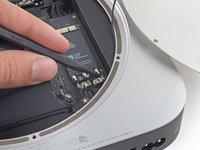
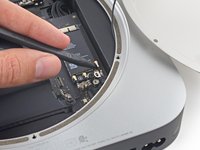
      • Use the point of a spudger to lift the antenna connector straight up off its socket on the airport card.

      FixBot'a Sor

      Yorum Ekle

    5. Mac mini Late 2014 Antenna Plate Replacement: adım 8, 2 resimden 1. Mac mini Late 2014 Antenna Plate Replacement: adım 8, 2 resimden 2.
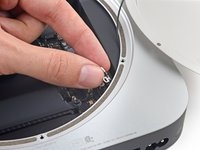
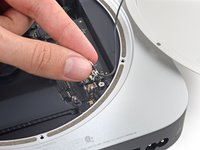
      • Carefully pull the antenna cable out from the gap between the power supply and case.

      FixBot'a Sor

      Yorum Ekle

    6. Mac mini Late 2014 Antenna Plate Replacement: adım 9, 1 resimden 1.
      • Remove the antenna plate from the Mac mini.

      FixBot'a Sor

      Yorum Ekle

Sonuç

To reassemble your device, follow these instructions in reverse order.

İptal et: Bu kılavuzu tamamlamadım.

11 farklı kişi bu kılavuzu tamamladı.

Sam Goldheart

Üyelik tarihi: 10/18/12

477.818 İtibar

538 adet Kılavuz yazıldı

Ekip

iFixit iFixit üyesi

Staff

123 Üyeler

44.111 adet Kılavuz yazıldı

1Rehber Yorum

Hello

I had really a problem with this instructions! The T6H Screw-Driver in the fixit-kit doesn’t fit in the holes of the 6 screws who hold the cover? Has Apple changes the screws of the macmini 2014, or has the T6H Screw-Driver has to much tolerance while produced!

I need to replace the HDD of the fusion drive! I will need to buy, HighEnd Tools to open my Cover ?!?

Gerard Dirks - Yanıt Paylaş

Yorum Ekle

İstatistikleri Görüntüle:

Son 24 Saat: 1

Son 7 gün: 21

Son 30 gün: 89

Her zaman: 16,748