Bu çeviri bir makine tarafından oluşturulmuştur ve henüz bir kişi tarafından incelenmemiştir. Bu dili konuşuyor musunuz? İnceleme için.
Giriş
Bozuk veya ses çıkaran fanı değiştirmek için bu kılavuzu kullanın.
Neye ihtiyacın var
-
-
Bu adımda kullanılan alet:P5 Pentalobe Screwdriver Retina MacBook Pro and Air$5.99
-
Alt kasayı sabitleyen on vidayı çıkarmak için bir P5 Pentalobe tornavida kullanın. Vidaların uzunlukları şöyledir:
-
İki adet 9 mm vida
-
Sekiz adet 2,6 mm vida
 FixBot'a Sor
-
-
-
Parmaklarınızı ekran ile alt kasa arasına yerleştirin ve alt kasayı Air'den ayırmak için yukarı doğru çekin.
-
Alt kasayı çıkarın ve bir kenara koyun.
-
-
-
-
-
Batarya konnektörüne takılı şeffaf plastik çekme tırnağını tutun ve bataryayı anakarttan ayırmak için Air'ın ön kenarına doğru çekin.
-
-
-
-
-
I/O kartı bağlantı kablosu konnektörünü I/O kartı üzerindeki soketinden yukarı doğru ayırmak için plastik kanırtma aparatının düz ucunu kullanın.
-
-
-
-
I/O kartı kablosunu anakarta bağlandığı noktanın yakınından nazikçe yukarı doğru çekerken, konnektörü soketinden yavaşça çıkarmak için bir plastik kanırtma aparatının ucunu konnektörün iki yanına sırayla yerleştirerek yukarı doğru kanırtın.
-
I/O kartı kablosunu çıkarın.
-
-
-
-
-
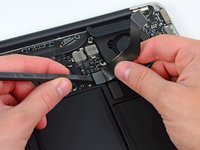
Plastik kanırtma aparatının ucunu kullanarak fan kablosu ZIF soketindeki tutucu çentiği dikkatlice yukarı doğru kaldırın.
-
-
-
Fan bileşenini üst kasaya sabitleyen aşağıdaki üç vidayı çıkarın:
-
Bir adet 3,6 mm T5 Torx vida
-
Bir adet 2,7 mm T5 Torx vida
-
Bir adet kısa başlı 3,6 mm T5 Torx vida
-
-
-
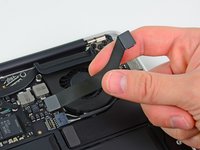
Fan'ı üst kasadan kaldırın ve Air'den çıkarırken ribbon kabloyu soketinden dikkatlice çekin.
-
-




Cihazınızı yeniden toplamak için bu talimatları ters sırada uygulayın.
İptal et: Bu kılavuzu tamamlamadım.
59 farklı kişi bu kılavuzu tamamladı.


4Kılavuz Yorumları
Great guide! Worked seamlessly! Big thumbs up!
The 13” mid 2012 requires a P4 Pentalobe screwdriver to remove case and change the fan.
The P5 is too large.
I recently replaced my battery (thanks to your awesome guidance and battery!). When I opened the cover, I saw that there was so much dust in there from over the years. I wiped off what I could and used a cotton swab to gently removed what I could. I noticed that there was tons and tons of dust on the inner ring of the fan. It seems to work but I have had issues with overheating. I am wondering whether I need to get a new fan or whether I can try cleaning the fan I have. If the latter, how do I do that? Should I just use one of those air cans that one uses for removing dust between keyboard keys? Or is there some other, better way to do it, without damaging anything?
