Bu çeviri bir makine tarafından oluşturulmuştur ve henüz bir kişi tarafından incelenmemiştir. Bu dili konuşuyor musunuz? İnceleme için.
Giriş
Bozuk bir sabit disk kablosunu değiştirmek için bu kılavuzu kullanın. Sabit disk kablosu aynı zamanda uyku LED'ini ve kızılötesi (IR) sensörünü de içerir.
Neye ihtiyacın var
-
-
-
Aşağıdaki on vidayı sökün:
-
Üç adet 14,4 mm Phillips #00 yıldız vida
-
Üç adet 3,5 mm Phillips #00 yıldız vida
-
Dört adet 3,5 mm omuzlu Phillips #00 yıldız vida
 FixBot'a Sor
-
-
-
Alt kasayı havalandırma deliğinin yakınından parmaklarınızla kaldırarak MacBook gövdesinden ayırın.
-
Alt kasayı çıkarın.
-
-
-
-
-
Plastik kanırtma aparatının ucunu kullanarak batarya konnektörünü anakart üzerindeki soketinden yukarı doğru kaldırarak ayırın.
-
-
-
Çalışırken yanlışlıkla tekrar temas etmemesi için batarya kablosunu anakart üzerindeki soketinden hafifçe uzağa doğru bükün.
-
-
-
-
-
Sabit disk braketini üst kasaya sabitleyen iki adet yıldız vidayı çıkarın.
-
-
-
-
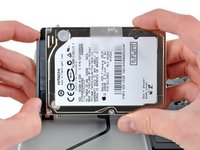
Sabit sürücüyü üst kasadan kaldırmak için üzerinde bulunan çekme tırnağını kullanın.
-
-
-
Sabit disk kablosunu sabit diskin gövdesinden uzağa doğru çekin.
-
Sabit diski çıkarın.
-
-
-
-
-
Hard disk bağlantı konnektörünü, anakart üzerindeki soketinden ayırmak için plastik kanırtma aparatının düz ucunu kullanın.
-
-
-
Aşağıdaki dört vidayı çıkarın:
-
İki adet 3 mm Yıldız vida
-
İki adet 9,7 mm Yıldız vida
-
-
-
İnce IR sensör/uyku LED'i ribbon kablosunu, üst kasaya sabitleyen yapışkandan dikkatlice ayırın.
-
-
-
IR sensörünü ve uyku LED'ini içeren ön sabit disk braketini, üst kasanın ön kenarından uzağa doğru çekin.
-
-
-
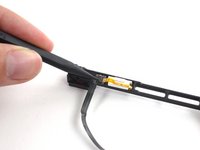
Sabit sürücü kablosu üzerindeki ZIF konnektörün "kilit mandalını" (ilk fotoğrafta sol tarafta) açmak için bir plastik kanırtma aparatının ucunu kullanın. Konnektör yerinden çıkmaz, bir sonraki talimata bakın.
-
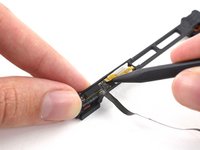
Sarı sensör braketi kablosunu ZIF konnektörden (ikinci fotoğrafta sağa doğru) nazikçe çekerek çıkarın.
-
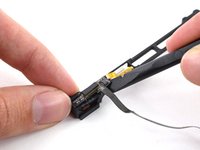
Sabit sürücü kablosunu yapışık olduğu sensör braketinden ayırmak için plastik kanırtma aparatının yassı ucunu kullanın.
-
-




Cihazınızı tekrar toplamak için bu talimatları ters sırayla uygulayın.
İptal et: Bu kılavuzu tamamlamadım.
643 farklı kişi bu kılavuzu tamamladı.


53Kılavuz Yorumları
Thank you Ifixit and Andrew "Optimus" Goldberg, the parts and tools arrived today i went to the shop to buy lunch when i had returned (15 mins later) my Husband had replaced the part (hdd cable) and my Macbook pro is super speedy again. Nice repair guide thank you i doubt i can say thank you enough.
After many hours of trying to get my SSD drive to work, I read elsewhere that other users had issues with the HD cable that came with the laptop. From when I opened the envelope until my SSD booted was less than 30 minutes. If you have the right tools this is an easy fix. Just keep in mind that there is adhesive on the cable that goes to the bracket -- don't forget to peel off the paper backing and line it up correctly.
Hello, I have a mid 2009 Macbook pro 13. I have bought a hard disk cable that looks almost the same as the original one except for greater width and shorter length. I guess that this new cable fits the 2012 model, SO YOU MAY HAVE TO UPDATE THE GUIDE accordingly.
Electrically the wider cable also works on the mid 2009 model (at least for disk access) though it does not fit mechanically.
My friends be careful when you buy this part.
thanks, Ifixit! Like many, my laptop developed the flashing question mark with startup even though when I removed the drive and put in external enclosure it worked perfectly, and putting in a different HD with a good system install on it also failed. thankfully I found out about the ribbon cable issue with a web search. The part fit perfectly and was easy to install, took about 10 minutes and I was up and running again.
Larry Schwartz
