Ana içeriğe geç
Onarım Topluluğuna Katılın - Hesap Oluşturun
Meta Quest 2 Controller Ring Shell Replacement

Neye ihtiyacın var

  1. Meta Quest 2 Controller Ring Shell Replacement, Remove the battery cover: adım 1, 3 resimden 1. Meta Quest 2 Controller Ring Shell Replacement, Remove the battery cover: adım 1, 3 resimden 2. Meta Quest 2 Controller Ring Shell Replacement, Remove the battery cover: adım 1, 3 resimden 3.
    • Use your fingers to slide the battery cover down towards the strap end of the controller.

    • Remove the battery cover.

    • If you're taking the controller apart for repairs, remove the batteries in the controller.

    FixBot'a Sor

    Yorum Ekle

  2. Meta Quest 2 Controller Ring Shell Replacement, Remove the wrist strap: adım 2, 2 resimden 1. Meta Quest 2 Controller Ring Shell Replacement, Remove the wrist strap: adım 2, 2 resimden 2.
    • Use your fingers to grasp the wrist strap near the anchor peg.

    • Lift the wrist strap anchor peg straight out of its recess.

    • Remove the wrist strap.

    FixBot'a Sor

    Yorum Ekle

  3. Meta Quest 2 Controller Ring Shell Replacement, Loosen the faceplate adhesive: adım 3, 1 resimden 1.
    • Heat an iOpener and apply it to the bottom edge of the controller faceplate for a minute.

    FixBot'a Sor

    Yorum Ekle

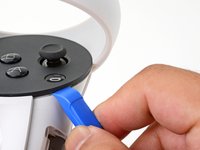
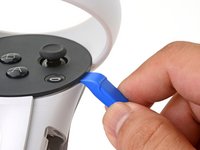
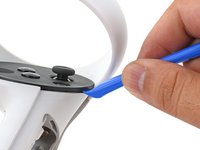
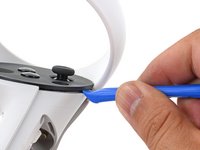
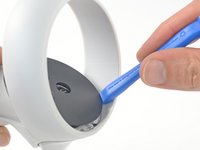
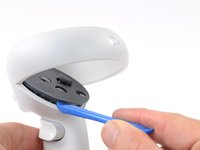
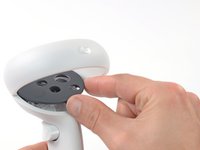
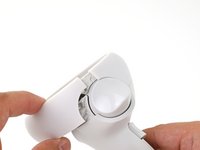
  4. Meta Quest 2 Controller Ring Shell Replacement, Loosen the controller faceplate: adım 4, 3 resimden 1. Meta Quest 2 Controller Ring Shell Replacement, Loosen the controller faceplate: adım 4, 3 resimden 2. Meta Quest 2 Controller Ring Shell Replacement, Loosen the controller faceplate: adım 4, 3 resimden 3.
    • The controller faceplate is secured with adhesive and three friction pegs.

    • Press the edge of an opening tool into the seam between the controller faceplate and shell, near the Oculus button.

    • If you can’t get the opening tool into the seam, heat the area with an iOpener for a minute and try again.

    • Slide the opening tool to the base of the ring shell to loosen the adhesive.

    FixBot'a Sor

    Yorum Ekle

  5. Meta Quest 2 Controller Ring Shell Replacement: adım 5, 2 resimden 1. Meta Quest 2 Controller Ring Shell Replacement: adım 5, 2 resimden 2.
    • Use an opening tool to pry up on the seam to loosen the first friction peg.

    FixBot'a Sor

    Yorum Ekle

  6. Meta Quest 2 Controller Ring Shell Replacement: adım 6, 2 resimden 1. Meta Quest 2 Controller Ring Shell Replacement: adım 6, 2 resimden 2.
    • Continue prying around the entire faceplate to separate the remaining friction pegs and adhesive.

    • If you're having trouble, apply a heated iOpener to the faceplate for a minute and try again.

    FixBot'a Sor

    Yorum Ekle

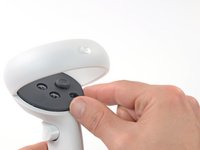
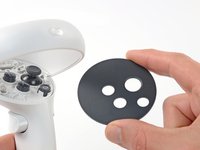
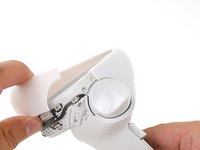
  7. Meta Quest 2 Controller Ring Shell Replacement, Remove the faceplate: adım 7, 3 resimden 1. Meta Quest 2 Controller Ring Shell Replacement, Remove the faceplate: adım 7, 3 resimden 2. Meta Quest 2 Controller Ring Shell Replacement, Remove the faceplate: adım 7, 3 resimden 3.
    • Remove the controller faceplate.

    • The three friction pegs should hold the faceplate securely, so you don’t need to replace the adhesive during reassembly. Be sure to firmly press the faceplate onto the controller so that all friction pegs fully engage.

    FixBot'a Sor

    Yorum Ekle

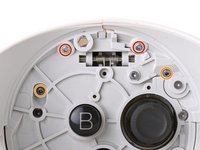
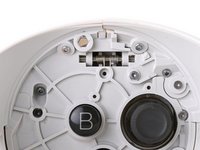
  8. Meta Quest 2 Controller Ring Shell Replacement, Loosen the controller ring shell: adım 8, 2 resimden 1. Meta Quest 2 Controller Ring Shell Replacement, Loosen the controller ring shell: adım 8, 2 resimden 2.
    • Use a Torx T5 driver to remove the four screws securing the controller ring shell to the controller:

    • Two 4.7 mm‑long screws

    • Two 5.9 mm‑long screws

    FixBot'a Sor

    Yorum Ekle

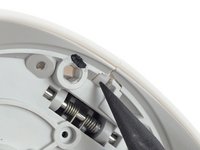
  9. Meta Quest 2 Controller Ring Shell Replacement: adım 9, 2 resimden 1. Meta Quest 2 Controller Ring Shell Replacement: adım 9, 2 resimden 2.
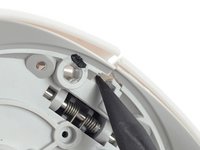
    • Press the point of a spudger firmly against the white alignment square to release the ring shell.

    FixBot'a Sor

    Yorum Ekle

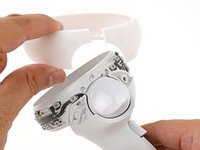
  10. Meta Quest 2 Controller Ring Shell Replacement, Remove the controller ring shell: adım 10, 3 resimden 1. Meta Quest 2 Controller Ring Shell Replacement, Remove the controller ring shell: adım 10, 3 resimden 2. Meta Quest 2 Controller Ring Shell Replacement, Remove the controller ring shell: adım 10, 3 resimden 3.
    • Use your fingers to grab the end of the ring shell that doesn’t have the white alignment square.

    • Gently lift the ring shell up and away from the controller to unclip it from the controller.

    • Remove the controller ring shell.

    FixBot'a Sor

    Yorum Ekle

Sonuç

To reassemble your device, follow these instructions in reverse order.

Repair didn’t go as planned? Try some basic troubleshooting, or ask our Answers community for help.

İptal et: Bu kılavuzu tamamlamadım.

2 farklı kişi bu kılavuzu tamamladı.

Arthur Shi

Üyelik tarihi: 01/03/18

337.614 İtibar

851 adet Kılavuz yazıldı

Ekip

iFixit iFixit üyesi

Staff

122 Üyeler

26.511 adet Kılavuz yazıldı

1Rehber Yorum

This Tutorial was really fast and easy also, I fixed my controller and it works very well now, Thank you!

# “‪Diamond‬” # - Yanıt Paylaş
Yorum Ekle

İstatistikleri Görüntüle:

Son 24 Saat: 9

Son 7 gün: 38

Son 30 gün: 156

Her zaman: 7,409