Ana içeriğe geç
Onarım Topluluğuna Katılın - Hesap Oluşturun

Microsoft Lumia 535 Display Assembly - LCD & Touch screen with Frame Replacement

Görüntüleme: 2,2 B

İstatistikleri görüntüle:

Son 24 Saat:
4
Son 7 Gün:
18
Son 30 Gün:
90
Her zaman:
2.198
Yorumlar: 3

3 comments on steps.

Tamamlandı: 4

4 kişi bu kılavuzu "tamamlandı" olarak işaretledi. Sıradaki sen olacak mısın?

Sık Kullanılanlar: 3

3 kişi bu kılavuzu favorilerine ekledi (ve abone oldu). Sıradaki sen olacak mısın?

Gerekli Süre: 20 dakika
Zorluk: Orta
Topluluk-Katkılı Kılavuz

Topluluğumuzdan muhteşem birisi bu kılavuzu hazırladı. Bu kılavuz iFixit elemanları tarafından oluşturulmamıştır.

Microsoft Lumia 535 Display Assembly - LCD & Touch screen with Frame Replacement

RM-1090 / RM-1091/ RM-1089 / RM-1092

How to fully disassemble Microsoft Lumia 535 to replace broken screen, loudspeaker, earpiece, charging dock board, etc.

Neye ihtiyacın var

Aletler

Videoya Genel Bakış

    1. Microsoft Lumia 535 Display Assembly - LCD & Touch screen with Frame Replacement, Back Cover / Rear Case: adım 1, 2 resimden 1. Microsoft Lumia 535 Display Assembly - LCD & Touch screen with Frame Replacement, Back Cover / Rear Case: adım 1, 2 resimden 2.
      • Turn off the phone.

      • Remove the battery and any SIM and memory cards.

      FixBot'a Sor

      Yorum Ekle

    2. Microsoft Lumia 535 Display Assembly - LCD & Touch screen with Frame Replacement: adım 2, 2 resimden 1. Microsoft Lumia 535 Display Assembly - LCD & Touch screen with Frame Replacement: adım 2, 2 resimden 2.
      • With a screwdriver Torx T4 remove the 9x screws.

      FixBot'a Sor

      Yorum Ekle

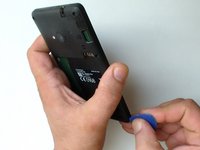
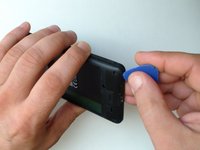
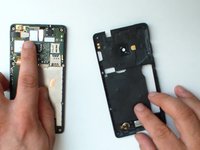
    3. Microsoft Lumia 535 Display Assembly - LCD & Touch screen with Frame Replacement: adım 3, 3 resimden 1. Microsoft Lumia 535 Display Assembly - LCD & Touch screen with Frame Replacement: adım 3, 3 resimden 2. Microsoft Lumia 535 Display Assembly - LCD & Touch screen with Frame Replacement: adım 3, 3 resimden 3.
      • With a plastic opening tool separate the back cover from the middle frame.

      FixBot'a Sor

      Yorum Ekle

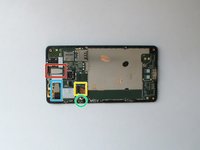
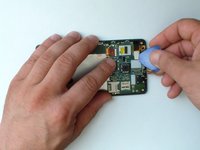
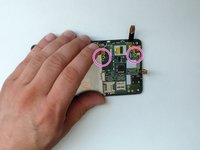
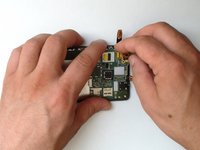
    1. Microsoft Lumia 535 Display Assembly - LCD & Touch screen with Frame Replacement, Logic board: adım 4, 3 resimden 1. Microsoft Lumia 535 Display Assembly - LCD & Touch screen with Frame Replacement, Logic board: adım 4, 3 resimden 2. Microsoft Lumia 535 Display Assembly - LCD & Touch screen with Frame Replacement, Logic board: adım 4, 3 resimden 3.
      • Disconnect:

      • Touch screen flex cable

      • LCD Display flex cable

      • Charging Dock board flex cable - remove the foam and tape, then flip up the black lock before easing out the flex.

      • Coaxial antena cable - take your time here, be sure to pull the metal connector and not the cable or you risk pulling the cable from the connector.

      • Remove the 2x Torx T4 screws.

      FixBot'a Sor

      Yorum Ekle

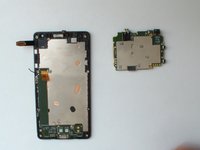
    2. Microsoft Lumia 535 Display Assembly - LCD & Touch screen with Frame Replacement: adım 5, 3 resimden 1. Microsoft Lumia 535 Display Assembly - LCD & Touch screen with Frame Replacement: adım 5, 3 resimden 2. Microsoft Lumia 535 Display Assembly - LCD & Touch screen with Frame Replacement: adım 5, 3 resimden 3.
      • Insert wisdom here.

      FixBot'a Sor

      Yorum Ekle

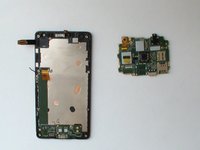
    1. Microsoft Lumia 535 Display Assembly - LCD & Touch screen with Frame Replacement, Display Assembly - LCD & Touch screen with Frame: adım 6, 3 resimden 1. Microsoft Lumia 535 Display Assembly - LCD & Touch screen with Frame Replacement, Display Assembly - LCD & Touch screen with Frame: adım 6, 3 resimden 2. Microsoft Lumia 535 Display Assembly - LCD & Touch screen with Frame Replacement, Display Assembly - LCD & Touch screen with Frame: adım 6, 3 resimden 3.
      • From the old display Assembly we have to move:

      • Earpiece

      • Proximity sensor rubber

      • LCD flex cable Rubber

      • Coaxial Antena Cable

      • Small board with the Charging port and Mic.

      FixBot'a Sor

      Yorum Ekle

    2. Microsoft Lumia 535 Display Assembly - LCD & Touch screen with Frame Replacement, Charging Port Flex - Step One: adım 7, 1 resimden 1.
      • Disconnect the coaxial antenna cable.

      • The cable is attached at several points to the frame and to the board. Gently remove it.

      FixBot'a Sor

      Yorum Ekle

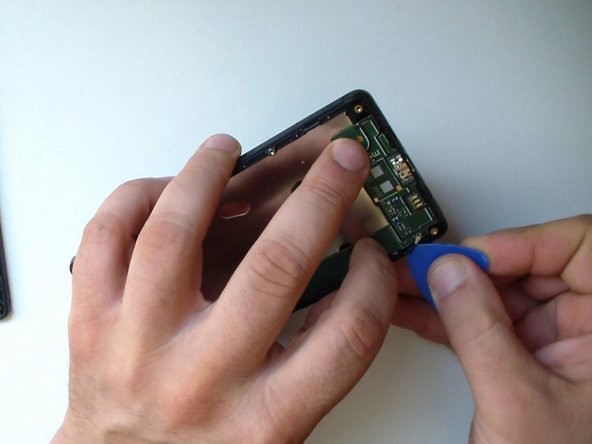
      • The board is glued to the main frame by adhesive tape.

      • Use a hot gun or hair dryer and warm the board.

      • Now you can easy separate the board from the main frame.

      • For the separation process use only plastic tools.

      FixBot'a Sor

      Yorum Ekle

    3. Microsoft Lumia 535 Display Assembly - LCD & Touch screen with Frame Replacement: adım 9, 1 resimden 1.
      • To reassemble your device, follow these instructions in reverse order.

      FixBot'a Sor

      Yorum Ekle

Sonuç

To reassemble your device, follow these instructions in reverse order.

İptal et: Bu kılavuzu tamamlamadım.

4 farklı kişi bu kılavuzu tamamladı.

Yazar

ile

ZFix

Üyelik tarihi: 12/09/13

197.846 İtibar

330 adet Kılavuz yazıldı

Ekip

Master Techs Master Techs üyesi

Community

337 Üyeler

8.294 adet Kılavuz yazıldı

0Kılavuz Yorumları

Yorum Ekle

İstatistikleri Görüntüle:

Son 24 Saat: 4

Son 7 gün: 18

Son 30 gün: 90

Her zaman: 2,198