Bu çeviri bir makine tarafından oluşturulmuştur ve henüz bir kişi tarafından incelenmemiştir. Bu dili konuşuyor musunuz? İnceleme için.
Giriş
Surface Pro 4, M.2 Samsung SSD ile donatılmıştır. SSD'niz arızalanırsa veya yükseltme yapmak isterseniz, bu kılavuzu kullanarak SSD'yi değiştirebilirsiniz.
Neye ihtiyacın var
-
-
-
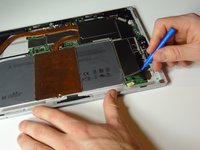
SSD sürücüsünü kaplayan metal koruyucunun kenarlarını mavi bir plastik açma aletiyle dikkatlice ayırın.
 FixBot'a Sor
-
-
-
-
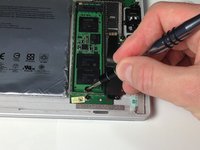
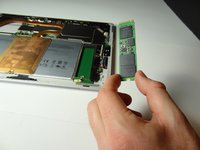
SSD sürücüsünü hafifçe kaldırmak için mavi bir plastik açma aleti veya plastik kanırtma aparatı kullanın ve parmaklarınızla kavrayın. Sürücüyü cihazdan çıkarmak için kendinize doğru çekin.
-
-






Cihazınızı yeniden toplamak için bu talimatları tersten uygulayın.
İptal et: Bu kılavuzu tamamlamadım.
93 farklı kişi bu kılavuzu tamamladı.

Ekip

Metro State, Team 1-3, Carpenter Spring 2016 Metro State, Team 1-3, Carpenter Spring 2016 üyesi
MSU-CARPENTER-S16S1G3
2 Üyeler
72 adet Kılavuz yazıldı
46Kılavuz Yorumları
Can you add more SSD to the SP4??
I would love to upgrade my storage while repairing my broken screen, does anyone know of which sdd would be compatible with my i7 8gb ram 256ssd right now? Does it have to be a samsung ssd or are there other options. Fairly new to computer repair here so would love some experienced advice thanks !
I would prefer a 1TB if possible but would settle for a 512 also.
@bthorne As long as it's the same connection (not sure, but maybe you should look for NVMe M.2 SSD) it should work without problems. You should run a quick search on the internet to check if anyone has found some sort of "blacklisted" parts (some vendors such as Lenovo used to place some code in their firmware which would prevent the computer from booting with a "unauthorized" wireless card for example.).
However I think this is not the case with the Surface Pro 4 or the world would be at rage right now. Just look for any size NVMe M.2 SSD you think it would be fit (if you can afford, look for performance models such as Samsung PRO, there's a huge difference from the cheaper ones.). Hope it helps!
