Ana içeriğe geç
Onarım Topluluğuna Katılın - Hesap Oluşturun

Motorola Defy Rear Facing Camera Replacement

Neye ihtiyacın var

  1. Motorola Defy Rear Facing Camera Replacement, Rear Case: adım 1, 1 resimden 1.
    • Using the screwdriver and the T-5 bit, unscrew the seven 5 mm screws around the outside of the phone.

    FixBot'a Sor
  2. Motorola Defy Rear Facing Camera Replacement: adım 2, 2 resimden 1. Motorola Defy Rear Facing Camera Replacement: adım 2, 2 resimden 2.
    • Remove the back cover of the phone by sliding the bottom black button to the unlock position and lifting it up.

    FixBot'a Sor
  3. Motorola Defy Rear Facing Camera Replacement, Battery: adım 3, 1 resimden 1.
    • Use a plastic opening tool to pry the battery out of the phone.

    FixBot'a Sor
  4. Motorola Defy Rear Facing Camera Replacement, Midframe: adım 4, 1 resimden 1.
    • Unscrew the two silver screws located at the top of the back of the phone.

    FixBot'a Sor
  5. Motorola Defy Rear Facing Camera Replacement: adım 5, 1 resimden 1.
    • Use a plastic opening tool to gently pry the midframe from the rest of the phone.

    FixBot'a Sor
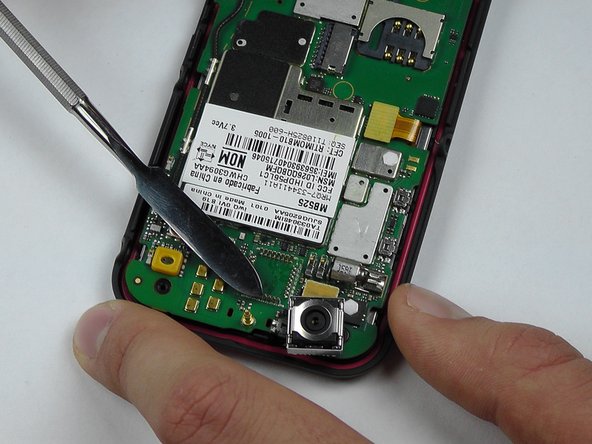
  6. Motorola Defy Rear Facing Camera Replacement, Rear Facing Camera: adım 6, 2 resimden 1. Motorola Defy Rear Facing Camera Replacement, Rear Facing Camera: adım 6, 2 resimden 2.
    • Start to pry around the bottom of the camera module with the metal spudger and replace with the new camera module.

    • Be careful of the pins that are connected to the camera module on the bottom.

    FixBot'a Sor
Sonuç

To reassemble your device, follow these instructions in reverse order.

Morgan Roark

Üyelik tarihi: 10/08/14

325 İtibar

3 adet Kılavuz yazıldı

Ekip

USF Tampa, Team 14-2, Leahy Fall 2014 USF Tampa, Team 14-2, Leahy Fall 2014 üyesi

USFT-LEAHY-F14S14G2

4 Üyeler

6 adet Kılavuz yazıldı

0Kılavuz Yorumları

Yorum Ekle

İstatistikleri Görüntüle:

Son 24 Saat: 1

Son 7 gün: 5

Son 30 gün: 46

Her zaman: 620