Ana içeriğe geç
Onarım Topluluğuna Katılın - Hesap Oluşturun

Motorola Droid RAZR Display Assembly Replacement

Neye ihtiyacın var

  1. Motorola Droid RAZR Display Assembly Replacement, Back Cover: adım 1, 2 resimden 1. Motorola Droid RAZR Display Assembly Replacement, Back Cover: adım 1, 2 resimden 2.
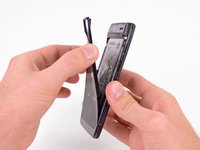
    • Insert a plastic opening tool between the back cover and rear case at the lower left edge of the back cover.

    • Pry the back cover up with the plastic opening tool to free the plastic clips.

    • Continue prying along the left edge of the back cover towards the top of the phone.

    FixBot'a Sor

    Yorum Ekle

  2. Motorola Droid RAZR Display Assembly Replacement: adım 2, 3 resimden 1. Motorola Droid RAZR Display Assembly Replacement: adım 2, 3 resimden 2. Motorola Droid RAZR Display Assembly Replacement: adım 2, 3 resimden 3.
    • Work the plastic opening tool across the top of the back case to free the plastic clips.

    • The top edge of the back case is very thin. Pry carefully to avoid cracking or snapping it.

    • Continue prying down the right side of the back cover to free the remaining clips.

    FixBot'a Sor

    Yorum Ekle

  3. Motorola Droid RAZR Display Assembly Replacement: adım 3, 3 resimden 1. Motorola Droid RAZR Display Assembly Replacement: adım 3, 3 resimden 2. Motorola Droid RAZR Display Assembly Replacement: adım 3, 3 resimden 3.
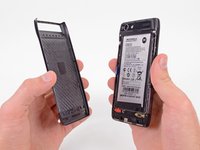
    • Pull the back cover away from the phone to remove it.

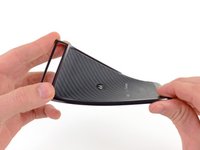
    • The back cover is attached to the battery with a generous amount of adhesive, so you may have to use quite a bit of force to separate the two pieces.

    • The battery must remain in the phone and not come off with the back cover or you will break the power lead.

    • Since the back cover is made of Kevlar, it can handle a fair amount of twisting and tugging without breaking.

    FixBot'a Sor

    Yorum Ekle

  4. Motorola Droid RAZR Display Assembly Replacement, Battery: adım 4, 2 resimden 1. Motorola Droid RAZR Display Assembly Replacement, Battery: adım 4, 2 resimden 2.
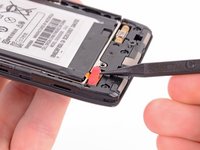
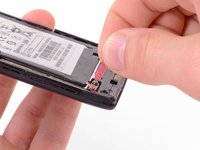
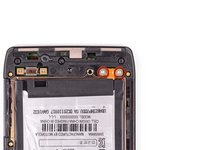
    • Use the tip of a spudger to lift up the red silicone cover over the battery terminal screws and remove it.

    FixBot'a Sor

    Yorum Ekle

  5. Motorola Droid RAZR Display Assembly Replacement: adım 5, 3 resimden 1. Motorola Droid RAZR Display Assembly Replacement: adım 5, 3 resimden 2. Motorola Droid RAZR Display Assembly Replacement: adım 5, 3 resimden 3.
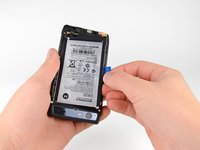
    • Remove the two 3.3 mm T5 Torx battery terminal screws.

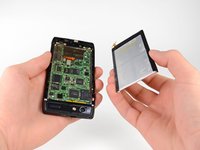
    • Grab the blue battery removal tab and lift the battery out to remove it.

    • There is quite a bit of adhesive securing the battery to the motherboard. Work slowly to avoid deforming the battery.

    • Your phone will have a number of metal EMI shields on the motherboard, rather than the bare ICs seen here.

    FixBot'a Sor

    Yorum Ekle

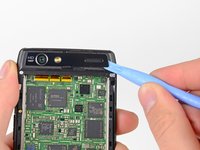
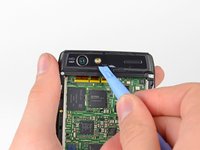
  6. Motorola Droid RAZR Display Assembly Replacement, Camera Cover: adım 6, 2 resimden 1. Motorola Droid RAZR Display Assembly Replacement, Camera Cover: adım 6, 2 resimden 2.
    • Use a heat gun or hair dryer to soften the adhesive underneath the camera cover.

    • The following steps were performed without the use of a heat gun. Notice that the camera cover cracks very easily if you do not heat the adhesive that holds it in place.

    • Gently pry up the bottom edge of the camera cover with a plastic opening tool.

    • Carefully slide the plastic opening tool across the bottom edge to free it from the adhesive.

    • Continue to use the heat gun as needed to soften the adhesive as you remove the camera cover.

    FixBot'a Sor

    Yorum Ekle

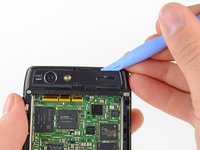
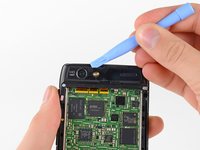
  7. Motorola Droid RAZR Display Assembly Replacement: adım 7, 3 resimden 1. Motorola Droid RAZR Display Assembly Replacement: adım 7, 3 resimden 2. Motorola Droid RAZR Display Assembly Replacement: adım 7, 3 resimden 3.
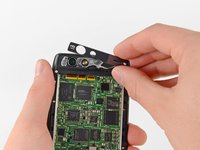
    • Insert the plastic opening tool underneath the top edge of the camera cover.

    • Gently pry the camera cover up as you slide the plastic opening tool across the top edge to free it from the adhesive.

    • Remove the camera cover.

    FixBot'a Sor

    Yorum Ekle

  8. Motorola Droid RAZR Display Assembly Replacement, Rear Case: adım 8, 1 resimden 1.
    • Remove the six screws securing the rear case to the rest of the phone:

    • three 6.7 mm silver T3 Torx screws at the top,

    • four 4.0 mm gold T3 Torx screws in the middle,

    • and three 4.5 mm black T5 Torx screws at the bottom.

    FixBot'a Sor

    Yorum Ekle

  9. Motorola Droid RAZR Display Assembly Replacement: adım 9, 3 resimden 1. Motorola Droid RAZR Display Assembly Replacement: adım 9, 3 resimden 2. Motorola Droid RAZR Display Assembly Replacement: adım 9, 3 resimden 3.
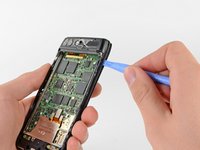
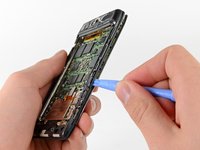
    • Insert a plastic opening tool between the rear case and the motherboard assembly.

    • Work your way down the side of the phone and gently pry the rear case up.

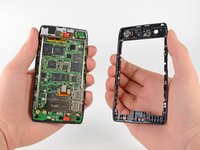
    • Separate the rear case from the motherboard assembly.

    FixBot'a Sor

    Yorum Ekle

  10. Motorola Droid RAZR Display Assembly Replacement, Motherboard Assembly: adım 10, 2 resimden 1. Motorola Droid RAZR Display Assembly Replacement, Motherboard Assembly: adım 10, 2 resimden 2.
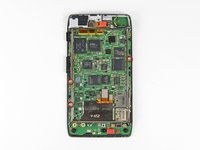
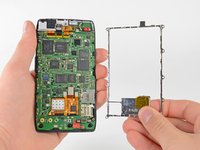
    • Remove the three 2.5 mm T3 Torx screws securing the metal chassis to the motherboard.

    • Remove the metal chassis from the motherboard assembly.

    FixBot'a Sor

    Yorum Ekle

  11. Motorola Droid RAZR Display Assembly Replacement: adım 11, 2 resimden 1. Motorola Droid RAZR Display Assembly Replacement: adım 11, 2 resimden 2.
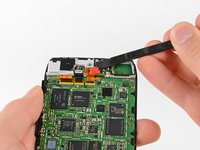
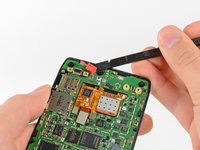
    • Use the flat end of a spudger to remove the two red silicone microphone covers at the top and bottom of the motherboard.

    FixBot'a Sor

    Yorum Ekle

  12. Motorola Droid RAZR Display Assembly Replacement: adım 12, 1 resimden 1.
    • There is a small metal shield that covers the display assembly cable connectors on the motherboard. This shield is held in place by a few small clips that attach to the surrounding EMI shields.

    • Use the tip of a spudger to gently bend the clips out of shape and remove the shield.

    FixBot'a Sor

    Yorum Ekle

  13. Motorola Droid RAZR Display Assembly Replacement: adım 13, 3 resimden 1. Motorola Droid RAZR Display Assembly Replacement: adım 13, 3 resimden 2. Motorola Droid RAZR Display Assembly Replacement: adım 13, 3 resimden 3.
    • Use the flat end of a spudger to pry the three display cable connectors off their sockets on the motherboard.

    FixBot'a Sor

    Yorum Ekle

  14. Motorola Droid RAZR Display Assembly Replacement: adım 14, 2 resimden 1. Motorola Droid RAZR Display Assembly Replacement: adım 14, 2 resimden 2.
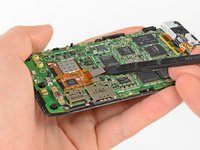
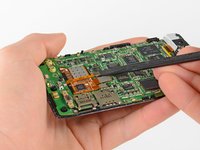
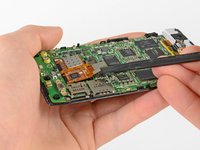
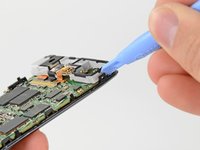
    • There are a number of small black plastic clips on the display assembly that hold the motherboard in place.

    • Release the securing clips with a plastic opening tool.

    FixBot'a Sor

    Yorum Ekle

  15. Motorola Droid RAZR Display Assembly Replacement: adım 15, 3 resimden 1. Motorola Droid RAZR Display Assembly Replacement: adım 15, 3 resimden 2. Motorola Droid RAZR Display Assembly Replacement: adım 15, 3 resimden 3.
    • Use a heat gun or hair dryer to soften the adhesive strip around the perimeter of the motherboard.

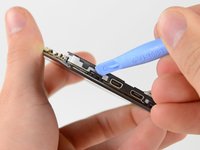
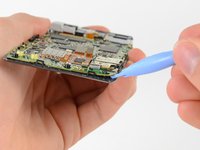
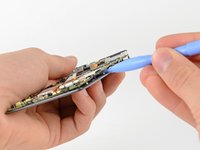
    • Pry the edges of the motherboard up from the display assembly with a plastic opening tool.

    • Remove the motherboard assembly.

    FixBot'a Sor

    Yorum Ekle

  16. Motorola Droid RAZR Display Assembly Replacement, Display Assembly: adım 16, 1 resimden 1.
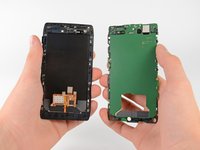
    • Once separated from the motherboard assembly, the entire display assembly can be replaced.

    FixBot'a Sor

    Yorum Ekle

Sonuç

To reassemble your device, follow these instructions in reverse order.

İptal et: Bu kılavuzu tamamlamadım.

49 farklı kişi bu kılavuzu tamamladı.

David Hodson

Üyelik tarihi: 04/13/10

156.220 İtibar

127 adet Kılavuz yazıldı

1Rehber Yorum

if the problem is charging point what should i do?

emmanuel.rambo75 - Yanıt Paylaş

Yorum Ekle

İstatistikleri Görüntüle:

Son 24 Saat: 3

Son 7 gün: 13

Son 30 gün: 59

Her zaman: 63,668