Ana içeriğe geç
Onarım Topluluğuna Katılın - Hesap Oluşturun

Motorola Droid RAZR HD Front Panel Assembly Replacement

Görüntüleme: 1,5 B

İstatistikleri görüntüle:

Son 24 Saat:
1
Son 7 Gün:
11
Son 30 Gün:
80
Her zaman:
1.484
Yorumlar: 0

Hiç kimse bu kılavuza yorum bırakmadı. Birinci olacak mısın?

Go to guide comments
Tamamlandı: 5

5 kişi bu kılavuzu "tamamlandı" olarak işaretledi. Sıradaki sen olacak mısın?

Sık Kullanılanlar: 3

3 kişi bu kılavuzu favorilerine ekledi (ve abone oldu). Sıradaki sen olacak mısın?

Gerekli Süre: Tahmin yok
Zorluk: Orta
Motorola Droid RAZR HD Front Panel Assembly Replacement

Use this guide to replace the entire front panel assembly on your Motorola Droid RAZR HD. This includes the

Neye ihtiyacın var

Aletler

    1. Motorola Droid RAZR HD Front Panel Assembly Replacement, Front Panel Assembly: adım 1, 1 resimden 1.
      • Power off the device before disassembly to avoid damage or harm from electrical surges.

      • Remove the two 4.5mm screws in the bottom left and right corners of the device using a T4 Torx Screwdriver.

      FixBot'a Sor

      Yorum Ekle

    2. Motorola Droid RAZR HD Front Panel Assembly Replacement: adım 2, 1 resimden 1.
      • Holding the device in your hand, push the screen towards the top of the phone until it disconnects from the base of the phone.

      FixBot'a Sor

      Yorum Ekle

    3. Motorola Droid RAZR HD Front Panel Assembly Replacement: adım 3, 1 resimden 1.
      • Use a plastic opening tool to lift the screen from the phone.

      • Do not try to completely detach the screen; cables are still connected to the device and can be damaged.

      FixBot'a Sor

      Yorum Ekle

    4. Motorola Droid RAZR HD Front Panel Assembly Replacement: adım 4, 2 resimden 1. Motorola Droid RAZR HD Front Panel Assembly Replacement: adım 4, 2 resimden 2.
      Bu adımda kullanılan alet:
      Tweezers
      $4.99
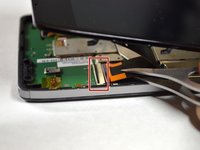
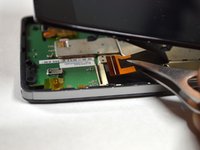
      • Use tweezers to remove the yellow tape covering the lcd/digitizer cable connector.

      • Carefully lift up the black locking tab to release the lcd/digitizer cable.

      • The cable connector is located on the bottom right section of the phone.

      FixBot'a Sor

      Yorum Ekle

    5. Motorola Droid RAZR HD Front Panel Assembly Replacement: adım 5, 1 resimden 1.
      • Lift up the screen further to reveal another cable at the top of the device connecting the motherboard to the screen.

      • This connector is located on the top right section of the phone.

      • Use tweezers to lift the black bar on top of the ZIF connector.

      • Pull the ribbon cable out of the connector with tweezers.

      • Now that there are no cables connecting the screen to the motherboard, remove the screen.

      FixBot'a Sor

      Yorum Ekle

Sonuç

To reassemble your device, follow these instructions in reverse order.

İptal et: Bu kılavuzu tamamlamadım.

5 farklı kişi bu kılavuzu tamamladı.

Brendan Baronia

Üyelik tarihi: 04/14/15

681 İtibar

2 adet Kılavuz yazıldı

Ekip

Cal Poly, Team 4-4, Maness Spring 2015 Cal Poly, Team 4-4, Maness Spring 2015 üyesi

CPSU-MANESS-S15S4G4

5 Üyeler

72 adet Kılavuz yazıldı

0Kılavuz Yorumları

Yorum Ekle

İstatistikleri Görüntüle:

Son 24 Saat: 1

Son 7 gün: 11

Son 30 gün: 80

Her zaman: 1,484