Ana içeriğe geç
Onarım Topluluğuna Katılın - Hesap Oluşturun

Motorola V557 Faceplate Replacement

Neye ihtiyacın var

  1. Motorola V557 Faceplate Replacement, Faceplate: adım 1, 3 resimden 1. Motorola V557 Faceplate Replacement, Faceplate: adım 1, 3 resimden 2. Motorola V557 Faceplate Replacement, Faceplate: adım 1, 3 resimden 3.
    • Remove the four rubber stoppers from around the screen with a pin to reveal four screws.

    FixBot'a Sor

    Yorum Ekle

  2. Motorola V557 Faceplate Replacement: adım 2, 2 resimden 1. Motorola V557 Faceplate Replacement: adım 2, 2 resimden 2.
    • Remove the four 3.8 mm T-6 Torx screws.

    FixBot'a Sor

    Yorum Ekle

  3. Motorola V557 Faceplate Replacement: adım 3, 2 resimden 1. Motorola V557 Faceplate Replacement: adım 3, 2 resimden 2.
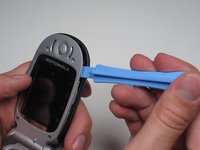
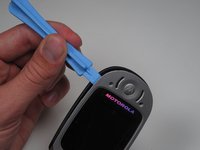
    • Separate the cover from the edges using a plastic opening tool.

    FixBot'a Sor

    Yorum Ekle

  4. Motorola V557 Faceplate Replacement: adım 4, 2 resimden 1. Motorola V557 Faceplate Replacement: adım 4, 2 resimden 2.
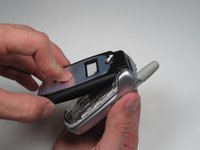
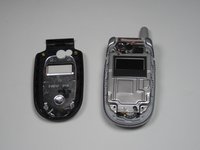
    • With the edges separated, close the phone and lift off the faceplate with your fingers.

    FixBot'a Sor

    Yorum Ekle

Sonuç

To reassemble your device, follow these instructions in reverse order.

İptal et: Bu kılavuzu tamamlamadım.

Blair Frandeen

Üyelik tarihi: 10/02/10

19 İtibar

4 adet Kılavuz yazıldı

Ekip

Cal Poly, Team 7-50, Amido Fall 2010 Cal Poly, Team 7-50, Amido Fall 2010 üyesi

CPSU-AMIDO-F10S7G50

4 Üyeler

24 adet Kılavuz yazıldı

0Kılavuz Yorumları

Yorum Ekle

İstatistikleri Görüntüle:

Son 24 Saat: 0

Son 7 gün: 9

Son 30 gün: 41

Her zaman: 2,317