Ana içeriğe geç
Onarım Topluluğuna Katılın - Hesap Oluşturun

Motorola V60i Keypad Sensor Replacement

Neye ihtiyacın var

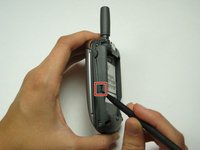
  1. Motorola V60i Keypad Sensor Replacement, Battery: adım 1, 2 resimden 1. Motorola V60i Keypad Sensor Replacement, Battery: adım 1, 2 resimden 2.
    • Flip the phone over so the back cover is facing up.

    • Using either a finger or a spudger, press the button located near the top of the phone by the antenna.

    FixBot'a Sor

    Yorum Ekle

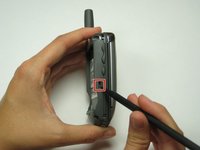
  2. Motorola V60i Keypad Sensor Replacement: adım 2, 2 resimden 1. Motorola V60i Keypad Sensor Replacement: adım 2, 2 resimden 2.
    • Pry up the back plate from the phone.

    • Push the button near the bottom of the battery using either your finger or the spudger to release the battery.

    FixBot'a Sor

    Yorum Ekle

  3. Motorola V60i Keypad Sensor Replacement, Back Plate: adım 3, 1 resimden 1.
    • Using a T6 Torx screwdriver, remove the four screws from the back of the phone.

    FixBot'a Sor

    Yorum Ekle

  4. Motorola V60i Keypad Sensor Replacement: adım 4, 2 resimden 1. Motorola V60i Keypad Sensor Replacement: adım 4, 2 resimden 2.
    • Simultaneously press the highlighted buttons on both sides of phone.

    FixBot'a Sor

    Yorum Ekle

  5. Motorola V60i Keypad Sensor Replacement: adım 5, 1 resimden 1.
    • Separate the back plate from the rest of phone.

    • Do not pull the wire connecting the front and back plates.

    FixBot'a Sor

    Yorum Ekle

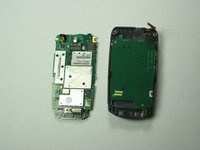
  6. Motorola V60i Keypad Sensor Replacement, Motherboard: adım 6, 1 resimden 1.
    • Gently lift logic board from back plate.

    FixBot'a Sor

    Yorum Ekle

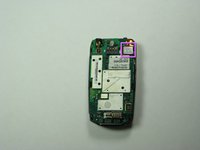
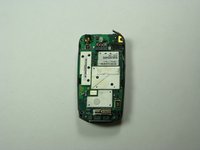
  7. Motorola V60i Keypad Sensor Replacement: adım 7, 2 resimden 1. Motorola V60i Keypad Sensor Replacement: adım 7, 2 resimden 2.
    • Place logic board on front cover.

    • Unsnap orange wire that connects the logic board to keypad sensor to allow the logic board to move freely.

    FixBot'a Sor

    Yorum Ekle

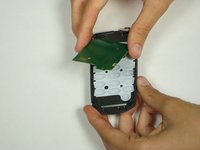
  8. Motorola V60i Keypad Sensor Replacement, Keypad Sensor: adım 8, 2 resimden 1. Motorola V60i Keypad Sensor Replacement, Keypad Sensor: adım 8, 2 resimden 2.
    • Once logic board is removed lift the green keypad sensor for the front plate.

    FixBot'a Sor

    Yorum Ekle

Sonuç

To reassemble your device, follow these instructions in reverse order.

İptal et: Bu kılavuzu tamamlamadım.

Elizabeth OBrien

Üyelik tarihi: 04/26/10

52 İtibar

7 adet Kılavuz yazıldı

Ekip

Cal Poly, Team 30-40, Garner Spring 2010 Cal Poly, Team 30-40, Garner Spring 2010 üyesi

CPSU-GARNER-S10S30G40

4 Üyeler

33 adet Kılavuz yazıldı

1Rehber Yorum

Using sim card

tolibasjaypee24 - Yanıt Paylaş

Yorum Ekle

İstatistikleri Görüntüle:

Son 24 Saat: 1

Son 7 gün: 4

Son 30 gün: 21

Her zaman: 2,281