Ana içeriğe geç
Onarım Topluluğuna Katılın - Hesap Oluşturun

NABI XD Screen Replacement

Neye ihtiyacın var

  1. NABI XD Screen Replacement, Rear panel: adım 1, 2 resimden 1. NABI XD Screen Replacement, Rear panel: adım 1, 2 resimden 2.
    • Use the plastic opening tool at the top left corner seam, then pry the corner apart.

    FixBot'a Sor

    Yorum Ekle

  2. NABI XD Screen Replacement: adım 2, 1 resimden 1.
    • Next slide the plastic opening tool across the sides of the Nabi. It will slowly open.

    • There are small plastic clips that need to be release. Gently apply outwards pressure until the clips give.

    • Go around the NABI XD and separate the rear panel from the device.

    FixBot'a Sor

    Yorum Ekle

  3. NABI XD Screen Replacement, Battery: adım 3, 2 resimden 1. NABI XD Screen Replacement, Battery: adım 3, 2 resimden 2.
    • Place your fingernails on both sides of the connector and pull it straight back away from the holder.

    FixBot'a Sor

    Yorum Ekle

  4. NABI XD Screen Replacement: adım 4, 1 resimden 1.
    • Battery is glued to the base, lift carefully.

    • To remove battery, lift the battery up from the motherboard.

    FixBot'a Sor

    Yorum Ekle

  5. NABI XD Screen Replacement, Charging port: adım 5, 2 resimden 1. NABI XD Screen Replacement, Charging port: adım 5, 2 resimden 2.
    Bu adımda kullanılan alet:
    Tweezers
    $4.99
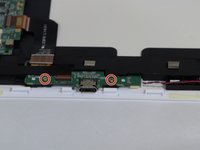
    • Remove the two 4mm Phillips screws with the PH#0 screwdriver.

    • Disconnect the left (L) speaker wire from the charging port by grabbing it on both sides with the tweezers and pulling straight back.

    FixBot'a Sor

    Yorum Ekle

  6. NABI XD Screen Replacement: adım 6, 1 resimden 1.
    • Use your fingernails or a spudger to flip up the small retaining flap, then pull the ribbon straight back to remove

    • Lift the charging port from the NABI XD.

    FixBot'a Sor

    Yorum Ekle

  7. NABI XD Screen Replacement, Motherboard: adım 7, 3 resimden 1. NABI XD Screen Replacement, Motherboard: adım 7, 3 resimden 2. NABI XD Screen Replacement, Motherboard: adım 7, 3 resimden 3.
    Bu adımda kullanılan alet:
    Tweezers
    $4.99
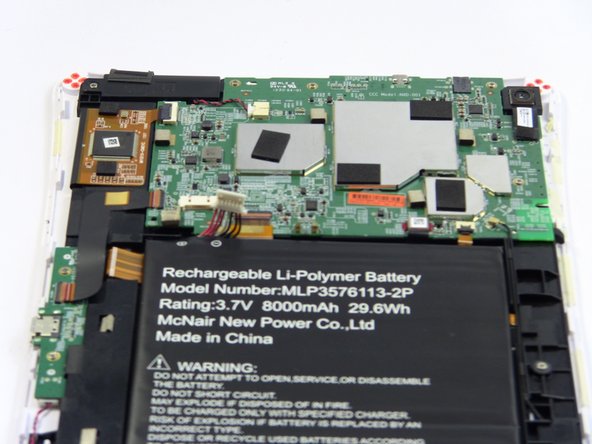
    • To remove the marked ribbons, use your fingernails or a spudger to lift up small tab

    • Use the Precision Tweezers to gently pull the ribbons straight out of the connectors.

    • You need to remove 4 ribbons

    FixBot'a Sor

    Yorum Ekle

  8. NABI XD Screen Replacement: adım 8, 3 resimden 1. NABI XD Screen Replacement: adım 8, 3 resimden 2. NABI XD Screen Replacement: adım 8, 3 resimden 3.
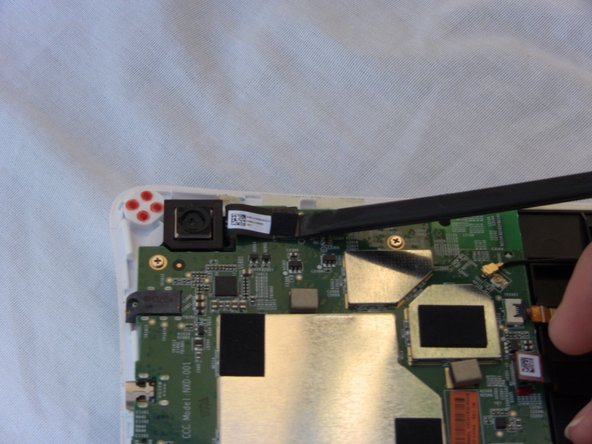
    • Disconnect the camera by lifting the ribbon straight up. Also disconnect the remaining ribbon by lifting up gently.

    • To disconnect antenna wire, use the tweezers to pry connector straight from the board.

    FixBot'a Sor

    Yorum Ekle

  9. NABI XD Screen Replacement: adım 9, 2 resimden 1. NABI XD Screen Replacement: adım 9, 2 resimden 2.
    • Disconnect the Right speaker by grabbing the wire head by its sides and pulling it back from the connector.

    FixBot'a Sor

    Yorum Ekle

  10. NABI XD Screen Replacement: adım 10, 2 resimden 1. NABI XD Screen Replacement: adım 10, 2 resimden 2.
    • Remove the four 4mm Phillips screws with the PH#0 screwdriver.

    FixBot'a Sor

    Yorum Ekle

  11. NABI XD Screen Replacement: adım 11, 1 resimden 1.
    • Lift the motherboard up away from the Nabi XD.

    FixBot'a Sor

    Yorum Ekle

  12. NABI XD Screen Replacement, Speakers: adım 12, 3 resimden 1. NABI XD Screen Replacement, Speakers: adım 12, 3 resimden 2. NABI XD Screen Replacement, Speakers: adım 12, 3 resimden 3.
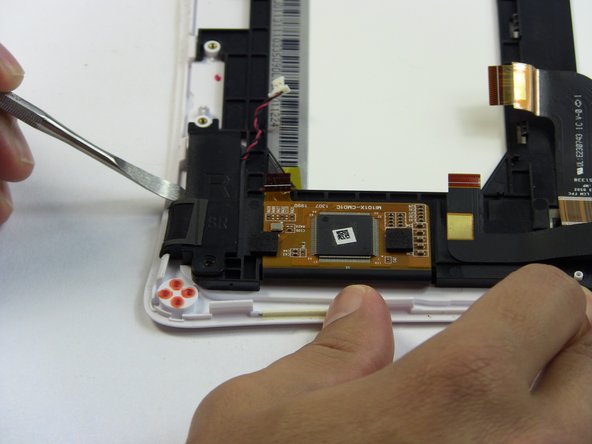
    • Right (R) speaker removal:

    • Remove one 4mm Phillips screw.

    • Use the metal spudger to separate the speaker from the frame.

    • The speaker is glued to the Nabi XD it will require some force to separate them.

    FixBot'a Sor

    Yorum Ekle

  13. NABI XD Screen Replacement: adım 13, 2 resimden 1. NABI XD Screen Replacement: adım 13, 2 resimden 2.
    • Remove the left (L) speaker wire from the frame by pulling it to the side and up.

    • The wire in this step, is connected to the charging port. Removing it, is shown in detail on step 6.

    FixBot'a Sor

    Yorum Ekle

  14. NABI XD Screen Replacement: adım 14, 3 resimden 1. NABI XD Screen Replacement: adım 14, 3 resimden 2. NABI XD Screen Replacement: adım 14, 3 resimden 3.
    • Left (L) speaker removal:

    • Remove two 4mm Phillips screws.

    • Use the metal spudger to separate the speaker from the frame.

    FixBot'a Sor

    Yorum Ekle

  15. NABI XD Screen Replacement, Screen: adım 15, 3 resimden 1. NABI XD Screen Replacement, Screen: adım 15, 3 resimden 2. NABI XD Screen Replacement, Screen: adım 15, 3 resimden 3.
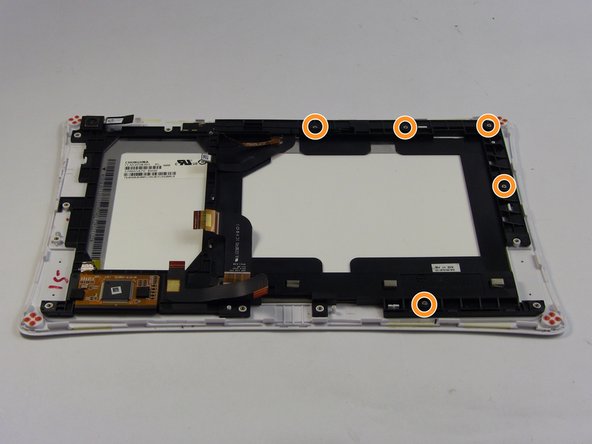
    • The ribbons are glued to the frame so gently lift them up without ripping them.

    • Lightly lift the marked wires and ribbons from the frame by gently pulling them in the direction of the arrows and up.

    • Remove five 4mm Phillips screws from the frame.

    FixBot'a Sor

    Yorum Ekle

  16. NABI XD Screen Replacement: adım 16, 2 resimden 1. NABI XD Screen Replacement: adım 16, 2 resimden 2.
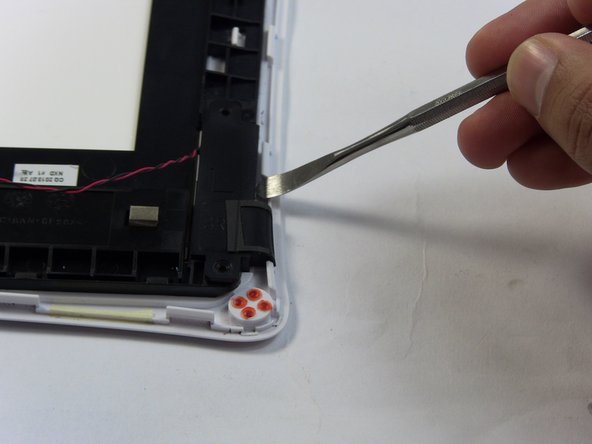
    • Use the Plastic Opening tools to lift the frame up.

    • The ribbons need to be detangled from the frame while you are lifting it up.

    • Do not yank the frame away from the Nabi XD it is connect to it by a ribbon. Gently lift.

    FixBot'a Sor

    Yorum Ekle

  17. NABI XD Screen Replacement: adım 17, 2 resimden 1. NABI XD Screen Replacement: adım 17, 2 resimden 2.
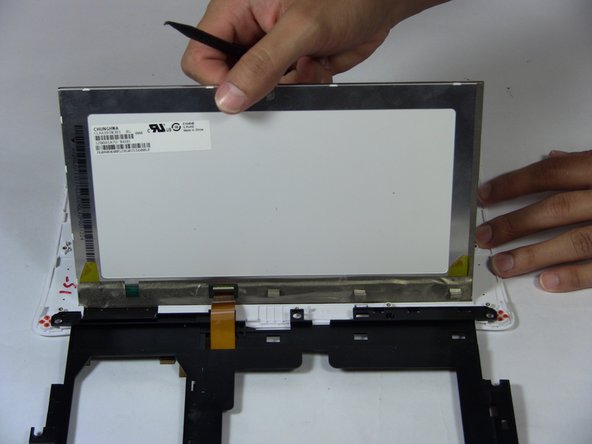
    • Lift the screen up with the black spudger.

    • Lift the frame up slowly and place it to the side.

    FixBot'a Sor

    Yorum Ekle

Sonuç

To reassemble your device, follow these instructions in reverse order.

İptal et: Bu kılavuzu tamamlamadım.

Bir başkası bu kılavuzu tamamladı.

Marissa Schiereck

Üyelik tarihi: 09/15/16

638 İtibar

6 adet Kılavuz yazıldı

Ekip

USF Tampa, Team 17-2, Blackwell Fall 2016 USF Tampa, Team 17-2, Blackwell Fall 2016 üyesi

USFT-BLACKWELL-F16S17G2

3 Üyeler

12 adet Kılavuz yazıldı

1Rehber Yorum

Will the screen from an A or C model work with a B model?

Kevin Fifer - Yanıt Paylaş

Yorum Ekle

İstatistikleri Görüntüle:

Son 24 Saat: 0

Son 7 gün: 10

Son 30 gün: 44

Her zaman: 1,037