Ana içeriğe geç
Onarım Topluluğuna Katılın - Hesap Oluşturun

Nabi Jr Battery Replacement

Neye ihtiyacın var

  1. Nabi Jr Battery Replacement, Rear Case: adım 1, 1 resimden 1.
    • Remove the red rubber case from the device. This should come off with ease.

    FixBot'a Sor

    Yorum Ekle

  2. Nabi Jr Battery Replacement: adım 2, 1 resimden 1.
    • Turn the device so the screen is facing away from you.

    • Using a philips head, size #00, screwdriver, remove the screws in each corner of the plastic casing.(total of 4 screws)

    FixBot'a Sor

    Yorum Ekle

  3. Nabi Jr Battery Replacement: adım 3, 1 resimden 1.
    • Remove the device casing using a small plastic pry bar.

    • This might take a little bit of force to accomplish, don't be afraid to go at it with a little gusto.

    FixBot'a Sor

    Yorum Ekle

  4. Nabi Jr Battery Replacement: adım 4, 1 resimden 1.
    • After loosening the back cover, remove it from the device so you can get at the innards.

    FixBot'a Sor

    Yorum Ekle

  5. Nabi Jr Battery Replacement, Battery: adım 5, 1 resimden 1.
    • Lift the battery up from the motherboard.

    • Don't rip the soldered wires from the board.

    • The battery is stuck to the motherboard with adhesive, it may take a little pull to separate.

    FixBot'a Sor

    Yorum Ekle

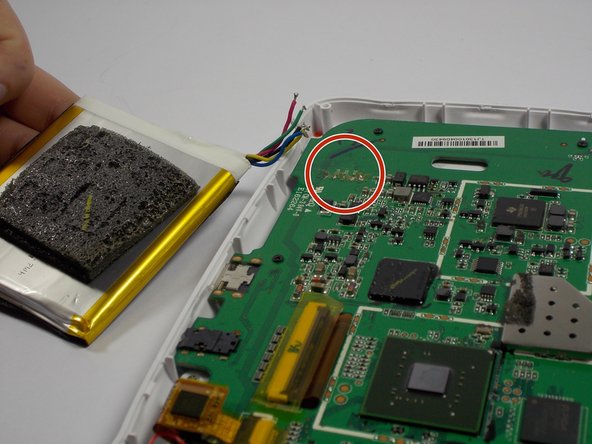
  6. Nabi Jr Battery Replacement: adım 6, 1 resimden 1.
    • Remove the battery from the motherboard

    • De-solder the colored wires

    • Be sure to note the order in which the wires are connected to the board before desoldering them.

    • Be careful while removing the solder off of the colored battery wires. The soldering iron will be extremely hot

    FixBot'a Sor

    Yorum Ekle

  7. Nabi Jr Battery Replacement: adım 7, 2 resimden 1. Nabi Jr Battery Replacement: adım 7, 2 resimden 2.
    • Replace the old battery with the new one

    • Solder the wires of the new battery into the pads on the motherboard

    • Be careful when soldering the wires in. Soldering iron will be extremely hot

    FixBot'a Sor

    Yorum Ekle

  8. Nabi Jr Battery Replacement: adım 8, 1 resimden 1.
    • Once the wires are fully soldered, put the new battery back to the initial position

    • Close the case by putting the back cover back on the device

    • Will take some force

    • Make sure the battery is not in the way of the back cover

    FixBot'a Sor

    Yorum Ekle

  9. Nabi Jr Battery Replacement: adım 9, 1 resimden 1.
    • Once the back cover is on, screw in the four screws that you had taken off in the beginning

    • Put the red rubber casing back on.

    FixBot'a Sor

    Yorum Ekle

Sonuç

If all the steps were followed correctly, the device should be fully closed and ready to go

İptal et: Bu kılavuzu tamamlamadım.

4 farklı kişi bu kılavuzu tamamladı.

Jimmy Nguyen

Üyelik tarihi: 03/24/15

271 İtibar

2 adet Kılavuz yazıldı

Ekip

UMass Dartmouth, Team 4-3, Vijaybhaskar Spring 2015 UMass Dartmouth, Team 4-3, Vijaybhaskar Spring 2015 üyesi

UMASSD-VIJAYBHASKAR-S15S4G3

3 Üyeler

12 adet Kılavuz yazıldı

7Kılavuz Yorumları

Thank you for sharing the idea ,but I need that NABI JR battery. So ,where from I can purchase it .

Lus Ka - Yanıt Paylaş

I have seen them on ebay but it's easier to find a Nabi 2 battery on ebay. The Nabi 2 battery is quite a bit larger but with a very minor mod to the Nabi Jr. the Nabi 2 battery will fit and give you a much longer run time from a single charge.

darcshadow - Yanıt Paylaş

My old Nabi jr battery is a plug in with 2 reds 1 white and 2 black wires. My new Cameron sino battery is blue green red yellow black. What is the order to resolder them.

Dennis Blixt - Yanıt Paylaş

I have the same problem with the problem of the replacement battery not having the same wiring configuration or plug. Did you ever get this resolved?

Delores Duke - Yanıt Paylaş

Where can I buy the battery live in Mexico

Roos - Yanıt Paylaş

Yorum Ekle

İstatistikleri Görüntüle:

Son 24 Saat: 1

Son 7 gün: 9

Son 30 gün: 63

Her zaman: 12,279