Giriş
The Neutab N7 Pro has a dual camera. The gadget comes with a back camera of 2 MP and a front camera of 0.3 MP. The Neutab N7 camera can sometimes break or malfunction, and must then be replaced to continue to be able to take pictures and video. Use this guide to replace the camera.
Neye ihtiyacın var
-
-
-
Insert plastic opening tool and pry back case away, slowly moving the plastic opening tool along the device.
 FixBot'a Sor
-
-
-
-
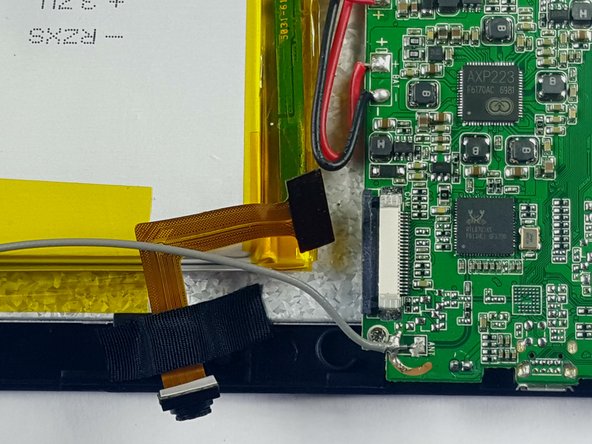
Locate the camera unit and note where it is attached to the motherboard.
-
Use a black nylon spudger to remove the adhesive holding it onto to the motherboard.
-
-
Bu adımda kullanılan alet:Tweezers$4.99
-
Use a black nylon spudger or tweezers to release the connector holding the camera ribbon cable in place.
-
Carefully pull the ribbon cable out, removing the camera from the motherboard.
-
-



To reassemble your device, follow these instructions in reverse order.
İptal et: Bu kılavuzu tamamlamadım.
Bir başkası bu kılavuzu tamamladı.

Ekip

USF Tampa, Team 7-1, Cheng Spring 2016 USF Tampa, Team 7-1, Cheng Spring 2016 üyesi
USFT-CHENG-S16S7G1
3 Üyeler
20 adet Kılavuz yazıldı
