Bu çeviri bir makine tarafından oluşturulmuştur ve henüz bir kişi tarafından incelenmemiştir. Bu dili konuşuyor musunuz? İnceleme için.
Giriş
Bu kılavuz, LCD ekranı değiştirmek için gereken adımları açıklamaktadır. Bazı parçalar hassas olabilir, bu nedenle bu değişim ekranı ile çalışırken dikkatli olunmalıdır.
Neye ihtiyacın var
-
-
-
Ekranın arka kasasının köşelerindeki dört adet 4 mm siyah Yıldız vida (#000) sökün.
-
Menteşe kasasındaki iki adet 2 mm siyah Yıldız vida (#000) sökün. (Menteşe, ekranı kameranın gövdesine bağlar.)
-
-
-
-
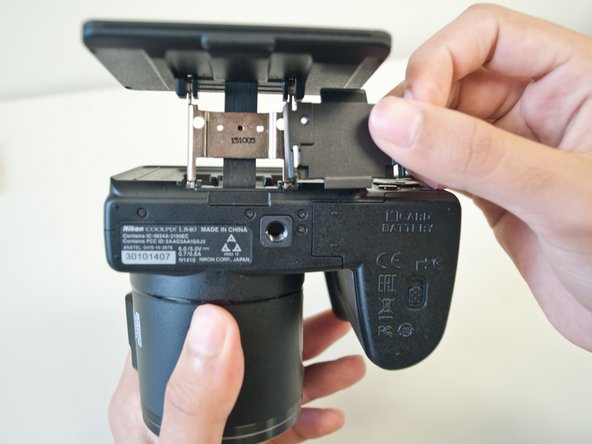
Menteşe kasasının üst yarısını kaldırarak çıkarın.
-
Menteşe kasasının alt yarısını kaldırarak çıkarın.
-
-
-
Metal bir spudger kullanarak, spudger'ı ekran kasasının ön ve arka yarıları arasına sokun ve spudger'ı ileri geri oynatarak arka kasayı ekrandan ayırın.
-

 FixBot'a Sor




Cihazınızı tekrar toplamak için bu talimatları ters sırayla uygulayın.
İptal et: Bu kılavuzu tamamlamadım.
6 farklı kişi bu kılavuzu tamamladı.

Ekip

Cal Poly, Team 1-11, Maness Spring 2016 Cal Poly, Team 1-11, Maness Spring 2016 üyesi
CPSU-MANESS-S16S1G11
4 Üyeler
60 adet Kılavuz yazıldı
9Kılavuz Yorumları
Where would you suggest I buy a replacement screen?
Yours must be different than mine,. mine required a separation of a sticky piece from around the screen and then getting it back on the new one in almost perfect alignment as you find out when you start putting it back together. I used a prying tool a very small Phillips screwdriver and a very small torx tool, all of which came in the kit I ordered from easyworldwidetrading (Hong Kong) (ebay) for $64.99 no. 302013683286, but make sure yours is the same Camera, good Luck
PS: Be very careful, the piece's are cheap plastic and will break... Now I gotta find the outside piece... ugh
My LCD screen shows what I am taking a picture of but when I hit the picture viewer button the screen goes black. So do I need to replace the LCD screen or do you think it would be something else?
My screen is showing a grainy pic especially red I have tried all I can think off. It goes when I turn color right down but leaves screen looking black and white. I know there’s an easy fix but can’t seem to find it. Any help pls
