Giriş
Piliniz sorun mu çıkarıyor ve değiştirilmesi mi gerekiyor? Bu kılavuz, Nintendo 3DS XL cihazınıza kısa sürede yeni bir pil takmanız için gereken adımları size gösterecektir!
Neye ihtiyacın var
-
-
-
Arka kapağın üst kenarındaki 4,2 mm uzunluğundaki vidaları gevşetmek için bir JIS 00 tornavida kullanın.
 FixBot'a Sor
-
-
-
-
Arka kapağı sabitleyen klipsleri, üst köşelerden başlayıp aşağı doğru ilerleyerek ayırmak için bir plastik açma aleti kullanın.
-
Arka kapağı elinizle çıkarın.
-
-
-
Açma aletini bataryanın sağ tarafında bulunan açıklığa yerleştirin.
-
Bataryayı yuvasından kaldırarak ayırın ve çıkarın.
-
-


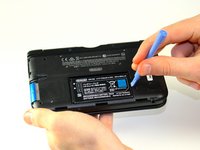
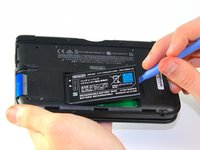
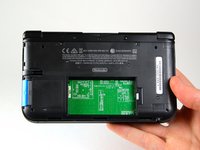
Bu adımları tamamladıktan sonra yeni değişim pilini takabilirsiniz.
Cihazınızı tekrar monte etmek için bu talimatları tersten uygulayın.
İptal et: Bu kılavuzu tamamlamadım.
63 farklı kişi bu kılavuzu tamamladı.
Bu çevirmenlere özel teşekkürler:
100%

Translation Bot dünyayı onarmamıza yardım ediyor! Katkıda bulunmak ister misiniz?
Çeviriye Başlayın ›

Ekip

Cal Poly, Team 9-13, Regan Spring 2014 Cal Poly, Team 9-13, Regan Spring 2014 üyesi
CPSU-REGAN-S14S9G13
5 Üyeler
96 adet Kılavuz yazıldı
6Kılavuz Yorumları
Time estimate: 3 - 9 hours Difficulty: Very difficult ??????
More like 30-90 seconds, and that's if you have to search for a screwdriver.
It should be noted that the bottom three clips on the bottom of the backplate can’t just be snapped in, they need to be slipped in, so when removing the backplate, it should be tiled away from the system and then pulled up from the bottom, and those three clips on the bottom should be the first clips in when you’re putting it back together, sliding them in with the backplate at an angle, and then the rest of the clips just snap in.
Nice tip. Ty.
Just did this. For reasmbly I recommend putting the bottom/lower part of the case on first before you screw it back on.
