Ana içeriğe geç
Onarım Topluluğuna Katılın - Hesap Oluşturun

Nintendo DSi Top LCD Screen Replacement

Arşivlenmiş Kılavuz
Bu kılavuz sadece arşivsel amaçlarla muhafaza edilmiştir. Onarımınızı gerçekleştirmek için kılavuzun güncel halini kullanın.

Neye ihtiyacın var

  1. Dikkatli ol: adımlar 1-2 yapım altında olarak işaretlenen bir kılavuzdan alınmıştır.

    Nintendo DSi Top LCD Screen Replacement, Battery: adım 1, 1 resimden 1.
    • Loosen the two screws on the battery panel. Then lift the panel up to remove it.

  2. Nintendo DSi Top LCD Screen Replacement: adım 2, 1 resimden 1.
    • L Button.

    • Top of the battery pack.

    • To remove the battery pack, place your fingernail or a spudger at the top of the battery near the L button. Gently lift the battery out.

  3. Dikkatli ol: adımlar 3-4 yapım altında olarak işaretlenen bir kılavuzdan alınmıştır.

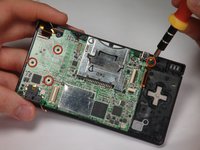
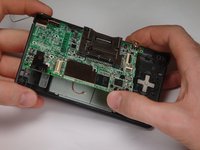
    Nintendo DSi Top LCD Screen Replacement, Motherboard: adım 3, 2 resimden 1. Nintendo DSi Top LCD Screen Replacement, Motherboard: adım 3, 2 resimden 2.
    • Remove 4 Phillips screws from the board.

    • Lift the main board from the bottom end and flip it over to reveal the last connector.

    • Keep the main board fairly close to the case, making sure not to damage the last ribbon cable holding it in place.

  4. Nintendo DSi Top LCD Screen Replacement: adım 4, 1 resimden 1.
    • Disconnect the ribbon cable by gently using a plastic opening tool to flip up the black connector latch. The cable should easily slide out from the connector.

    • The motherboard should now be free from the rest of the device.

  5. Nintendo DSi Top LCD Screen Replacement, Bottom Case: adım 5, 1 resimden 1.
    • Remove the rubber front-panel button membranes from the device. Pay careful attention to where the buttons go, so you can replace them correctly.

    • A/B/X/Y button assembly

    • Select/Start button assembly

    • D-pad

    • Power button

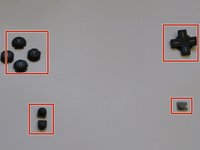
  6. Nintendo DSi Top LCD Screen Replacement: adım 6, 2 resimden 1. Nintendo DSi Top LCD Screen Replacement: adım 6, 2 resimden 2.
    • Remove the plastic buttons and keep them in a safe place.

    • All of the buttons have "key" notches to prevent them from being inserted incorrectly (backwards or in the wrong place), but it can take a while to figure out where everything goes if they get shuffled around.

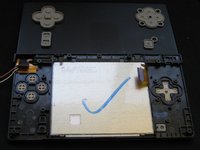
  7. Nintendo DSi Top LCD Screen Replacement: adım 7, 2 resimden 1. Nintendo DSi Top LCD Screen Replacement: adım 7, 2 resimden 2.
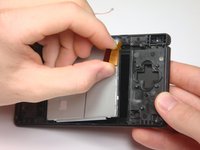
    • Flip the case open, and push the lower screen assembly out of the frame.

  8. Nintendo DSi Top LCD Screen Replacement, Top LCD Screen: adım 8, 1 resimden 1.
    • To make the repair easier, we recommend removing the bottom LCD screen prior to replacing the top LCD screen.

    • Using a spudger, or similar tool, pry out the 4 square screw covers.

  9. Nintendo DSi Top LCD Screen Replacement: adım 9, 1 resimden 1.
    • Remove 4 Phillips screws with a #00 Phillips screwdriver.

  10. Nintendo DSi Top LCD Screen Replacement: adım 10, 1 resimden 1.
    • Place a plastic opening tool between the front panel and top edge of the outer case. Slide the tool along the edge as needed to prop open the case.

    • With the screen facing you, slide the screen side down with your thumbs to separate the screen from the cover.

  11. Nintendo DSi Top LCD Screen Replacement: adım 11, 1 resimden 1.
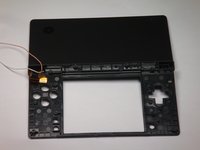
    • Remove the antenna from the bottom left of the device.

    • Remove the microphone from the top of the frame.

  12. Nintendo DSi Top LCD Screen Replacement: adım 12, 1 resimden 1.
    • Use a spudger to pry the camera out of its place.

  13. Nintendo DSi Top LCD Screen Replacement: adım 13, 1 resimden 1.
    • Cables for the components in the upper half of the device run through the hinge, which must be carefully disassembled before continuing.

    • Start by pushing the sliding shaft in the hinge on the opposite side of the wires/ribbons.

  14. Nintendo DSi Top LCD Screen Replacement: adım 14, 1 resimden 1.
    • On the reverse side of the casing, insert the spudger onto the surface of the sliding shaft just left of the LED light channels.

    • Push the sliding shaft completely through the hinge until it stops and the hinge is released.

  15. Nintendo DSi Top LCD Screen Replacement: adım 15, 1 resimden 1.
    • The right side of bottom case should separate from the top case when you remove the sliding shaft.

    • Do not pull up too far or the wire hinge may be damaged.

    • Slide the top case to the right to separate the joint.

    • Weave the wires and ribbons through the wire hinge to completely separate the top and bottom casings.

  16. Nintendo DSi Top LCD Screen Replacement: adım 16, 2 resimden 1. Nintendo DSi Top LCD Screen Replacement: adım 16, 2 resimden 2.
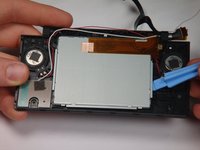
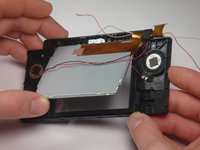
    • The speakers are soldered to the ribbon cable attached to the upper LCD, so they must be removed at the same time as the LCD.

    • Lift the top LCD out of the plastic frame. Carefully thread the ribbon cable out of the hinge to avoid damaging it.

  17. Nintendo DSi Top LCD Screen Replacement: adım 17, 1 resimden 1.
    • To remove the speakers, use a spudger or a similar tool to gently pry them off.

Sonuç

To reassemble your device, follow these instructions in reverse order.

Bir başkası bu kılavuzu tamamladı.

rjcamero

Üyelik tarihi: 11/05/09

50 İtibar

3 adet Kılavuz yazıldı

Ekip

Cal Poly, Team 6-1, Maness Fall 2009 Cal Poly, Team 6-1, Maness Fall 2009 üyesi

CPSU-MANESS-F09S6G1

5 Üyeler

4 adet Kılavuz yazıldı

0Kılavuz Yorumları

Yorum Ekle

İstatistikleri Görüntüle:

Son 24 Saat: 15

Son 7 gün: 142

Son 30 gün: 679

Her zaman: 39,391