Bu çeviri bir makine tarafından oluşturulmuştur ve henüz bir kişi tarafından incelenmemiştir. Bu dili konuşuyor musunuz? İnceleme için.

Nintendo WaveBird Kablosuz Kontrolcü Tuş Değişimi

Douglas ve 9 diğer katkıda bulunanlar
En son 29 Tem 2026 tarihinde güncellendi
Görüntüleme: 4,6 B
İstatistikleri görüntüle:
- Son 24 Saat:
- 2
- Son 7 Gün:
- 23
- Son 30 Gün:
- 112
- Her zaman:
- 4.573
Yorumlar: 0
Hiç kimse bu kılavuza yorum bırakmadı. Birinci olacak mısın?
Go to guide commentsTamamlandı: 6 7
6 kişi bu kılavuzu "tamamlandı" olarak işaretledi. Sıradaki sen olacak mısın?
7 kişi bu kılavuzu "tamamlandı" olarak işaretledi. Siz de dahil - harika iş!
Sık Kullanılanlar: 2 3
2 kişi bu kılavuzu favorilerine ekledi (ve abone oldu). Sıradaki sen olacak mısın?
Siz de dahil olmak üzere 3 kişi bu kılavuzu favorilerine ekledi (ve abone oldu)!
Öne Çıkan Öğrenci Kılavuzu
Bu kılavuz, çalışkan öğrencilerimizin alın teriyle üretildi ve iFixit kadrosu tarafından epey havalı bulunuyor.
Daha iyi giriş
Girişi tamamlayarak ya da daha iyi hale getirerek bu kılavuzu geliştirin.
Giriş
1. adıma git ↓Bu kılavuz, arızalı tuşları nasıl değiştireceğinizi öğretecektir. Tuşlarınız yapış yapışsa veya basmıyorsa, tuşların altını temizlemeniz gerekebilir.
Neye ihtiyacın var
Aletler


-
-
-
Batarya arka kapağını serbest bırakma kolunu aşağı doğru çekin ve kapağı çıkarmak için geriye doğru çekin.
 FixBot'a Sor
-
-
-
-
-
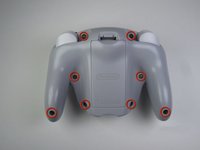
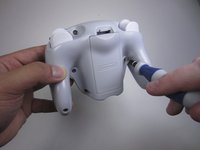
Tri-point Y1 tornavidayı kullanarak arka paneldeki sekiz adet 9 mm vidayı çıkarın.
-
-
-
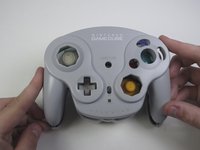
Kontrol cihazını dikkatlice ters çevirin ve düz bir yüzeye yerleştirin.
-
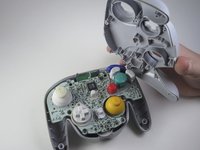
Üst paneli alt panelden yavaşça ayırın.
-
Ayırdıktan sonra üst paneli bir kenara koyun.
-
-
-
-
-
Bu adımda kullanılan alet:Tweezers$4.99
-
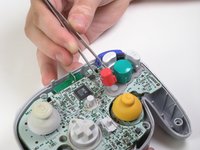
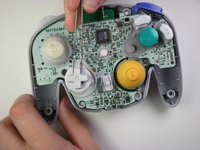
Düğmeleri çıkarmak için cımbız kullanın.
-
-






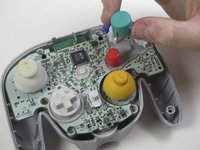
Cihazınızı yeniden toplamak için bu talimatları ters sırayla uygulayın.
İptal et: Bu kılavuzu tamamlamadım.
6 farklı kişi bu kılavuzu tamamladı.

Ekip

Cal Poly, Team 10-40, Amido Spring 2013 Cal Poly, Team 10-40, Amido Spring 2013 üyesi
CPSU-AMIDO-S13S10G40
4 Üyeler
180 adet Kılavuz yazıldı
