Ana içeriğe geç
Onarım Topluluğuna Katılın - Hesap Oluşturun

Nintendo Wii DVD Drive Replacement

Salt Önkoşul
Bu sadece bir ön koşul kılavuzudur! Bu kılavuz başka bir prosedürün parçasıdır ve tek başına kullanılması amaçlanmamıştır.

Neye ihtiyacın var

  1. Nintendo Wii DVD Drive Replacement, Faceplate: adım 1, 2 resimden 1. Nintendo Wii DVD Drive Replacement, Faceplate: adım 1, 2 resimden 2.
    • Use a metal spudger to remove the white plastic screw covers stuck to the lower case near the front of the Wii.

    FixBot'a Sor

    Yorum Ekle

  2. Nintendo Wii DVD Drive Replacement: adım 2, 1 resimden 1.
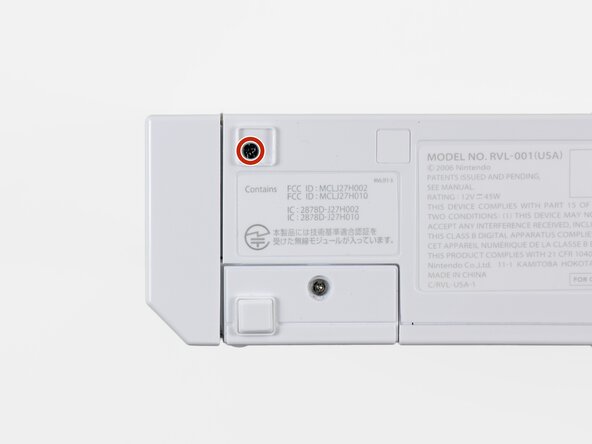
    • Remove the two 8.3 mm Tri-Point screws hidden under the covers you just removed.

    FixBot'a Sor

    Yorum Ekle

  3. Nintendo Wii DVD Drive Replacement: adım 3, 1 resimden 1.
    • Remove the single 5.9 mm Phillips screw under the controller port door nearest the faceplate.

    FixBot'a Sor

    Yorum Ekle

  4. Nintendo Wii DVD Drive Replacement: adım 4, 1 resimden 1.
    • Use a metal spudger to remove the rubber foot stuck to the side of the Wii near the DVD drive opening.

    FixBot'a Sor

    Yorum Ekle

  5. Nintendo Wii DVD Drive Replacement: adım 5, 1 resimden 1.
    • Remove the single 5.9 mm Phillips screw hidden under the foot you just removed.

    FixBot'a Sor

    Yorum Ekle

  6. Nintendo Wii DVD Drive Replacement: adım 6, 2 resimden 1. Nintendo Wii DVD Drive Replacement: adım 6, 2 resimden 2.
    Bu adımda kullanılan alet:
    Tweezers
    $4.99
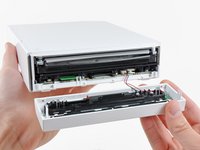
    • Carefully pull the faceplate away from the front of the Wii.

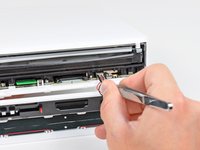
    • Use a pair of tweezers to disconnect the LED cable's plastic connector from the motherboard.

    • Remove the faceplate.

    FixBot'a Sor

    Yorum Ekle

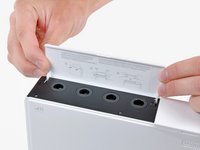
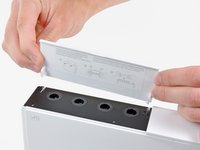
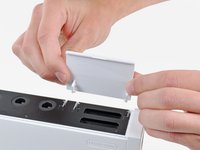
  7. Nintendo Wii DVD Drive Replacement, Outer Case: adım 7, 3 resimden 1. Nintendo Wii DVD Drive Replacement, Outer Case: adım 7, 3 resimden 2. Nintendo Wii DVD Drive Replacement, Outer Case: adım 7, 3 resimden 3.
    • Open the controller port cover until it is perpendicular to the black controller port bezel.

    • Pull the controller port cover straight up to release it from the outer case.

    • Repeat this procedure for the memory card port cover.

    FixBot'a Sor

    Yorum Ekle

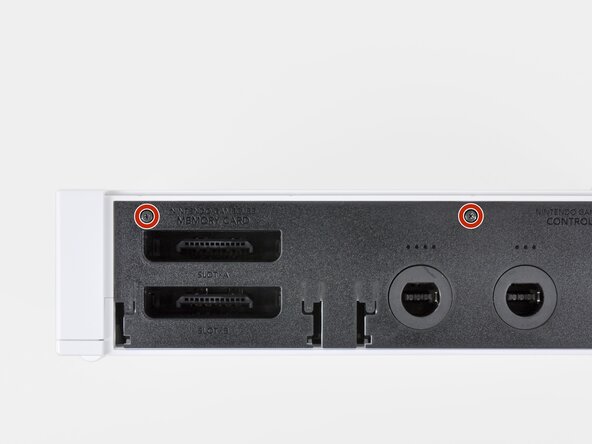
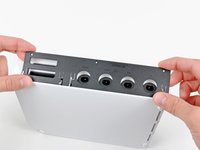
  8. Nintendo Wii DVD Drive Replacement: adım 8, 2 resimden 1. Nintendo Wii DVD Drive Replacement: adım 8, 2 resimden 2.
    • Remove the two remaining 4.1 mm Phillips screws along the top edge of the black plastic controller port bezel.

    • Lift the bezel from the long edge furthest away from the controller ports and remove it from the Wii.

    FixBot'a Sor

    Yorum Ekle

  9. Nintendo Wii DVD Drive Replacement: adım 9, 1 resimden 1.
    • Remove the two 5 mm Phillips screws above the controller ports.

    FixBot'a Sor

    Yorum Ekle

  10. Nintendo Wii DVD Drive Replacement: adım 10, 1 resimden 1.
    • Use a metal spudger to remove the three highlighted screw covers stuck to the side of the Wii.

    FixBot'a Sor

    Yorum Ekle

  11. Nintendo Wii DVD Drive Replacement: adım 11, 1 resimden 1.
    • Remove the following screws:

    • Two 5 mm Phillips screws

    • One 8.2 mm Tri-Point screw

    FixBot'a Sor

    Yorum Ekle

  12. Nintendo Wii DVD Drive Replacement: adım 12, 1 resimden 1.
    • Use a metal spudger to remove the two rubber feet stuck to the bottom face of the Wii near the rear ports.

    FixBot'a Sor

    Yorum Ekle

  13. Nintendo Wii DVD Drive Replacement: adım 13, 1 resimden 1.
    Bu adımda kullanılan alet:
    iFixit Precision 4 mm Screwdriver Bit
    $2.99
    • Remove the two 8.2 mm Tri-Point screws hidden under the feet you just removed.

    • You may use a 4 mm hex nut driver to extend your bit into the recesses and reach the screws.

    FixBot'a Sor

    Yorum Ekle

  14. Nintendo Wii DVD Drive Replacement: adım 14, 1 resimden 1.
    • Lift the outer case straight up off the body of the Wii.

    FixBot'a Sor

    Yorum Ekle

  15. Nintendo Wii DVD Drive Replacement, DVD Drive: adım 15, 2 resimden 1. Nintendo Wii DVD Drive Replacement, DVD Drive: adım 15, 2 resimden 2.
    • Remove the small Phillips screw securing the battery door to the bottom panel.

    • This screw is captive to the battery door.

    • Pull the battery door out of the Wii.

    • The system time will be reset once you remove the battery door.

    • This is a good time to change the CR2032 battery if it hasn't been changed recently.

    FixBot'a Sor

    Yorum Ekle

  16. Nintendo Wii DVD Drive Replacement: adım 16, 1 resimden 1.
    • Remove the 8.2 mm Tri-Point screw that was hidden beneath the battery door.

    FixBot'a Sor

    Yorum Ekle

  17. Nintendo Wii DVD Drive Replacement: adım 17, 1 resimden 1.
    • Remove the two 8.2 mm Tri-Point screws securing the DVD drive shield near the controller ports.

    FixBot'a Sor

    Yorum Ekle

  18. Nintendo Wii DVD Drive Replacement: adım 18, 1 resimden 1.
    • Be cautious as you remove the DVD shield, the edges are sharp and could cut you

    • Lift the DVD drive shield upward and remove it from the Wii.

    FixBot'a Sor

    Yorum Ekle

  19. Nintendo Wii DVD Drive Replacement: adım 19, 1 resimden 1.
    • Remove the four 9 mm Phillips screws securing the DVD drive to the bottom panel.

    FixBot'a Sor

    Yorum Ekle

  20. Nintendo Wii DVD Drive Replacement: adım 20, 1 resimden 1.
    • Lift the side of the DVD drive opposite the controller ports enough to access the cables on its bottom face.

    • Carefully pull the DVD drive power cable out from under the plastic shroud near the heat sink.

    FixBot'a Sor

    Yorum Ekle

  21. Nintendo Wii DVD Drive Replacement: adım 21, 1 resimden 1.
    • Pull the DVD drive power cable away from its socket on the DVD drive.

    FixBot'a Sor

    Yorum Ekle

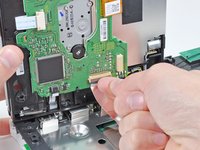
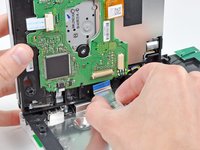
  22. Nintendo Wii DVD Drive Replacement: adım 22, 2 resimden 1. Nintendo Wii DVD Drive Replacement: adım 22, 2 resimden 2.
    • Use your fingernail to flip up the retaining flap on the DVD drive ribbon cable socket.

    • Be sure you are prying up on the retaining flap, not the socket itself.

    • Pull the DVD drive ribbon cable out of its socket.

    • Remove the DVD drive from the Wii.

    FixBot'a Sor

    Yorum Ekle

Sonuç

To reassemble your device, follow these instructions in reverse order.

İptal et: Bu kılavuzu tamamlamadım.

44 farklı kişi bu kılavuzu tamamladı.

8Kılavuz Yorumları

My problem was an object that had been lodged in the drive - in fact, I didn't need to replace the drive. I successfully followed thru step 19, and at that point, I was able to extract the foreign object through the gaps in the disc housing. Then I reversed the steps through to the start and everything is working again.

JJones - Yanıt Paylaş

I used this to access the drive area where I successfully identified and removed a plastic toy 50p coin my 2 yr old had carefully inserted in it; The Wii works again now

I am v gratefuil for these excellent instructions

And a tip - use a computer/laptop to view; an iphone was a wee (Wii?) bit too small!

david simpson - Yanıt Paylaş

You can also download our free iPad app.

David Hodson - Yanıt Paylaş

Your instructions were very thorough, and my Wii now works again, thanks!

Robotai - Yanıt Paylaş

I’ve replaced the drive & receive the same error.

it doesn’t appear to read the disc.

Could it be the ribbon cable needs checking or

do you need to run a WII update as the device realises a hardware change and it won’t work until

an update has been run.

Brendon J - Yanıt Paylaş

Yorum Ekle

İstatistikleri Görüntüle:

Son 24 Saat: 2

Son 7 gün: 27

Son 30 gün: 154

Her zaman: 126,616