Ana içeriğe geç
Onarım Topluluğuna Katılın - Hesap Oluşturun

Nintendo Wii Wi-Fi Antennas Replacement

Görüntüleme: 17 B

İstatistikleri görüntüle:

Son 24 Saat:
5
Son 7 Gün:
33
Son 30 Gün:
146
Her zaman:
16.623
Yorumlar: 157

155 comments on steps, 2 guide comments.

Go to guide comments
Tamamlandı: 6

6 kişi bu kılavuzu "tamamlandı" olarak işaretledi. Sıradaki sen olacak mısın?

Sık Kullanılanlar: 30

30 kişi bu kılavuzu favorilerine ekledi (ve abone oldu). Sıradaki sen olacak mısın?

Gerekli Süre: 30 dakika - 1 saat
Zorluk: Orta
Nintendo Wii Wi-Fi Antennas Replacement

Use this guide to replace the two antennas responsible for providing Wi-Fi connectivity.

Neye ihtiyacın var

Parçalar

Aletler

    1. Nintendo Wii Wi-Fi Antennas Replacement, Faceplate: adım 1, 2 resimden 1. Nintendo Wii Wi-Fi Antennas Replacement, Faceplate: adım 1, 2 resimden 2.
      • Use a metal spudger to remove the white plastic screw covers stuck to the lower case near the front of the Wii.

      FixBot'a Sor

      Yorum Ekle

    2. Nintendo Wii Wi-Fi Antennas Replacement: adım 2, 1 resimden 1.
      • Remove the two 8.3 mm Tri-Point screws hidden under the covers you just removed.

      FixBot'a Sor

      Yorum Ekle

    3. Nintendo Wii Wi-Fi Antennas Replacement: adım 3, 1 resimden 1.
      • Remove the single 5.9 mm Phillips screw under the controller port door nearest the faceplate.

      FixBot'a Sor

      Yorum Ekle

    4. Nintendo Wii Wi-Fi Antennas Replacement: adım 4, 1 resimden 1.
      • Use a metal spudger to remove the rubber foot stuck to the side of the Wii near the DVD drive opening.

      FixBot'a Sor

      Yorum Ekle

    5. Nintendo Wii Wi-Fi Antennas Replacement: adım 5, 1 resimden 1.
      • Remove the single 5.9 mm Phillips screw hidden under the foot you just removed.

      FixBot'a Sor

      Yorum Ekle

    6. Nintendo Wii Wi-Fi Antennas Replacement: adım 6, 2 resimden 1. Nintendo Wii Wi-Fi Antennas Replacement: adım 6, 2 resimden 2.
      Bu adımda kullanılan alet:
      Tweezers
      $4.99
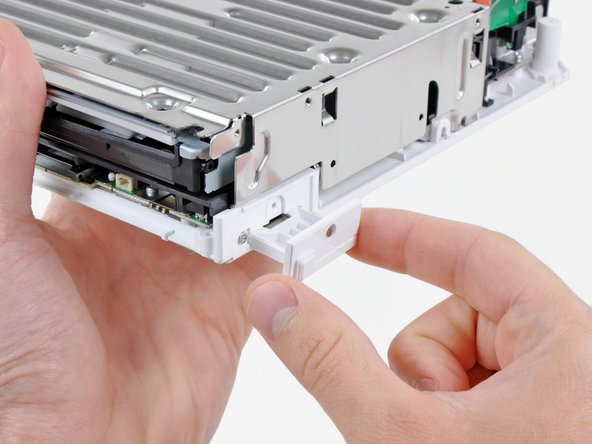
      • Carefully pull the faceplate away from the front of the Wii.

      • Use a pair of tweezers to disconnect the LED cable's plastic connector from the motherboard.

      • Remove the faceplate.

      FixBot'a Sor

      Yorum Ekle

    1. Nintendo Wii Wi-Fi Antennas Replacement, Outer Case: adım 7, 3 resimden 1. Nintendo Wii Wi-Fi Antennas Replacement, Outer Case: adım 7, 3 resimden 2. Nintendo Wii Wi-Fi Antennas Replacement, Outer Case: adım 7, 3 resimden 3.
      • Open the controller port cover until it is perpendicular to the black controller port bezel.

      • Pull the controller port cover straight up to release it from the outer case.

      • Repeat this procedure for the memory card port cover.

      FixBot'a Sor

      Yorum Ekle

    2. Nintendo Wii Wi-Fi Antennas Replacement: adım 8, 2 resimden 1. Nintendo Wii Wi-Fi Antennas Replacement: adım 8, 2 resimden 2.
      • Remove the two remaining 4.1 mm Phillips screws along the top edge of the black plastic controller port bezel.

      • Lift the bezel from the long edge furthest away from the controller ports and remove it from the Wii.

      FixBot'a Sor

      Yorum Ekle

    3. Nintendo Wii Wi-Fi Antennas Replacement: adım 9, 1 resimden 1.
      • Remove the two 5 mm Phillips screws above the controller ports.

      FixBot'a Sor

      Yorum Ekle

    4. Nintendo Wii Wi-Fi Antennas Replacement: adım 10, 1 resimden 1.
      • Use a metal spudger to remove the three highlighted screw covers stuck to the side of the Wii.

      FixBot'a Sor

      Yorum Ekle

    5. Nintendo Wii Wi-Fi Antennas Replacement: adım 11, 1 resimden 1.
      • Remove the following screws:

      • Two 5 mm Phillips screws

      • One 8.2 mm Tri-Point screw

      FixBot'a Sor

      Yorum Ekle

    6. Nintendo Wii Wi-Fi Antennas Replacement: adım 12, 1 resimden 1.
      • Use a metal spudger to remove the two rubber feet stuck to the bottom face of the Wii near the rear ports.

      FixBot'a Sor

      Yorum Ekle

    7. Nintendo Wii Wi-Fi Antennas Replacement: adım 13, 1 resimden 1.
      Bu adımda kullanılan alet:
      iFixit Precision 4 mm Screwdriver Bit
      $2.99
      • Remove the two 8.2 mm Tri-Point screws hidden under the feet you just removed.

      • You may use a 4 mm hex nut driver to extend your bit into the recesses and reach the screws.

      FixBot'a Sor

      Yorum Ekle

    8. Nintendo Wii Wi-Fi Antennas Replacement: adım 14, 1 resimden 1.
      • Lift the outer case straight up off the body of the Wii.

      FixBot'a Sor

      Yorum Ekle

    1. Nintendo Wii Wi-Fi Antennas Replacement, DVD Drive: adım 15, 2 resimden 1. Nintendo Wii Wi-Fi Antennas Replacement, DVD Drive: adım 15, 2 resimden 2.
      • Remove the small Phillips screw securing the battery door to the bottom panel.

      • This screw is captive to the battery door.

      • Pull the battery door out of the Wii.

      • The system time will be reset once you remove the battery door.

      • This is a good time to change the CR2032 battery if it hasn't been changed recently.

      FixBot'a Sor

      Yorum Ekle

    2. Nintendo Wii Wi-Fi Antennas Replacement: adım 16, 1 resimden 1.
      • Remove the 8.2 mm Tri-Point screw that was hidden beneath the battery door.

      FixBot'a Sor

      Yorum Ekle

    3. Nintendo Wii Wi-Fi Antennas Replacement: adım 17, 1 resimden 1.
      • Remove the two 8.2 mm Tri-Point screws securing the DVD drive shield near the controller ports.

      FixBot'a Sor

      Yorum Ekle

    4. Nintendo Wii Wi-Fi Antennas Replacement: adım 18, 1 resimden 1.
      • Be cautious as you remove the DVD shield, the edges are sharp and could cut you

      • Lift the DVD drive shield upward and remove it from the Wii.

      FixBot'a Sor

      Yorum Ekle

    5. Nintendo Wii Wi-Fi Antennas Replacement: adım 19, 1 resimden 1.
      • Remove the four 9 mm Phillips screws securing the DVD drive to the bottom panel.

      FixBot'a Sor

      Yorum Ekle

    6. Nintendo Wii Wi-Fi Antennas Replacement: adım 20, 1 resimden 1.
      • Lift the side of the DVD drive opposite the controller ports enough to access the cables on its bottom face.

      • Carefully pull the DVD drive power cable out from under the plastic shroud near the heat sink.

      FixBot'a Sor

      Yorum Ekle

    7. Nintendo Wii Wi-Fi Antennas Replacement: adım 21, 1 resimden 1.
      • Pull the DVD drive power cable away from its socket on the DVD drive.

      FixBot'a Sor

      Yorum Ekle

    8. Nintendo Wii Wi-Fi Antennas Replacement: adım 22, 2 resimden 1. Nintendo Wii Wi-Fi Antennas Replacement: adım 22, 2 resimden 2.
      • Use your fingernail to flip up the retaining flap on the DVD drive ribbon cable socket.

      • Be sure you are prying up on the retaining flap, not the socket itself.

      • Pull the DVD drive ribbon cable out of its socket.

      • Remove the DVD drive from the Wii.

      FixBot'a Sor

      Yorum Ekle

    1. Nintendo Wii Wi-Fi Antennas Replacement, Motherboard Cover: adım 23, 1 resimden 1.
      Bu adımda kullanılan alet:
      Tweezers
      $4.99
      • Use a pair of tweezers to lift the fan connector up and out of its socket on the logic board.

      • Be sure your tweezers are clamped down on the fan connector, not the socket on the motherboard.

      FixBot'a Sor

      Yorum Ekle

    2. Nintendo Wii Wi-Fi Antennas Replacement: adım 24, 2 resimden 1. Nintendo Wii Wi-Fi Antennas Replacement: adım 24, 2 resimden 2.
      • Remove the two 10 mm Phillips screws securing the fan to the fan shroud.

      • Remove the fan from the Wii.

      FixBot'a Sor

      Yorum Ekle

    3. Nintendo Wii Wi-Fi Antennas Replacement: adım 25, 2 resimden 1. Nintendo Wii Wi-Fi Antennas Replacement: adım 25, 2 resimden 2.
      • Use the tip of a spudger or another fine-pointed tool to carefully pry one of the black plastic retaining fingers attached to the fan shroud away from the Wi-Fi antenna board.

      • Lift the Wi-Fi antenna out of the fan shroud.

      FixBot'a Sor

      Yorum Ekle

    4. Nintendo Wii Wi-Fi Antennas Replacement: adım 26, 1 resimden 1.
      • Remove the single 10 mm Phillips screw securing the second Wi-Fi antenna to the top of the fan shroud.

      FixBot'a Sor

      Yorum Ekle

    5. Nintendo Wii Wi-Fi Antennas Replacement: adım 27, 1 resimden 1.
      • Remove the two pieces of tape securing the second Wi-Fi antenna cable to the plastic bracket near the heat sink.

      FixBot'a Sor

      Yorum Ekle

    6. Nintendo Wii Wi-Fi Antennas Replacement: adım 28, 1 resimden 1.
      • Carefully de-route both antennas from the frame of the Wii and lay them aside.

      FixBot'a Sor

      Yorum Ekle

    7. Nintendo Wii Wi-Fi Antennas Replacement: adım 29, 2 resimden 1. Nintendo Wii Wi-Fi Antennas Replacement: adım 29, 2 resimden 2.
      • Remove the three 10 mm Phillips screws securing the fan shroud to the Wii.

      • Lift the fan shroud off the heat sink and remove it from the Wii.

      FixBot'a Sor

      Yorum Ekle

    8. Nintendo Wii Wi-Fi Antennas Replacement: adım 30, 3 resimden 1. Nintendo Wii Wi-Fi Antennas Replacement: adım 30, 3 resimden 2. Nintendo Wii Wi-Fi Antennas Replacement: adım 30, 3 resimden 3.
      • Remove the following six screws securing the EMI fingers to the bottom panel:

      • Four 7 mm Phillips screws

      • Two 11.3 mm Phillips screws

      • Remove both sets of EMI fingers from the Wii.

      FixBot'a Sor

      Yorum Ekle

    9. Nintendo Wii Wi-Fi Antennas Replacement: adım 31, 2 resimden 1. Nintendo Wii Wi-Fi Antennas Replacement: adım 31, 2 resimden 2.
      • Remove the following three screws:

      • One 7 mm Phillips screw

      • Two 10 mm Phillips screws

      • Lift the bracket out of the Wii.

      FixBot'a Sor

      Yorum Ekle

    10. Nintendo Wii Wi-Fi Antennas Replacement: adım 32, 3 resimden 1. Nintendo Wii Wi-Fi Antennas Replacement: adım 32, 3 resimden 2. Nintendo Wii Wi-Fi Antennas Replacement: adım 32, 3 resimden 3.
      • Remove the three 10 mm Phillips screws securing the black bracket to the bottom panel near the front of the Wii.

      • Slightly lift the bracket and use your other hand to pull the retaining clip away from where the Wi-Fi antennas enter the motherboard sheild.

      • Remove the bracket from the Wii.

      • Be sure not to lose the small square nut loosely held by the black plastic bracket.

      FixBot'a Sor

      Yorum Ekle

    11. Nintendo Wii Wi-Fi Antennas Replacement: adım 33, 1 resimden 1.
      • Remove the nine remaining 7 mm Phillips screws securing the motherboard cover to the bottom panel.

      FixBot'a Sor

      Yorum Ekle

    12. Nintendo Wii Wi-Fi Antennas Replacement: adım 34, 1 resimden 1.
      • Carefully lift the motherboard cover off the motherboard, minding any cables that may get caught.

      • On some models, a thermal pad for the wireless chip is attached to the underside of the motherboard cover. Be sure to replace it when reassembling.

      FixBot'a Sor

      Yorum Ekle

    1. Nintendo Wii Wi-Fi Antennas Replacement, Wi-Fi Antennas: adım 35, 1 resimden 1.
      • Lift the side of the Wi-Fi board furthest away from the heat sink and lift it out of its socket on the motherboard, being careful not to put too much sideways force on the connector.

      FixBot'a Sor

      Yorum Ekle

    2. Nintendo Wii Wi-Fi Antennas Replacement: adım 36, 1 resimden 1.
      • Use the flat end of a spudger to pry both antenna connectors off their sockets on the Wi-Fi board.

      FixBot'a Sor

      Yorum Ekle

Sonuç

To reassemble your device, follow these instructions in reverse order.

İptal et: Bu kılavuzu tamamlamadım.

6 farklı kişi bu kılavuzu tamamladı.

2Kılavuz Yorumları

After I pry the antenna's off then what

Brendan keller - Yanıt Paylaş

Put it on the new board

Chris - Yanıt Paylaş

Yorum Ekle

İstatistikleri Görüntüle:

Son 24 Saat: 5

Son 7 gün: 33

Son 30 gün: 146

Her zaman: 16,623