Ana içeriğe geç
Onarım Topluluğuna Katılın - Hesap Oluşturun

Nokia 2610 Circuit Board Replacement

Neye ihtiyacın var

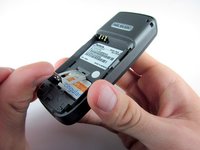
    1. Nokia 2610 Circuit Board Replacement, Battery and Sim Card: adım 1, 3 resimden 1. Nokia 2610 Circuit Board Replacement, Battery and Sim Card: adım 1, 3 resimden 2. Nokia 2610 Circuit Board Replacement, Battery and Sim Card: adım 1, 3 resimden 3.
      • Place your thumb on the middle of the back cover and push it toward the bottom of the phone to slide the cover off.

      FixBot'a Sor

      Yorum Ekle

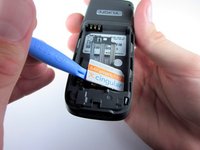
    2. Nokia 2610 Circuit Board Replacement: adım 2, 3 resimden 1. Nokia 2610 Circuit Board Replacement: adım 2, 3 resimden 2. Nokia 2610 Circuit Board Replacement: adım 2, 3 resimden 3.
      • Use a plastic opening tool (or your finger) to gently pry the battery out of the battery slot on the back of the phone.

      FixBot'a Sor

      Yorum Ekle

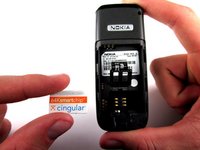
    3. Nokia 2610 Circuit Board Replacement: adım 3, 3 resimden 1. Nokia 2610 Circuit Board Replacement: adım 3, 3 resimden 2. Nokia 2610 Circuit Board Replacement: adım 3, 3 resimden 3.
      • Lift the metal sim card holder (at the bottom of the battery slot) up and carefully pry the sim card out of its slot with a plastic opening tool or your finger.

      • After removal, lower the metal sim card holder into its original position.

      FixBot'a Sor

      Yorum Ekle

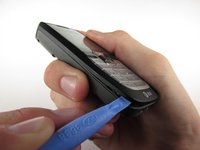
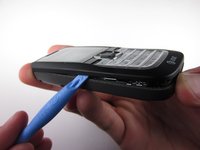
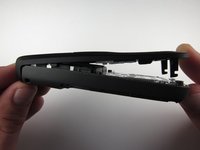
    1. Nokia 2610 Circuit Board Replacement, Front Pannel: adım 4, 2 resimden 1. Nokia 2610 Circuit Board Replacement, Front Pannel: adım 4, 2 resimden 2.
      • Insert the plastic opening tool into the crack between the front and back panels.

      • Gently pry the front cover away from the back cover while sliding the plastic opening tool towards the top of the phone.

      FixBot'a Sor

      Yorum Ekle

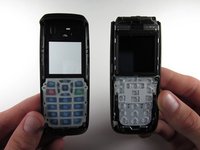
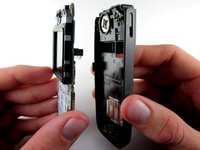
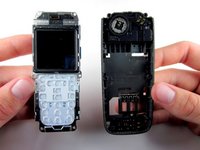
    2. Nokia 2610 Circuit Board Replacement: adım 5, 2 resimden 1. Nokia 2610 Circuit Board Replacement: adım 5, 2 resimden 2.
      • Lift the bottom of the front cover away from the phone.

      • Continue lifting until the top of the front cover is fully removed from the phone.

      • Note: To replace the Keypad, gently lift it out of the front cover. It is located below the clear viewing window.

      FixBot'a Sor

      Yorum Ekle

    1. Nokia 2610 Circuit Board Replacement, Circuit Board: adım 6, 1 resimden 1.
      • Use the Torx screwdriver with the T6 attachmet to remove the 6 .4 mm screws around the outside of the circuit board.

      • Note: Removing the 4 T6 screws around the screen will loosen it, so don't worry if the screen also separates from the circuit board.

      FixBot'a Sor

      Yorum Ekle

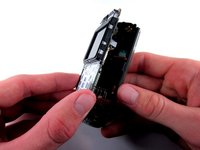
    2. Nokia 2610 Circuit Board Replacement: adım 7, 3 resimden 1. Nokia 2610 Circuit Board Replacement: adım 7, 3 resimden 2. Nokia 2610 Circuit Board Replacement: adım 7, 3 resimden 3.
      • Lift the circuit board out of the back cover.

      FixBot'a Sor

      Yorum Ekle

Sonuç

To reassemble your device, follow these instructions in reverse order.

İptal et: Bu kılavuzu tamamlamadım.

5 farklı kişi bu kılavuzu tamamladı.

Andrew Wood

Üyelik tarihi: 10/05/10

336 İtibar

3 adet Kılavuz yazıldı

Ekip

Cal Poly, Team 7-52, Amido Fall 2010 Cal Poly, Team 7-52, Amido Fall 2010 üyesi

CPSU-AMIDO-F10S7G52

4 Üyeler

48 adet Kılavuz yazıldı

1Rehber Yorum

This is so cool tom!

Mo Chiggle - Yanıt Paylaş

Yorum Ekle

İstatistikleri Görüntüle:

Son 24 Saat: 1

Son 7 gün: 8

Son 30 gün: 39

Her zaman: 3,701