Ana içeriğe geç
Onarım Topluluğuna Katılın - Hesap Oluşturun

Nokia 3300B Motherboard Replacement

Neye ihtiyacın var

    1. Nokia 3300B Motherboard Replacement, Battery: adım 1, 2 resimden 1. Nokia 3300B Motherboard Replacement, Battery: adım 1, 2 resimden 2.
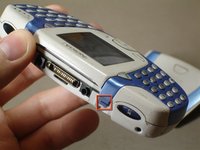
      • Flip the Nokia 3300B over with the back-side facing towards you.

      • Gently press the button on the back of the battery cover to release the cover and slide up.

      FixBot'a Sor

      Yorum Ekle

    2. Nokia 3300B Motherboard Replacement: adım 2, 2 resimden 1. Nokia 3300B Motherboard Replacement: adım 2, 2 resimden 2.
      • Lift the battery out of the back of the phone.

      • It is easiest to lift the battery out of the phone from the right-hand side, as seen in the picture.

      FixBot'a Sor

      Yorum Ekle

    1. Nokia 3300B Motherboard Replacement, Keyboard: adım 3, 2 resimden 1. Nokia 3300B Motherboard Replacement, Keyboard: adım 3, 2 resimden 2.
      Bu adımda kullanılan alet:
      Tweezers
      $4.99
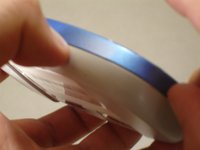
      • Gently push the blue tabs on the top of the phone out of their slots.

      • With the phone facing up, pop the blue faceplate off by using your fingernail (or some tweezers) and working your way around the phone.

      • Note: If the blue cover does not detach easily use your finger nails to try and split it open, as seen in the picture.

      FixBot'a Sor

      Yorum Ekle

    2. Nokia 3300B Motherboard Replacement: adım 4, 1 resimden 1.
      • With the screen still facing you, lift and remove the blue faceplate.

      FixBot'a Sor

      Yorum Ekle

    3. Nokia 3300B Motherboard Replacement: adım 5, 1 resimden 1.
      • Grab the sides of the keypad and lift each side up vertically, until the keypad is completely removed.

      • If you encounter resistance while removing the keypad, be sure to lift up evenly on both sides to ensure that the pins do not snap.

      • When replacing the keypad, make sure that the plastic pegs all enter their proper holes.

      FixBot'a Sor

      Yorum Ekle

    1. Nokia 3300B Motherboard Replacement, Motherboard: adım 6, 2 resimden 1. Nokia 3300B Motherboard Replacement, Motherboard: adım 6, 2 resimden 2.
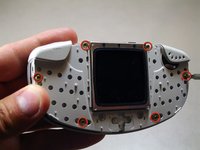
      • Remove the six Torx T6 screws from the phone's front case.

      FixBot'a Sor

      Yorum Ekle

    2. Nokia 3300B Motherboard Replacement: adım 7, 1 resimden 1.
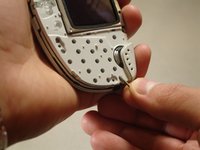
      • Pull up on the front case containing the screen to separate it from the rest of the phone.

      • Gently lift the main board out of the back case.

      FixBot'a Sor

      Yorum Ekle

Sonuç

To reassemble your device, follow these instructions in reverse order.

İptal et: Bu kılavuzu tamamlamadım.

4 farklı kişi bu kılavuzu tamamladı.

Jose Quezada

Üyelik tarihi: 04/13/10

59 İtibar

1 Kılavuz yazıldı

Ekip

Cal Poly, Team 18-65, Johann Spring 2010 Cal Poly, Team 18-65, Johann Spring 2010 üyesi

CPSU-JOHANN-S10S18G65

4 Üyeler

60 adet Kılavuz yazıldı

0Kılavuz Yorumları

Yorum Ekle

İstatistikleri Görüntüle:

Son 24 Saat: 2

Son 7 gün: 24

Son 30 gün: 105

Her zaman: 3,513