Ana içeriğe geç
Onarım Topluluğuna Katılın - Hesap Oluşturun

Nokia XL Dual Sim Front Camera Replacement

Neye ihtiyacın var

  1. Nokia XL Dual Sim Front Camera Replacement, Back Cover Removal: adım 1, 1 resimden 1.
    • You will first need to separate the back cover from the device.

    • Gently pry open each side of the device at the indicated locations. It is best to use a plastic opening tool or similar tool.

    FixBot'a Sor

    Yorum Ekle

  2. Nokia XL Dual Sim Front Camera Replacement, Battery Removal: adım 2, 2 resimden 1. Nokia XL Dual Sim Front Camera Replacement, Battery Removal: adım 2, 2 resimden 2.
    • Remove the back cover.

    • Use a plastic opening tool to lift the battery. Then, remove it.

    FixBot'a Sor

    Yorum Ekle

  3. Nokia XL Dual Sim Front Camera Replacement, Screen Separation part 1: adım 3, 2 resimden 1. Nokia XL Dual Sim Front Camera Replacement, Screen Separation part 1: adım 3, 2 resimden 2.
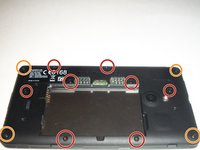
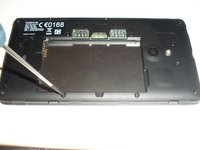
    • To access the inner components of the device, remove the various screws. Keep them separate, and organize them by size.

    • You will need a T5 Precision Torx screw driver to remove the screws.

    • The locations of the T5x3.4mm screws are indicated in the picture.

    • The locations of the T5x4.1mm screws are indicated in the picture.

    FixBot'a Sor

    Yorum Ekle

  4. Nokia XL Dual Sim Front Camera Replacement, Screen Separation part 2: adım 4, 3 resimden 1. Nokia XL Dual Sim Front Camera Replacement, Screen Separation part 2: adım 4, 3 resimden 2. Nokia XL Dual Sim Front Camera Replacement, Screen Separation part 2: adım 4, 3 resimden 3.
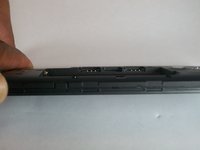
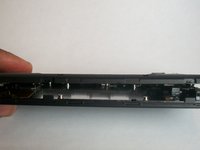
    • Use the plastic opening tool to gently pry the device apart.

    • There are flaps on both sides of the phone as indicated in the picture. This is what you will need to pry apart.

    • Please be cautious when opening the device. There are various connectors inside the device that must be handled with care.

    FixBot'a Sor

    Yorum Ekle

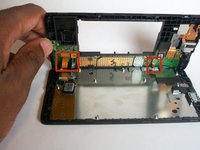
  5. Nokia XL Dual Sim Front Camera Replacement, System components: adım 5, 1 resimden 1.
    • Once the device is open, take note of all the components.

    FixBot'a Sor

    Yorum Ekle

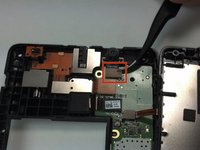
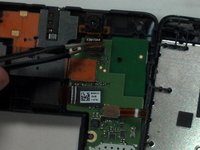
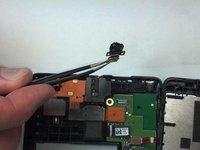
  6. Nokia XL Dual Sim Front Camera Replacement, Camera Removal: adım 6, 3 resimden 1. Nokia XL Dual Sim Front Camera Replacement, Camera Removal: adım 6, 3 resimden 2. Nokia XL Dual Sim Front Camera Replacement, Camera Removal: adım 6, 3 resimden 3.
    Bu adımda kullanılan alet:
    Tweezers
    $4.99
    • With Tweezers, gently unsnap the front camera motherboard connector.

    • The front camera component can now be gently removed.

    FixBot'a Sor

    Yorum Ekle

Sonuç

To reassemble your device, follow these instructions in reverse order.

İptal et: Bu kılavuzu tamamlamadım.

6 farklı kişi bu kılavuzu tamamladı.

Shadeed Bilal

Üyelik tarihi: 09/25/14

231 İtibar

4 adet Kılavuz yazıldı

Ekip

USF Tampa, Team 1-4, Brown Fall 2014 USF Tampa, Team 1-4, Brown Fall 2014 üyesi

USFT-BROWN-F14S1G4

3 Üyeler

7 adet Kılavuz yazıldı

1Rehber Yorum

merci 1000 fois pour ce cite

zmohye - Yanıt Paylaş

Yorum Ekle

İstatistikleri Görüntüle:

Son 24 Saat: 1

Son 7 gün: 6

Son 30 gün: 38

Her zaman: 1,406