Ana içeriğe geç
Onarım Topluluğuna Katılın - Hesap Oluşturun

Olympus D590 Motherboard Replacement

Neye ihtiyacın var

  1. Olympus D590 Motherboard Replacement, Face Plate: adım 1, 1 resimden 1.
    • Remove five baseplate screws using a Phillips #00 screwdriver.

    FixBot'a Sor
  2. Olympus D590 Motherboard Replacement: adım 2, 1 resimden 1.
    Bu adımda kullanılan alet:
    Tweezers
    $4.99
    • Press and slide the battery cover retainer clip to the left. Use tweezers to lift the battery cover away.

    FixBot'a Sor
  3. Olympus D590 Motherboard Replacement: adım 3, 1 resimden 1.
    • Remove the single screw from the battery housing using a Phillips #00 screwdriver.

    FixBot'a Sor
  4. Olympus D590 Motherboard Replacement: adım 4, 1 resimden 1.
    • Using tweezers, lift the rubber plate to expose the ports.

    FixBot'a Sor
  5. Olympus D590 Motherboard Replacement: adım 5, 1 resimden 1.
    • Remove two screws from the ports using a Phillips #00 screwdriver.

    FixBot'a Sor
  6. Olympus D590 Motherboard Replacement: adım 6, 1 resimden 1.
    • Use a spudger to pry the faceplate away from the rest of the camera.

    FixBot'a Sor
  7. Olympus D590 Motherboard Replacement: adım 7, 1 resimden 1.
    • To avoid disconnection of the connector line to the motherboard, use caution when pulling faceplate away from camera case.

    • Damage to the connector line will prevent the on/off power switch's operational function.

    FixBot'a Sor
  8. Olympus D590 Motherboard Replacement, Motherboard: adım 8, 1 resimden 1.
    • Remove four screws holding the motherboard to the internal housing component using a Phillips #1 screwdriver.

    FixBot'a Sor
  9. Olympus D590 Motherboard Replacement: adım 9, 1 resimden 1.
    • Be cautious of the wires attached to the motherboard.

    • Remove the motherboard from the internal housing component.

    • Do not completely lift the motherboard out with the wiring connected. The wires must be disconnected before proceeding. The next step will demonstrate disconnection process.

    FixBot'a Sor
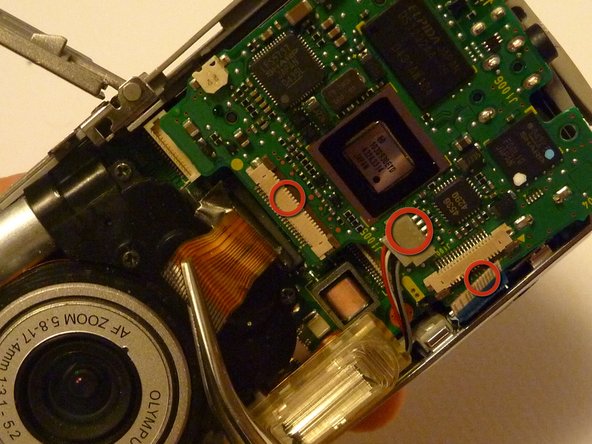
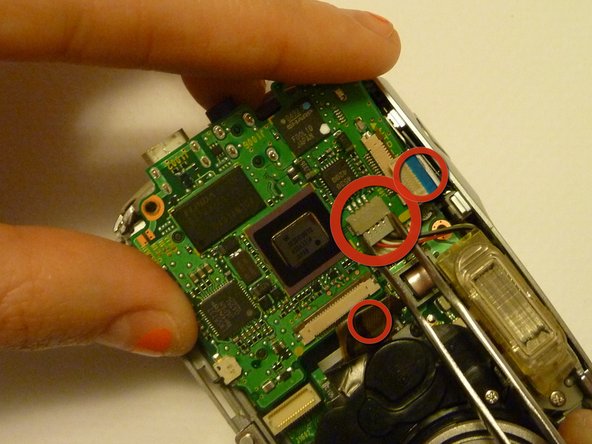
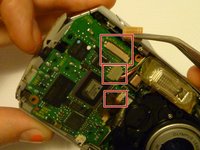
  10. Olympus D590 Motherboard Replacement: adım 10, 3 resimden 1. Olympus D590 Motherboard Replacement: adım 10, 3 resimden 2. Olympus D590 Motherboard Replacement: adım 10, 3 resimden 3.
    Bu adımda kullanılan alet:
    Tweezers
    $4.99
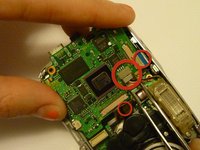
    • Use rounded tweezers to disconnect the three wiring strips from the motherboard.

    • Using sharp tweezers may tear wiring tape and wires.

    • Use gentle force when wiggling or pulling wiring tape and wires to disconnect from the motherboard.

    FixBot'a Sor
Sonuç

To reassemble your device, follow these instructions in reverse order.

2 farklı kişi bu kılavuzu tamamladı.

Sara

Üyelik tarihi: 04/15/10

84 İtibar

2 adet Kılavuz yazıldı

Ekip

Cal Poly, Team 28-23, Regan Spring 2010 Cal Poly, Team 28-23, Regan Spring 2010 üyesi

CPSU-REGAN-S10S28G23

4 Üyeler

14 adet Kılavuz yazıldı

0Kılavuz Yorumları

Yorum Ekle

İstatistikleri Görüntüle:

Son 24 Saat: 2

Son 7 gün: 15

Son 30 gün: 77

Her zaman: 2,164