Ana içeriğe geç
Onarım Topluluğuna Katılın - Hesap Oluşturun

Palm Treo 650 Earphone Replacement

Neye ihtiyacın var

  1. Palm Treo 650 Earphone Replacement, Battery and Stylus: adım 1, 1 resimden 1.
    • Position the phone so the screen faces down.

    • Remove the stylus found on the back of the phone.

    FixBot'a Sor

    Yorum Ekle

  2. Palm Treo 650 Earphone Replacement: adım 2, 1 resimden 1.
    • Hold the button in the middle of the phone's back to remove the battery cover.

    • Slide the cover down to remove it, and set the cover aside.

    FixBot'a Sor

    Yorum Ekle

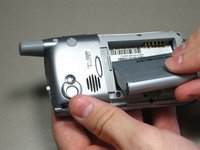
  3. Palm Treo 650 Earphone Replacement: adım 3, 2 resimden 1. Palm Treo 650 Earphone Replacement: adım 3, 2 resimden 2.
    • Lift the edge of the battery, separating contact points, and pull out as pictured.

    FixBot'a Sor

    Yorum Ekle

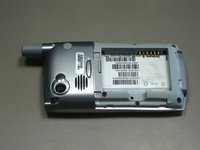
  4. Palm Treo 650 Earphone Replacement, Case: adım 4, 1 resimden 1.
    • Remove the round, rubber cover to expose a screw that will be removed in the next step.

    FixBot'a Sor

    Yorum Ekle

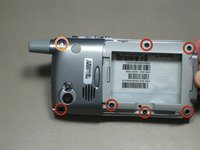
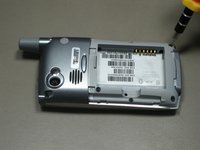
  5. Palm Treo 650 Earphone Replacement: adım 5, 2 resimden 1. Palm Treo 650 Earphone Replacement: adım 5, 2 resimden 2.
    • Remove the six 6.9 mm screws as pictured with a T5 Torx screwdriver.

    • Remove the single 9.8 mm screw next to the antenna on the back plate, using a Phillips #00 screwdriver.

    FixBot'a Sor

    Yorum Ekle

  6. Palm Treo 650 Earphone Replacement: adım 6, 1 resimden 1.
    • Pull the antenna outward to remove the antenna from the body of the phone.

    FixBot'a Sor

    Yorum Ekle

  7. Palm Treo 650 Earphone Replacement: adım 7, 2 resimden 1. Palm Treo 650 Earphone Replacement: adım 7, 2 resimden 2.
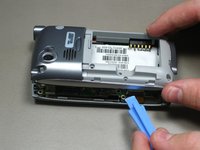
    • Pry the back cover off using an iFixit opening tool.

    • Several small clips on the inside attach to the back cover.

    FixBot'a Sor

    Yorum Ekle

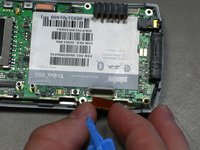
  8. Palm Treo 650 Earphone Replacement, Motherboard: adım 8, 3 resimden 1. Palm Treo 650 Earphone Replacement, Motherboard: adım 8, 3 resimden 2. Palm Treo 650 Earphone Replacement, Motherboard: adım 8, 3 resimden 3.
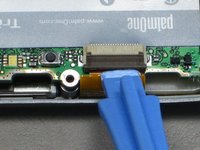
    • Disconnect the ribbon cable before removing the motherboard.

    • Unclip the gray tab.

    • Pull out the orange ribbon cable.

    FixBot'a Sor

    Yorum Ekle

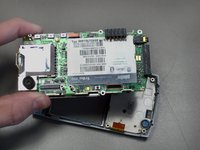
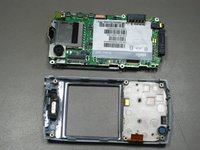
  9. Palm Treo 650 Earphone Replacement: adım 9, 2 resimden 1. Palm Treo 650 Earphone Replacement: adım 9, 2 resimden 2.
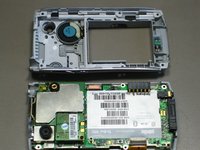
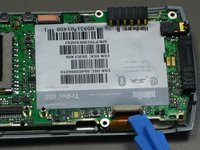
    • Pull off the motherboard.

    FixBot'a Sor

    Yorum Ekle

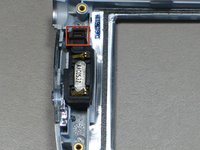
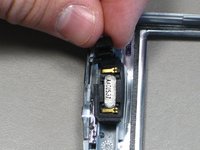
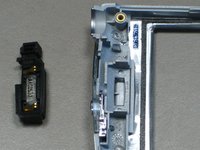
  10. Palm Treo 650 Earphone Replacement, Earphone: adım 10, 3 resimden 1. Palm Treo 650 Earphone Replacement, Earphone: adım 10, 3 resimden 2. Palm Treo 650 Earphone Replacement, Earphone: adım 10, 3 resimden 3.
    • Pull out the earphone by grabbing the black rubber piece identified in the picture.

    FixBot'a Sor

    Yorum Ekle

Sonuç

To reassemble your device, follow these instructions in reverse order.

İptal et: Bu kılavuzu tamamlamadım.

cgood

Üyelik tarihi: 10/28/09

134 İtibar

7 adet Kılavuz yazıldı

Ekip

Cal Poly, Team 19-3, Maness Fall 2009 Cal Poly, Team 19-3, Maness Fall 2009 üyesi

CPSU-MANESS-F09S19G3

4 Üyeler

27 adet Kılavuz yazıldı

0Kılavuz Yorumları

Yorum Ekle

İstatistikleri Görüntüle:

Son 24 Saat: 2

Son 7 gün: 9

Son 30 gün: 35

Her zaman: 3,384