Ana içeriğe geç
Onarım Topluluğuna Katılın - Hesap Oluşturun

Palm Treo 700P Camera Replacement

Neye ihtiyacın var

  1. Palm Treo 700P Camera Replacement, Battery: adım 1, 3 resimden 1. Palm Treo 700P Camera Replacement, Battery: adım 1, 3 resimden 2. Palm Treo 700P Camera Replacement, Battery: adım 1, 3 resimden 3.
    • Press the button located just above the Sprint™ logo and then slide the cover down.

    FixBot'a Sor

    Yorum Ekle

  2. Palm Treo 700P Camera Replacement: adım 2, 2 resimden 1. Palm Treo 700P Camera Replacement: adım 2, 2 resimden 2.
    • Use the small notch on the left hand side of the phone to remove the battery.

    FixBot'a Sor

    Yorum Ekle

  3. Palm Treo 700P Camera Replacement, Back Case: adım 3, 1 resimden 1.
    • Remove the stylus from the phone.

    FixBot'a Sor

    Yorum Ekle

  4. Palm Treo 700P Camera Replacement: adım 4, 1 resimden 1.
    • After removing the battery and stylus, unscrew the 5 Torx screws (using a T-5 Torx screw driver)

    FixBot'a Sor

    Yorum Ekle

  5. Palm Treo 700P Camera Replacement: adım 5, 1 resimden 1.
    • Using the spudger, remove the small rubberized patch under the antenna.

    FixBot'a Sor

    Yorum Ekle

  6. Palm Treo 700P Camera Replacement: adım 6, 1 resimden 1.
    • Unscrew the last two screws using the previous screw driver.

    FixBot'a Sor

    Yorum Ekle

  7. Palm Treo 700P Camera Replacement: adım 7, 2 resimden 1. Palm Treo 700P Camera Replacement: adım 7, 2 resimden 2.
    • Using the plastic opening tool, gently separate the back case from the phone body.

    FixBot'a Sor

    Yorum Ekle

  8. Palm Treo 700P Camera Replacement, Motherboard: adım 8, 3 resimden 1. Palm Treo 700P Camera Replacement, Motherboard: adım 8, 3 resimden 2. Palm Treo 700P Camera Replacement, Motherboard: adım 8, 3 resimden 3.
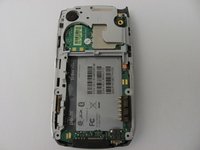
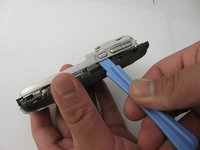
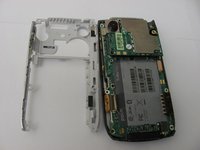
    • Using a plastic opening tool, gently edge your way between the back and border case (Picture 2) until they are completely separated (Picture 3).

    FixBot'a Sor

    Yorum Ekle

  9. Palm Treo 700P Camera Replacement: adım 9, 3 resimden 1. Palm Treo 700P Camera Replacement: adım 9, 3 resimden 2. Palm Treo 700P Camera Replacement: adım 9, 3 resimden 3.
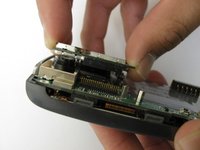
    • Remove the antenna chip by unscrewing the two screws with Torx T-5 screwdriver (Picture 1).

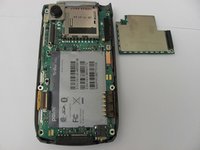
    • Once unscrewed, gently detach the antenna chip with your hands (Picture 2).

    FixBot'a Sor

    Yorum Ekle

  10. Palm Treo 700P Camera Replacement: adım 10, 2 resimden 1. Palm Treo 700P Camera Replacement: adım 10, 2 resimden 2.
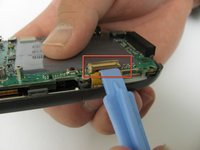
    • Use the plastic opening tool to unlock the tab holding the keyboard connection (Picture 1).

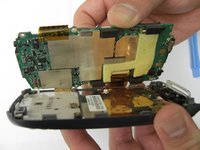
    • Once the keyboard connection is detached, use your hands to gently separate the motherboard from the back panel (Picture 2).

    FixBot'a Sor

    Yorum Ekle

  11. Palm Treo 700P Camera Replacement: adım 11, 3 resimden 1. Palm Treo 700P Camera Replacement: adım 11, 3 resimden 2. Palm Treo 700P Camera Replacement: adım 11, 3 resimden 3.
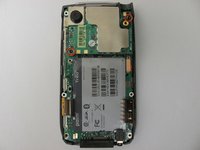
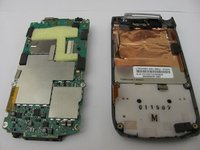
    • To completely detach the motherboard from the back panel, use the plastic opening tool to unlock the LCD connection from the motherboard (Picture 2).

    • Once the LCD connection is unlocked, the motherboard should now be completely detached from the back panel, keyboard, and LCD (Picture 3).

    FixBot'a Sor

    Yorum Ekle

  12. Palm Treo 700P Camera Replacement, Camera: adım 12, 1 resimden 1.
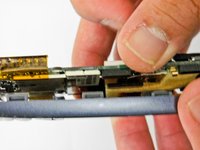
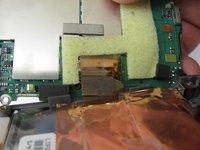
    • Using the plastic opening tool, loosen the metal camera holder.

    FixBot'a Sor

    Yorum Ekle

  13. Palm Treo 700P Camera Replacement: adım 13, 1 resimden 1.
    • Once the camera holder is loose, gently detach it from the camera.

    FixBot'a Sor

    Yorum Ekle

Sonuç

To reassemble your device, follow these instructions in reverse order.

İptal et: Bu kılavuzu tamamlamadım.

John Rainier Solanzo

Üyelik tarihi: 04/17/12

7 İtibar

2 adet Kılavuz yazıldı

Ekip

Cal Poly, Team 12-37, Regan Spring 2012 Cal Poly, Team 12-37, Regan Spring 2012 üyesi

CPSU-REGAN-S12S12G37

4 Üyeler

14 adet Kılavuz yazıldı

1Rehber Yorum

Does anyone know where or how to get a developers guide or geeks guide to tearing this phone down completely? I have a number of these, as well as old Galaxy Note phones, a broken S7 etc. And I would love to have the blueprint to know how to hack a LTE antenae, and S7 camera into my treo palm 700p..Wouldn't that be awesome? I still like it better than the modern smart phone, and just lost use of it when my carrier killed CDMA last week> :-(

peterveri - Yanıt Paylaş
Yorum Ekle

İstatistikleri Görüntüle:

Son 24 Saat: 1

Son 7 gün: 8

Son 30 gün: 41

Her zaman: 897