Bu çeviri bir makine tarafından oluşturulmuştur ve henüz bir kişi tarafından incelenmemiştir. Bu dili konuşuyor musunuz? İnceleme için.
Neye ihtiyacın var
-
-
-
Güç kaynağını çıkarmadan önce DVD oynatıcının disk tepsisini dışarı çıkarın.
 FixBot'a Sor
-
-
-
Disk tepsisi ön kapağını (görseldeki gibi eğik olmayacak şekilde) eşit bir şekilde yukarı doğru kaldırın. Bu, oynatıcının sökülmesini kolaylaştıracaktır.
-
-
-
-
-
-
Arka kapak/kılıfın arka kenarı boyunca uzanan üç vidayı çıkarın.
-
Arka kapak/kılıfın her iki yanındaki ikişer vidayı çıkarın.
-
-
-
Kapağın kenarlarını ellerinizle kavrayın. Hafifçe dışarı doğru çekin, ardından doğrudan yukarı kaldırın.
-
-
-
-
-
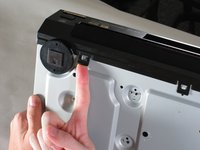
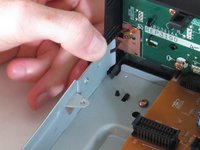
Ön paneli şasiye sabitleyen beş tırnağı kaldırın. Bunların üçü altta, ikisi panelin iç kenarlarındadır. Panel daha sonra oynatıcıdan ayrılacaktır.
-
-


Cihazınızı yeniden toplamak için bu talimatları ters sırayla uygulayın.

Ekip

Cal Poly, Team 18-20, Garner Spring 2011 Cal Poly, Team 18-20, Garner Spring 2011 üyesi
CPSU-GARNER-S11S18G20
4 Üyeler
132 adet Kılavuz yazıldı
