Ana içeriğe geç
Onarım Topluluğuna Katılın - Hesap Oluşturun

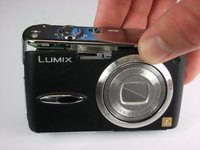
Panasonic Lumix DMC-FX01 Camera Lens Replacement

Neye ihtiyacın var

    1. Panasonic Lumix DMC-FX01 Camera Lens Replacement, Battery: adım 1, 1 resimden 1.
      • Locate the memory card and battery card latch on the bottom of the camera.

      • Slide the latch to the open position.

      FixBot'a Sor

      Yorum Ekle

    2. Panasonic Lumix DMC-FX01 Camera Lens Replacement: adım 2, 1 resimden 1.
      • Open the battery latch, and slide the battery release lever to the right.

      FixBot'a Sor

      Yorum Ekle

    3. Panasonic Lumix DMC-FX01 Camera Lens Replacement: adım 3, 1 resimden 1.
      • Remove the battery from the camera.

      FixBot'a Sor

      Yorum Ekle

    1. Panasonic Lumix DMC-FX01 Camera Lens Replacement, Rear Casing: adım 4, 1 resimden 1.
      • Remove the three 4.6 mm screws on the bottom of the camera using a Phillips #00 screwdriver.

      FixBot'a Sor

      Yorum Ekle

    2. Panasonic Lumix DMC-FX01 Camera Lens Replacement: adım 5, 1 resimden 1.
      • Remove the single 3.2 mm screw on the left side of the camera using a Phillips #00 screwdriver.

      FixBot'a Sor

      Yorum Ekle

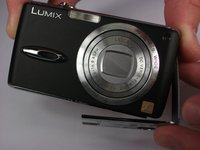
    3. Panasonic Lumix DMC-FX01 Camera Lens Replacement: adım 6, 2 resimden 1. Panasonic Lumix DMC-FX01 Camera Lens Replacement: adım 6, 2 resimden 2.
      • Remove the left side casing.

      FixBot'a Sor

      Yorum Ekle

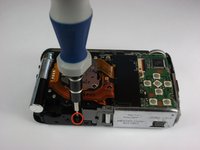
    4. Panasonic Lumix DMC-FX01 Camera Lens Replacement: adım 7, 1 resimden 1.
      • Remove the two 3.2 mm screws on the right side of the camera using a Phillips #00 screwdriver.

      FixBot'a Sor

      Yorum Ekle

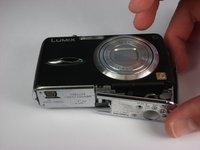
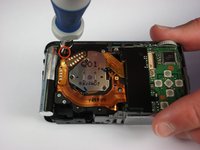
    5. Panasonic Lumix DMC-FX01 Camera Lens Replacement: adım 8, 1 resimden 1.
      • Remove the bottom right panel.

      FixBot'a Sor

      Yorum Ekle

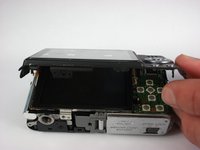
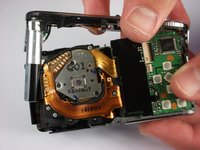
    6. Panasonic Lumix DMC-FX01 Camera Lens Replacement: adım 9, 2 resimden 1. Panasonic Lumix DMC-FX01 Camera Lens Replacement: adım 9, 2 resimden 2.
      • Gently remove the back casing.

      • Start at the bottom and carefully pry towards the top to get this piece free.

      FixBot'a Sor

      Yorum Ekle

    1. Panasonic Lumix DMC-FX01 Camera Lens Replacement, Front Casing: adım 10, 2 resimden 1. Panasonic Lumix DMC-FX01 Camera Lens Replacement, Front Casing: adım 10, 2 resimden 2.
      • Remove the two black 5.4 mm screws that hold in the front faceplate using a Phillips #00 screwdriver.

      • There may be a third screw the the right of the lens assembly.

      FixBot'a Sor

      Yorum Ekle

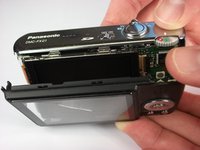
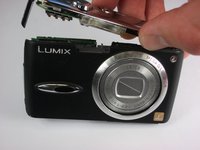
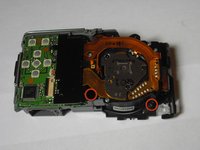
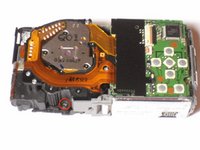
    2. Panasonic Lumix DMC-FX01 Camera Lens Replacement: adım 11, 3 resimden 1. Panasonic Lumix DMC-FX01 Camera Lens Replacement: adım 11, 3 resimden 2. Panasonic Lumix DMC-FX01 Camera Lens Replacement: adım 11, 3 resimden 3.
      • Carefully remove the upper assembly, which houses the buttons and the flash battery.

      FixBot'a Sor

      Yorum Ekle

    3. Panasonic Lumix DMC-FX01 Camera Lens Replacement: adım 12, 1 resimden 1.
      • Carefully remove the front casing after verifying that the thin plastic around the lens is not still attached.

      FixBot'a Sor

      Yorum Ekle

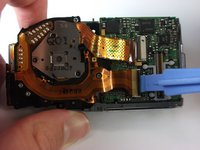
    1. Panasonic Lumix DMC-FX01 Camera Lens Replacement, Lens Assembly: adım 13, 2 resimden 1. Panasonic Lumix DMC-FX01 Camera Lens Replacement, Lens Assembly: adım 13, 2 resimden 2.
      • Remove the three black 5mm screws attached to the lens frame.

      FixBot'a Sor

      Yorum Ekle

    2. Panasonic Lumix DMC-FX01 Camera Lens Replacement: adım 14, 1 resimden 1.
      • Remove the lens frame.

      FixBot'a Sor

      Yorum Ekle

    3. Panasonic Lumix DMC-FX01 Camera Lens Replacement: adım 15, 1 resimden 1.
      • Lift out the circuit board as shown.

      FixBot'a Sor

      Yorum Ekle

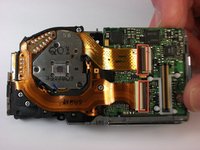
    4. Panasonic Lumix DMC-FX01 Camera Lens Replacement: adım 16, 2 resimden 1. Panasonic Lumix DMC-FX01 Camera Lens Replacement: adım 16, 2 resimden 2.
      • Lift the two black latches that hold the connector ribbons in place.

      • Disconnect the two ribbons.

      FixBot'a Sor

      Yorum Ekle

    5. Panasonic Lumix DMC-FX01 Camera Lens Replacement: adım 17, 1 resimden 1.
      • Remove the lens assembly as shown.

      FixBot'a Sor

      Yorum Ekle

    1. Panasonic Lumix DMC-FX01 Camera Lens Replacement, Camera Lens: adım 18, 1 resimden 1.
      • Remove four 4 mm screws from the lens assembly using the Phillips #00 screwdriver.

      FixBot'a Sor

      Yorum Ekle

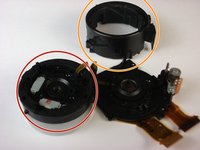
    2. Panasonic Lumix DMC-FX01 Camera Lens Replacement: adım 19, 2 resimden 1. Panasonic Lumix DMC-FX01 Camera Lens Replacement: adım 19, 2 resimden 2.
      • Separate the fixed frame unit from the main lens assembly.

      • Separate the direct frame unit from the main lens assembly.

      FixBot'a Sor

      Yorum Ekle

    3. Panasonic Lumix DMC-FX01 Camera Lens Replacement: adım 20, 1 resimden 1.
      • Remove the first lens frame from the lens assembly.

      FixBot'a Sor

      Yorum Ekle

    4. Panasonic Lumix DMC-FX01 Camera Lens Replacement: adım 21, 1 resimden 1.
      • Detach the second frame unit from the lens assembly.

      FixBot'a Sor

      Yorum Ekle

    5. Panasonic Lumix DMC-FX01 Camera Lens Replacement: adım 22, 1 resimden 1.
      • Remove the 4m m screw from the lens housing using the Phillips #00 screwdriver.

      FixBot'a Sor

      Yorum Ekle

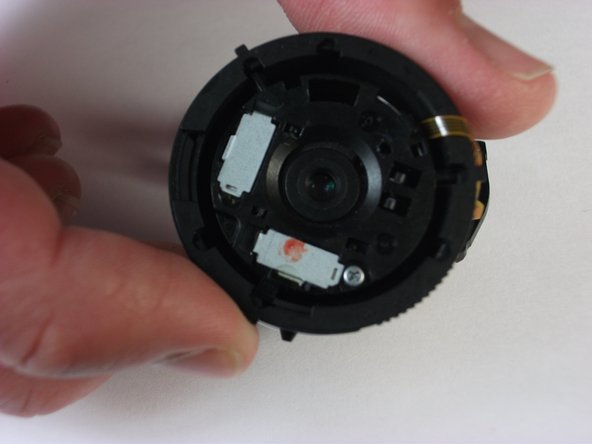
    6. Panasonic Lumix DMC-FX01 Camera Lens Replacement: adım 23, 1 resimden 1.
      • Separate the lens housing.

      • Replace the lens by gently prying away from the assembly.

      FixBot'a Sor

      Yorum Ekle

Sonuç

To reassemble your device, follow these instructions in reverse order.

İptal et: Bu kılavuzu tamamlamadım.

4 farklı kişi bu kılavuzu tamamladı.

Caleb Fink

Üyelik tarihi: 10/11/10

191 İtibar

2 adet Kılavuz yazıldı

Ekip

Cal Poly, Team 9-22, Regan Fall 2010 Cal Poly, Team 9-22, Regan Fall 2010 üyesi

CPSU-REGAN-F10S9G22

4 Üyeler

16 adet Kılavuz yazıldı

0Kılavuz Yorumları

Yorum Ekle

İstatistikleri Görüntüle:

Son 24 Saat: 2

Son 7 gün: 12

Son 30 gün: 43

Her zaman: 13,668