Bu çeviri bir makine tarafından oluşturulmuştur ve henüz bir kişi tarafından incelenmemiştir. Bu dili konuşuyor musunuz? İnceleme için.
Giriş
PlayStation 2 Slimline cihazınızın optik sürücüsü bozuksa, bu onarım kılavuzu, onarım veya değişim için eski optik sürücüye nasıl erişeceğiniz ve onu nasıl çıkaracağınız konusunda adım adım bir süreç sunacaktır.
Neye ihtiyacın var
-
-
-
Konsolun altındaki vida kapaklarından ikisinin üzerindeki lastik ayakları çıkarın.
-
Vida kapaklarını ve vidaların kendilerini çıkarın.
 FixBot'a Sor
-
-
-
-
Üç kabloyu soketlerinden çıkarın.
-
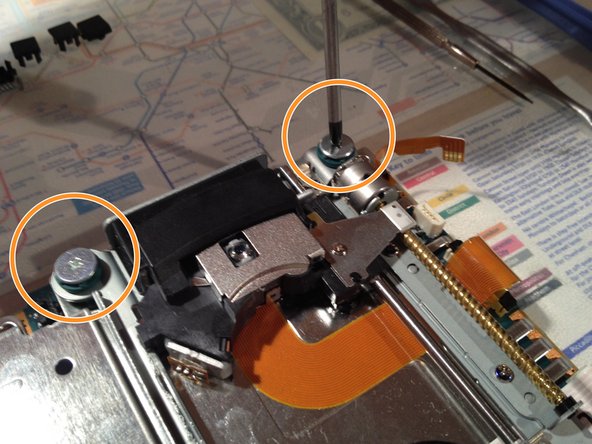
Optik sürücüyü sabitleyen dört vidayı bir PH01 tornavida ile çıkarın.
-
Optik sürücüyü kaldırın ve fleks kablonun altındaki koli bandını çıkarın.
-
-



Cihazınızı yeniden toplamak için bu talimatları ters sırada uygulayın.
İptal et: Bu kılavuzu tamamlamadım.
17 farklı kişi bu kılavuzu tamamladı.
Bu çevirmenlere özel teşekkürler:
100%

Translation Bot dünyayı onarmamıza yardım ediyor! Katkıda bulunmak ister misiniz?
Çeviriye Başlayın ›

