Ana içeriğe geç
Onarım Topluluğuna Katılın - Hesap Oluşturun

PlayStation 2 Slimline SCPH-7500x Motherboard Replacement

Görüntüleme: 13 B

İstatistikleri görüntüle:

Son 24 Saat:
4
Son 7 Gün:
54
Son 30 Gün:
259
Her zaman:
13.185
Yorumlar: 3

3 comments on steps.

Tamamlandı: 17

17 kişi bu kılavuzu "tamamlandı" olarak işaretledi. Sıradaki sen olacak mısın?

Sık Kullanılanlar: 15

15 kişi bu kılavuzu favorilerine ekledi (ve abone oldu). Sıradaki sen olacak mısın?

Gerekli Süre: 15 dakika
Zorluk: Orta
Eksik Adımlar

Hata! Bu kılavuzda şu anda bir veya daha fazla önemli adım eksik.

Daha Fazla Görsel Gerekli

Biraz daha fazla görsel sayesinde bu kılavuzdaki prosedürler apaçık olacaktır.

Adım Kırpıcı

Bu kılavuzda gereksiz adımlar mevcut. Az ve öz olması için kırpın!

Topluluk-Katkılı Kılavuz

Topluluğumuzdan muhteşem birisi bu kılavuzu hazırladı. Bu kılavuz iFixit elemanları tarafından oluşturulmamıştır.

Tutarsız Görseller

Bu kılavuzdaki görselleri ön koşullarla daha tutarlı olacak şekilde güncellemek, kusursuzluğunuza katkıda bulunacaktır.

Dilim ve Zar

Bu kılavuzdaki adımlar bölünerek bir dizi önkoşul kılavuzu olarak düzenlenmelidir.

PlayStation 2 Slimline SCPH-7500x Motherboard Replacement

This guide will walk you through step-by-step on how to properly remove and install the motherboard in the PlayStation 2 Slimline.

Neye ihtiyacın var

Aletler

      • Turn off the PlayStation 2 and carefully unplug it from the power source. Also, it is important to eject the CD from the console before flipping the it upside down.

      FixBot'a Sor

      Yorum Ekle

    1. PlayStation 2 Slimline SCPH-7500x Motherboard Replacement: adım 2, 1 resimden 1.
      • Locate the six feet on the bottom of the PS2.

      • Five of these feet are in plain sight while the last foot is located under the black void sticker on the back of the device.

      • Some versions of the console, such as the PAL Version, may not have this sticker. In this case, the foot or the screw should be in plain sight.

      FixBot'a Sor

      Yorum Ekle

    2. PlayStation 2 Slimline SCPH-7500x Motherboard Replacement: adım 3, 3 resimden 1. PlayStation 2 Slimline SCPH-7500x Motherboard Replacement: adım 3, 3 resimden 2. PlayStation 2 Slimline SCPH-7500x Motherboard Replacement: adım 3, 3 resimden 3.
      • Remove the five visible feet from the bottom of the device using a spudger.

      FixBot'a Sor

      Yorum Ekle

    3. PlayStation 2 Slimline SCPH-7500x Motherboard Replacement: adım 4, 2 resimden 1. PlayStation 2 Slimline SCPH-7500x Motherboard Replacement: adım 4, 2 resimden 2.
      • Remove the sticker and then remove the 6th foot.

      FixBot'a Sor

      Yorum Ekle

    4. PlayStation 2 Slimline SCPH-7500x Motherboard Replacement: adım 5, 3 resimden 1. PlayStation 2 Slimline SCPH-7500x Motherboard Replacement: adım 5, 3 resimden 2. PlayStation 2 Slimline SCPH-7500x Motherboard Replacement: adım 5, 3 resimden 3.
      • After all of the feet have been removed, Use a Phillips #1 screwdriver to remove the six 4.0mm screws from the base of the PS2.

      FixBot'a Sor

      Yorum Ekle

    5. PlayStation 2 Slimline SCPH-7500x Motherboard Replacement: adım 6, 3 resimden 1. PlayStation 2 Slimline SCPH-7500x Motherboard Replacement: adım 6, 3 resimden 2. PlayStation 2 Slimline SCPH-7500x Motherboard Replacement: adım 6, 3 resimden 3.
      • Once all of the screws have been removed, pry apart the plastic covers. Start by lifting the side containing the power cable and Ethernet port. Then, lift the opposite side to fully separate the two sides.

      • You may need to apply some gentle force to detach the covers. Be careful not to break the plastic screw pins.

      FixBot'a Sor

      Yorum Ekle

    6. PlayStation 2 Slimline SCPH-7500x Motherboard Replacement: adım 7, 1 resimden 1.
      • If done correctly, you should have a fully detached plastic backing, revealing the electronic components of the PlayStation 2.

      FixBot'a Sor

      Yorum Ekle

    1. PlayStation 2 Slimline SCPH-7500x Motherboard Replacement, IR Sensor: adım 8, 3 resimden 1. PlayStation 2 Slimline SCPH-7500x Motherboard Replacement, IR Sensor: adım 8, 3 resimden 2. PlayStation 2 Slimline SCPH-7500x Motherboard Replacement, IR Sensor: adım 8, 3 resimden 3.
      Bu adımda kullanılan alet:
      Tweezers
      $4.99
      • Locate the IR sensor on the motherboard. Then, use tweezers to gently detach the blue/white ribbon that attaches the IR sensor to the motherboard.

      FixBot'a Sor

      Yorum Ekle

    1. PlayStation 2 Slimline SCPH-7500x Motherboard Replacement, Clock Battery: adım 9, 3 resimden 1. PlayStation 2 Slimline SCPH-7500x Motherboard Replacement, Clock Battery: adım 9, 3 resimden 2. PlayStation 2 Slimline SCPH-7500x Motherboard Replacement, Clock Battery: adım 9, 3 resimden 3.
      Bu adımda kullanılan alet:
      Tweezers
      $4.99
      • Identify the clock battery, then use tweezers to disconnect the connector from the motherboard.

      FixBot'a Sor

      Yorum Ekle

    2. PlayStation 2 Slimline SCPH-7500x Motherboard Replacement: adım 10, 2 resimden 1. PlayStation 2 Slimline SCPH-7500x Motherboard Replacement: adım 10, 2 resimden 2.
      • Gently lift the battery up from the battery compartment using a spudger.

      FixBot'a Sor

      Yorum Ekle

    1. PlayStation 2 Slimline SCPH-7500x Motherboard Replacement, Fan: adım 11, 3 resimden 1. PlayStation 2 Slimline SCPH-7500x Motherboard Replacement, Fan: adım 11, 3 resimden 2. PlayStation 2 Slimline SCPH-7500x Motherboard Replacement, Fan: adım 11, 3 resimden 3.
      Bu adımda kullanılan alet:
      Tweezers
      $4.99
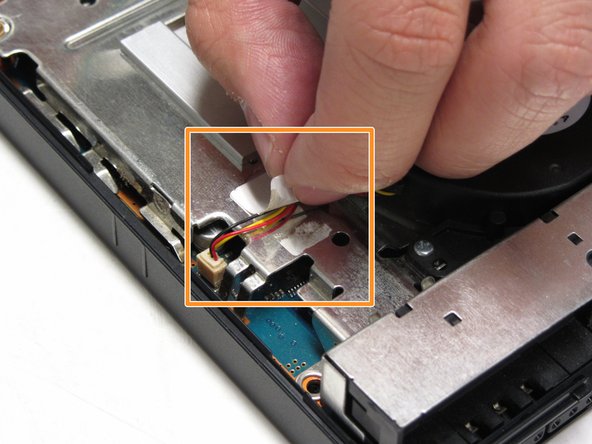
      • Locate the fan component of the motherboard of the PS2.

      • With your fingers or tweezers, peel off the sticker that holds down the fan's wiring.

      FixBot'a Sor

      Yorum Ekle

    2. PlayStation 2 Slimline SCPH-7500x Motherboard Replacement: adım 12, 2 resimden 1. PlayStation 2 Slimline SCPH-7500x Motherboard Replacement: adım 12, 2 resimden 2.
      • Detach the terminal (white covering) to the red and yellow cords from the motherboard to the fan with the use of tweezers.

      FixBot'a Sor

      Yorum Ekle

    3. PlayStation 2 Slimline SCPH-7500x Motherboard Replacement: adım 13, 2 resimden 1. PlayStation 2 Slimline SCPH-7500x Motherboard Replacement: adım 13, 2 resimden 2.
      • Locate and unscrew the three 1.6mm screws located next to the base of the fan.

      • They are located off the curved edge of the fan.

      • Once you have removed the three screws, you are able to remove the fan from the PS2.

      FixBot'a Sor

      Yorum Ekle

    1. PlayStation 2 Slimline SCPH-7500x Motherboard Replacement, Optical Drive: adım 14, 2 resimden 1. PlayStation 2 Slimline SCPH-7500x Motherboard Replacement, Optical Drive: adım 14, 2 resimden 2.
      • Locate the optical drive on the motherboard.

      FixBot'a Sor

      Yorum Ekle

    2. PlayStation 2 Slimline SCPH-7500x Motherboard Replacement: adım 15, 3 resimden 1. PlayStation 2 Slimline SCPH-7500x Motherboard Replacement: adım 15, 3 resimden 2. PlayStation 2 Slimline SCPH-7500x Motherboard Replacement: adım 15, 3 resimden 3.
      • Unscrew the four 4.0mm screws that mount the optical drive to the motherboard.

      FixBot'a Sor

      Yorum Ekle

    3. PlayStation 2 Slimline SCPH-7500x Motherboard Replacement: adım 16, 1 resimden 1.
      • Locate the three ribbons that are attached to the motherboard.

      • Note: These ribbons are different sizes: one large, one medium and one small sized ribbon.

      FixBot'a Sor

      Yorum Ekle

    4. PlayStation 2 Slimline SCPH-7500x Motherboard Replacement: adım 17, 3 resimden 1. PlayStation 2 Slimline SCPH-7500x Motherboard Replacement: adım 17, 3 resimden 2. PlayStation 2 Slimline SCPH-7500x Motherboard Replacement: adım 17, 3 resimden 3.
      Bu adımda kullanılan alet:
      Tweezers
      $4.99
      • Using tweezers, gently detach all three ribbons from the motherboard terminal. Unlock the middle orange ribbon to lift the black tab up on either side.

      • IMPORTANT: The orange ribbon is glued to the metal chassis. Gently pull the ribbon upward to make sure that you don't rip it.

      FixBot'a Sor

      Yorum Ekle

    5. PlayStation 2 Slimline SCPH-7500x Motherboard Replacement: adım 18, 3 resimden 1. PlayStation 2 Slimline SCPH-7500x Motherboard Replacement: adım 18, 3 resimden 2. PlayStation 2 Slimline SCPH-7500x Motherboard Replacement: adım 18, 3 resimden 3.
      • Gently lift the optical drive away from the motherboard.

      FixBot'a Sor

      Yorum Ekle

    1. PlayStation 2 Slimline SCPH-7500x Motherboard Replacement, Motherboard: adım 19, 1 resimden 1.
      • What you see in this picture is the electronic components found in the PS2. We are now going to remove the top metal casing found on top of the motherboard.

      FixBot'a Sor

      Yorum Ekle

    2. PlayStation 2 Slimline SCPH-7500x Motherboard Replacement: adım 20, 1 resimden 1.
      • Locate the one 2.4mm screw that mounts the metal casing to the top of the motherboard and unscrew the screw with a Philips Screwdriver.

      FixBot'a Sor

      Yorum Ekle

    3. PlayStation 2 Slimline SCPH-7500x Motherboard Replacement: adım 21, 2 resimden 1. PlayStation 2 Slimline SCPH-7500x Motherboard Replacement: adım 21, 2 resimden 2.
      • Gently lift the metal casing from the motherboard.

      • Then lift the motherboard from the plastic outer shell.

      • You should have three separate components: The metal casing, the motherboard and the top half of the outer shell of the PS2.

      FixBot'a Sor

      Yorum Ekle

    4. PlayStation 2 Slimline SCPH-7500x Motherboard Replacement: adım 22, 2 resimden 1. PlayStation 2 Slimline SCPH-7500x Motherboard Replacement: adım 22, 2 resimden 2.
      • Flip the motherboard over.

      • Locate and unscrew all five 1.6mm screws that mount the metal plate to the motherboard.

      • Note that there are four on one side and one on the other.

      FixBot'a Sor

      Yorum Ekle

    5. PlayStation 2 Slimline SCPH-7500x Motherboard Replacement: adım 23, 2 resimden 1. PlayStation 2 Slimline SCPH-7500x Motherboard Replacement: adım 23, 2 resimden 2.
      • Gently lift the metal plates from the top and the bottom of the motherboard.

      FixBot'a Sor

      Yorum Ekle

    6. PlayStation 2 Slimline SCPH-7500x Motherboard Replacement: adım 24, 1 resimden 1.
      • Remove the plastic film that is sandwiched in between the metal plate and the motherboard.

      FixBot'a Sor

      Yorum Ekle

    7. PlayStation 2 Slimline SCPH-7500x Motherboard Replacement: adım 25, 2 resimden 1. PlayStation 2 Slimline SCPH-7500x Motherboard Replacement: adım 25, 2 resimden 2.
      • After you have detached all the other components, it should look like the image shown.

      FixBot'a Sor

      Yorum Ekle

Sonuç

To reassemble your device, follow these instructions in reverse order.

İptal et: Bu kılavuzu tamamlamadım.

17 farklı kişi bu kılavuzu tamamladı.

Jared Hirata

Üyelik tarihi: 04/09/13

1.071 İtibar

7 adet Kılavuz yazıldı

Ekip

Cal Poly, Team 17-4, Regan Spring 2013 Cal Poly, Team 17-4, Regan Spring 2013 üyesi

CPSU-REGAN-S13S17G4

3 Üyeler

84 adet Kılavuz yazıldı

0Kılavuz Yorumları

Yorum Ekle

İstatistikleri Görüntüle:

Son 24 Saat: 4

Son 7 gün: 54

Son 30 gün: 259

Her zaman: 13,185