Ana içeriğe geç
Onarım Topluluğuna Katılın - Hesap Oluşturun

Polaroid Cube Battery Replacement

Neye ihtiyacın var

  1. Polaroid Cube Battery Replacement, Battery: adım 1, 1 resimden 1.
    • Remove the SD card cover by twisting it using a Plastic Opening Tool

    FixBot'a Sor

    Yorum Ekle

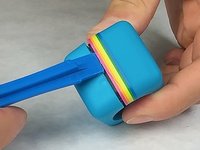
  2. Polaroid Cube Battery Replacement: adım 2, 1 resimden 1.
    • Use the Plastic Opening tool to pry off and remove the front cover.

    FixBot'a Sor

    Yorum Ekle

  3. Polaroid Cube Battery Replacement: adım 3, 1 resimden 1.
    • Using a J00 head screwdriver, remove the four 3.27mm screws from the front of the camera near the lens.

    FixBot'a Sor

    Yorum Ekle

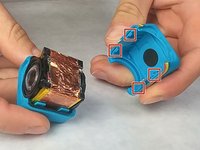
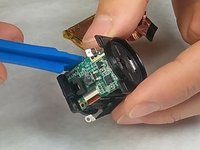
  4. Polaroid Cube Battery Replacement: adım 4, 2 resimden 1. Polaroid Cube Battery Replacement: adım 4, 2 resimden 2.
    • Use the Plastic Opening Tool to pry open the shell of the camera.

    • There are four latches, one at each corner, that you will need to detach.

    FixBot'a Sor

    Yorum Ekle

  5. Polaroid Cube Battery Replacement: adım 5, 1 resimden 1.
    • Remove shell from top and bottom of camera.

    FixBot'a Sor

    Yorum Ekle

  6. Polaroid Cube Battery Replacement: adım 6, 1 resimden 1.
    • Remove the rubber seal wrapped around the camera.

    FixBot'a Sor

    Yorum Ekle

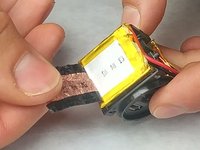
  7. Polaroid Cube Battery Replacement: adım 7, 2 resimden 1. Polaroid Cube Battery Replacement: adım 7, 2 resimden 2.
    • Remove the tape wrapped around the battery.

    FixBot'a Sor

    Yorum Ekle

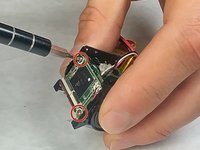
  8. Polaroid Cube Battery Replacement: adım 8, 3 resimden 1. Polaroid Cube Battery Replacement: adım 8, 3 resimden 2. Polaroid Cube Battery Replacement: adım 8, 3 resimden 3.
    • Using a J00 head screwdriver, unscrew the four 3.46mm screws from the top and bottom circuit board.

    FixBot'a Sor

    Yorum Ekle

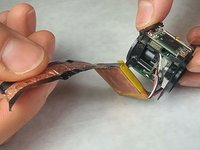
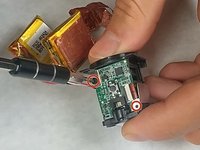
  9. Polaroid Cube Battery Replacement: adım 9, 2 resimden 1. Polaroid Cube Battery Replacement: adım 9, 2 resimden 2.
    • Use the plastic opening tool to remove the circuit board that the battery is connected to.

    FixBot'a Sor

    Yorum Ekle

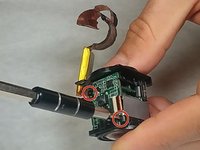
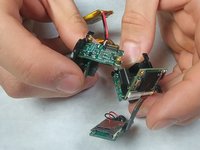
  10. Polaroid Cube Battery Replacement: adım 10, 1 resimden 1.
    • Gently remove the battery pin connector from the circuit board.

    FixBot'a Sor

    Yorum Ekle

Sonuç

To reassemble your device, follow these instructions in reverse order.

İptal et: Bu kılavuzu tamamlamadım.

10 farklı kişi bu kılavuzu tamamladı.

heath lamkin

Üyelik tarihi: 09/29/16

372 İtibar

1 Kılavuz yazıldı

Ekip

IUPUI, Team 3-2, Harley Fall 2016 IUPUI, Team 3-2, Harley Fall 2016 üyesi

IUPUI-HARLEY-F16S3G2

4 Üyeler

3 adet Kılavuz yazıldı

13Kılavuz Yorumları

Any idea where to find the replacement batteries?

hooverhogg - Yanıt Paylaş

Well described! Need to buy a replacement battery though but I have no idea about the specs of the battery. Any information?

seyhangul - Yanıt Paylaş

Fuji 402424 Lithium ion (Pouch)battery 240mA 4.8V Can’t find it. Can anyone help with a source?

David F O'Connor - Yanıt Paylaş

Was anyone able to to find the replacement batteries for the Cube?

yzorger - Yanıt Paylaş

the cube requires a two-pack battery which has a single plug for both of them and so they have to be wired together in just the right way to be able to fit inside the cube. i guess it's not possible to buy replacement batt. and paying minimum $16 for it? u could just buy a new one for too close to $16. or a used one.

Timothy Davenport - Yanıt Paylaş

Yorum Ekle

İstatistikleri Görüntüle:

Son 24 Saat: 1

Son 7 gün: 28

Son 30 gün: 100

Her zaman: 10,850