Ana içeriğe geç

PowerA ProEX Xbox 360 Wired Controller Buttons Replacement

Neye ihtiyacın var

  1. PowerA ProEX Xbox 360 Wired Controller Buttons Replacement, Buttons: adım 1, 2 resimden 1. PowerA ProEX Xbox 360 Wired Controller Buttons Replacement, Buttons: adım 1, 2 resimden 2.
    • Disassemble the case by removing the 8 screws, indicated in red on the picture, that hold the back of the case to the front of the case using a J0 screwdriver.

  2. PowerA ProEX Xbox 360 Wired Controller Buttons Replacement: adım 2, 2 resimden 1. PowerA ProEX Xbox 360 Wired Controller Buttons Replacement: adım 2, 2 resimden 2.
    • The case should come apart easily. If not, use a spudger to pry the back from the front of the case.

  3. PowerA ProEX Xbox 360 Wired Controller Buttons Replacement: adım 3, 3 resimden 1. PowerA ProEX Xbox 360 Wired Controller Buttons Replacement: adım 3, 3 resimden 2. PowerA ProEX Xbox 360 Wired Controller Buttons Replacement: adım 3, 3 resimden 3.
    Bu adımda kullanılan alet:
    Tweezers
    $4.99
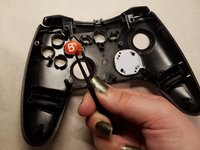
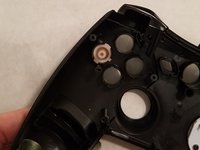
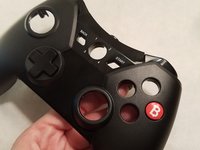
    • Using a pair of tweezers, remove each button and replace it with a new one.

    • A Button

    • B Button

    • X Button

    • Y Button

Sonuç

To reassemble your device, follow these instructions in reverse order.

12 farklı kişi bu kılavuzu tamamladı.

Rachel Ferreira

Üyelik tarihi: 10/20/16

458 İtibar

1 Kılavuz yazıldı

Ekip

UMass Dartmouth, Team 3-1, Isaacson Fall 2016 UMass Dartmouth, Team 3-1, Isaacson Fall 2016 üyesi

UMASSD-ISAACSON-F16S3G1

3 Üyeler

2 adet Kılavuz yazıldı

0Kılavuz Yorumları

Yorum Ekle

İstatistikleri Görüntüle:

Son 24 Saat: 12

Son 7 gün: 101

Son 30 gün: 214

Her zaman: 6,499