Ana içeriğe geç
Onarım Topluluğuna Katılın - Hesap Oluşturun

PowerBook 3400 M3553 Floppy Disk Drive Replacement

    1. PowerBook 3400 M3553 Floppy Disk Drive Replacement, Battery: adım 1, 1 resimden 1.
      • Close the screen and turn the PowerBook over, orienting the computer upside down, using the label to guide you.

      FixBot'a Sor

      Yorum Ekle

    2. PowerBook 3400 M3553 Floppy Disk Drive Replacement: adım 2, 2 resimden 1. PowerBook 3400 M3553 Floppy Disk Drive Replacement: adım 2, 2 resimden 2.
      • Hold the button on the front left side and slide the battery out.

      FixBot'a Sor

      Yorum Ekle

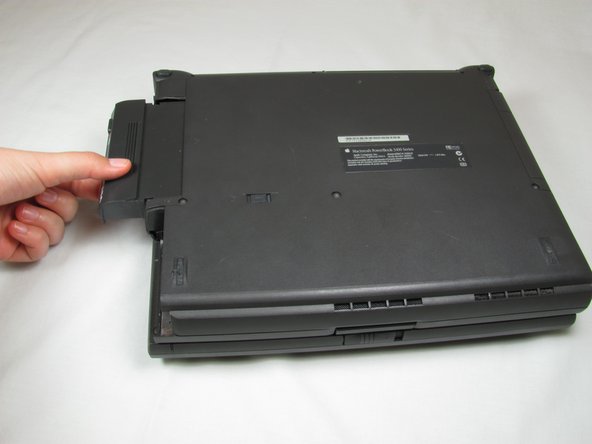
    1. PowerBook 3400 M3553 Floppy Disk Drive Replacement, Floppy Disk Drive: adım 3, 2 resimden 1. PowerBook 3400 M3553 Floppy Disk Drive Replacement, Floppy Disk Drive: adım 3, 2 resimden 2.
      • First, slide the switch on the back of the computer to the left.

      • Then pull the floppy drive out of the computer.

      FixBot'a Sor

      Yorum Ekle

Sonuç

To reassemble your device, follow these instructions in reverse order.

İptal et: Bu kılavuzu tamamlamadım.

Bir başkası bu kılavuzu tamamladı.

Michael Mondragon

Üyelik tarihi: 04/12/11

397 İtibar

9 adet Kılavuz yazıldı

Ekip

Cal Poly, Team 24-59, Amido Spring 2011 Cal Poly, Team 24-59, Amido Spring 2011 üyesi

CPSU-AMIDO-S11S24G59

4 Üyeler

27 adet Kılavuz yazıldı

0Kılavuz Yorumları

Yorum Ekle

İstatistikleri Görüntüle:

Son 24 Saat: 0

Son 7 gün: 6

Son 30 gün: 32

Her zaman: 2,366