Giriş
If your device isn't working and other troubleshooting methods have failed, or a component of the motherboard has failed, use this guide to replace the motherboard and make your device functional again.
Neye ihtiyacın var
-
-
-
Remove both 4 mm screws from the top of the tablet using a PH00 screw driver.
 FixBot'a Sor
-
-
-
-
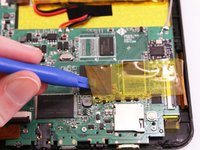
With the soldering tool remove the speaker wires, battery wires and gray wire that are connected to the motherboard.
-
-
-
Use a PH00 screw driver to remove the three 4 mm screws holding the motherboard down.
-
-




To reassemble your device, follow these instructions in reverse order.
İptal et: Bu kılavuzu tamamlamadım.
2 farklı kişi bu kılavuzu tamamladı.

Ekip

Eastern Washington University, Team 1-4, Rowley Winter 2016 Eastern Washington University, Team 1-4, Rowley Winter 2016 üyesi
EWU-ROWLEY-W16S1G4
4 Üyeler
10 adet Kılavuz yazıldı
1Rehber Yorum
Once the motherboard is out, what do you do ? Where do I go? More information would be appreciated.
