Ana içeriğe geç
Onarım Topluluğuna Katılın - Hesap Oluşturun

Razer DeathAdder Chroma USB Cable Replacement

Neye ihtiyacın var

  1. Razer DeathAdder Chroma USB Cable Replacement, Outer Casing: adım 1, 1 resimden 1.
    • Opening the mouse casing will void any warranty that exists for the mouse.

    • Turn the mouse over so the bottom is facing up.

    FixBot'a Sor
    Yorum Ekle

  2. Razer DeathAdder Chroma USB Cable Replacement: adım 2, 2 resimden 1. Razer DeathAdder Chroma USB Cable Replacement: adım 2, 2 resimden 2.
    • Use the blunt end of the spudger to pry the adhesive rubber pads from the top left and right edges.

    FixBot'a Sor
    Yorum Ekle

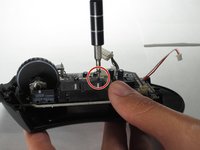
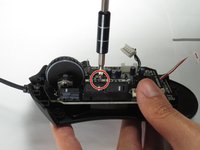
  3. Razer DeathAdder Chroma USB Cable Replacement: adım 3, 2 resimden 1. Razer DeathAdder Chroma USB Cable Replacement: adım 3, 2 resimden 2.
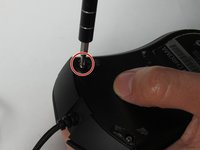
    • Use a Phillips #0 screwdriver to remove two 6.7 mm screws.

    FixBot'a Sor
    Yorum Ekle

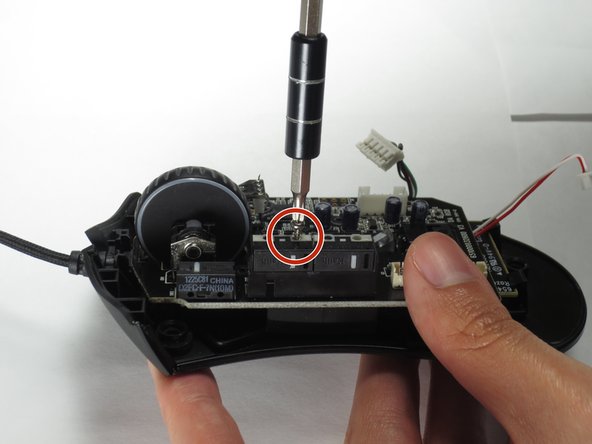
  4. Razer DeathAdder Chroma USB Cable Replacement: adım 4, 1 resimden 1.
    • Use your fingers to identify the location of the screw under the bottom label.

    FixBot'a Sor

    Yorum Ekle

  5. Razer DeathAdder Chroma USB Cable Replacement: adım 5, 1 resimden 1.
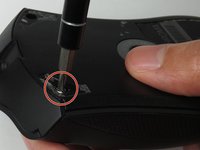
    • Use a Phillips #0 screwdriver to remove one 6.7 mm screw.

    • Clear the label away from around the screw for easier removal.

    FixBot'a Sor

    Yorum Ekle

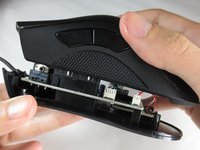
  6. Razer DeathAdder Chroma USB Cable Replacement: adım 6, 3 resimden 1. Razer DeathAdder Chroma USB Cable Replacement: adım 6, 3 resimden 2. Razer DeathAdder Chroma USB Cable Replacement: adım 6, 3 resimden 3.
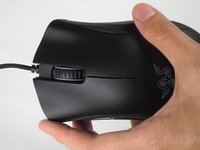
    • Turn the mouse over so the bottom is facing down.

    • Separate the top casing from the bottom base by pulling the top casing upwards.

    • Separating the casing too quickly could damage the ribbon connector between the motherboard and the LED lights.

    FixBot'a Sor

    Yorum Ekle

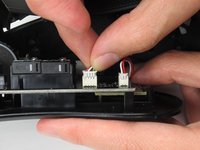
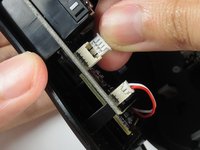
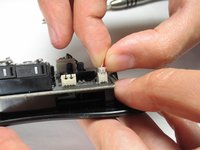
  7. Razer DeathAdder Chroma USB Cable Replacement: adım 7, 2 resimden 1. Razer DeathAdder Chroma USB Cable Replacement: adım 7, 2 resimden 2.
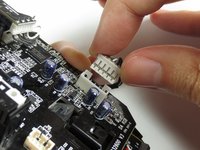
    • Disconnect the ribbon connector between the motherboard and the LED lights by pulling upward.

    • Pulling too hard could damage the wire connections.

    FixBot'a Sor
    Yorum Ekle

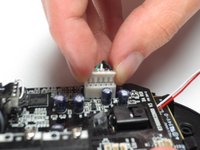
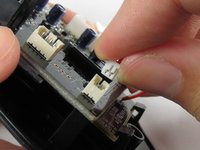
  8. Razer DeathAdder Chroma USB Cable Replacement, Motherboard: adım 8, 2 resimden 1. Razer DeathAdder Chroma USB Cable Replacement, Motherboard: adım 8, 2 resimden 2.
    • Disconnect the ribbon connector between the motherboard and the USB cable by pulling upward.

    FixBot'a Sor
    Yorum Ekle

  9. Razer DeathAdder Chroma USB Cable Replacement: adım 9, 1 resimden 1.
    • Use a Phillips #0 screwdriver to remove three 5.5 mm screws.

    FixBot'a Sor

    Yorum Ekle

  10. Razer DeathAdder Chroma USB Cable Replacement: adım 10, 2 resimden 1. Razer DeathAdder Chroma USB Cable Replacement: adım 10, 2 resimden 2.
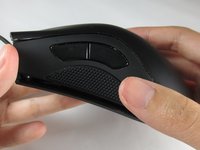
    • Use a Phillips #0 screwdriver to remove two 11.5 mm screws on the side buttons.

    FixBot'a Sor

    Yorum Ekle

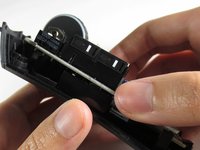
  11. Razer DeathAdder Chroma USB Cable Replacement: adım 11, 1 resimden 1.
    • Use a Phillips #000 screwdriver to remove one 5.0 mm screw.

    FixBot'a Sor
    Yorum Ekle

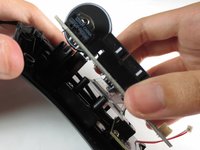
  12. Razer DeathAdder Chroma USB Cable Replacement: adım 12, 2 resimden 1. Razer DeathAdder Chroma USB Cable Replacement: adım 12, 2 resimden 2.
    • Disconnect the ribbon connector between the motherboard and the optical sensor.
    FixBot'a Sor

    Yorum Ekle

  13. Razer DeathAdder Chroma USB Cable Replacement: adım 13, 2 resimden 1. Razer DeathAdder Chroma USB Cable Replacement: adım 13, 2 resimden 2.
    • Remove the motherboard by grasping the sides and gently pulling upward.

    FixBot'a Sor

    Yorum Ekle

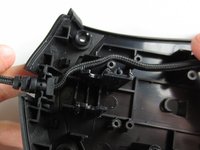
  14. Razer DeathAdder Chroma USB Cable Replacement, USB Cable: adım 14, 1 resimden 1.
    • Locate the USB cable.

    FixBot'a Sor

    Yorum Ekle

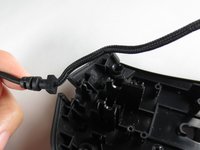
  15. Razer DeathAdder Chroma USB Cable Replacement: adım 15, 2 resimden 1. Razer DeathAdder Chroma USB Cable Replacement: adım 15, 2 resimden 2.
    • Remove the USB cable by pulling it up and out.

    FixBot'a Sor

    Yorum Ekle

Sonuç

To reassemble your device, follow these instructions in reverse order.

İptal et: Bu kılavuzu tamamlamadım.

8 farklı kişi bu kılavuzu tamamladı.

Henry Shi

Üyelik tarihi: 03/26/17

236 İtibar

1 Kılavuz yazıldı

Ekip

Baylor, Team S5-G2, Williams Spring 2017 Baylor, Team S5-G2, Williams Spring 2017 üyesi

BU-WILLIAMS-S17S5G2

3 Üyeler

6 adet Kılavuz yazıldı

5Kılavuz Yorumları

Thank you! It realy worked. Btw: The cable for the Deathadder 2013 is working for the Chroma and Elite as well. I Just tried it :)

Pokefreeks - Yanıt Paylaş

Thanks for the advice

João Costa Santos - Yanıt Paylaş

Great and easy guide thanx alot, saved me a new mouse :)

jesperkb - Yanıt Paylaş

Is there a reliable website where I can get a replacement cable with low delivery time?

Bubbles EXE - Yanıt Paylaş

where can i get the cable from?

Mourya Singham - Yanıt Paylaş

Yorum Ekle

İstatistikleri Görüntüle:

Son 24 Saat: 3

Son 7 gün: 15

Son 30 gün: 50

Her zaman: 15,431