Giriş
How to correctly change the batteries of the Ricoh Shotmaster 130Z.
Neye ihtiyacın var
-
-
-
First, make sure that the camera is turned off. The dial must line up the word "off" with the white tally mark.
 FixBot'a Sor
-
-
-
-
You can find the battery compartment on the side of the camera. Search for the arrow and the abreviation "BATT"
-
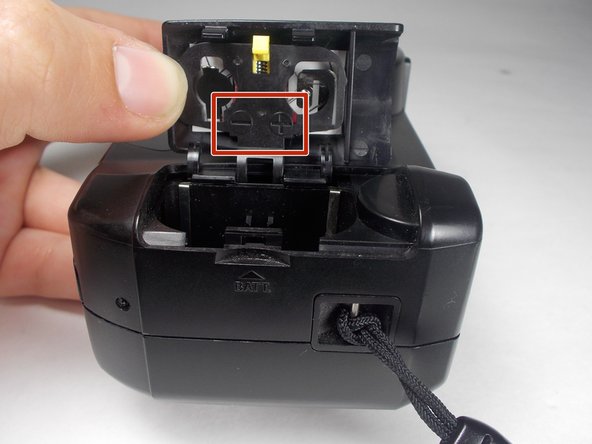
Stick your finger nail (or a blue opening tool if you wish) in the notch and flip open the door to expose the battery compartment.
-
-
-
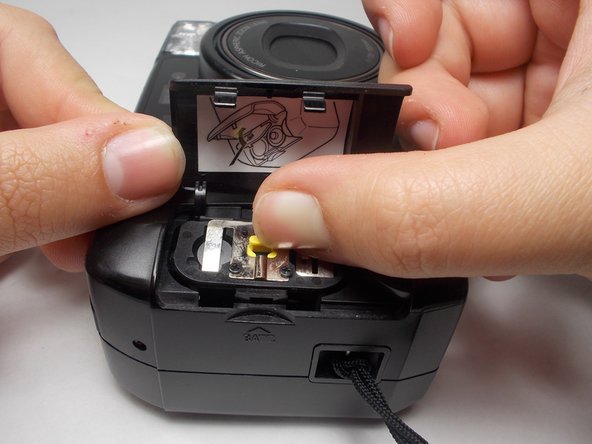
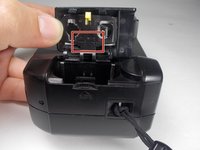
The yellow latch holds down an extra cover for the batteries
-
Push on it in to open the compartment
-
Insert batteries according to the charges marked on the inside part of the cover
-
-


To reassemble your device, follow these instructions in reverse order.

Ekip

UMass Dartmouth, Team 3-4, Isaacson Fall 2016 UMass Dartmouth, Team 3-4, Isaacson Fall 2016 üyesi
UMASSD-ISAACSON-F16S3G4
3 Üyeler
10 adet Kılavuz yazıldı
