Ana içeriğe geç
Onarım Topluluğuna Katılın - Hesap Oluşturun

Ring Floodlight Cam Camera Module Replacement

Neye ihtiyacın var

  1. Ring Floodlight Cam Camera Module Replacement, Motherboard: adım 1, 2 resimden 1. Ring Floodlight Cam Camera Module Replacement, Motherboard: adım 1, 2 resimden 2.
    • Remove the external cover with a Jimmy tool.

    FixBot'a Sor

    Yorum Ekle

  2. Ring Floodlight Cam Camera Module Replacement: adım 2, 2 resimden 1. Ring Floodlight Cam Camera Module Replacement: adım 2, 2 resimden 2.
    • Remove the four outer cover 4.5mm screws with a Philips 1 screwdriver.

    FixBot'a Sor

    Yorum Ekle

  3. Ring Floodlight Cam Camera Module Replacement: adım 3, 1 resimden 1.
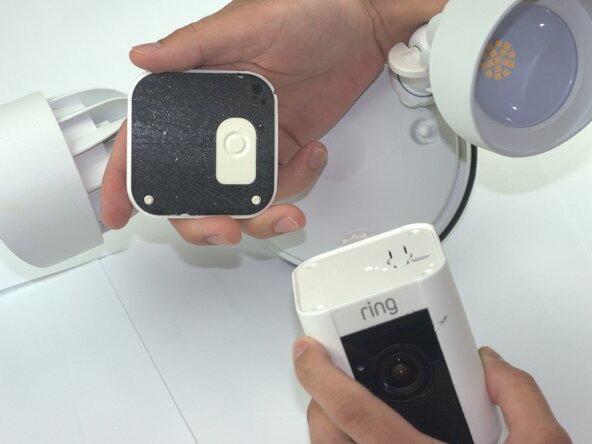
    • Remove the internal cover.

    FixBot'a Sor

    Yorum Ekle

  4. Ring Floodlight Cam Camera Module Replacement: adım 4, 1 resimden 1.
    • Disconnect the flexible flat cable (FFC) from the motherboard.

    FixBot'a Sor

    Yorum Ekle

  5. Ring Floodlight Cam Camera Module Replacement: adım 5, 1 resimden 1.
    • Remove the three-prong connector with angled tweezers.

    FixBot'a Sor

    Yorum Ekle

  6. Ring Floodlight Cam Camera Module Replacement: adım 6, 1 resimden 1.
    • Remove the 2mm screws with a Phillips #00 screwdriver.

    FixBot'a Sor

    Yorum Ekle

  7. Ring Floodlight Cam Camera Module Replacement: adım 7, 2 resimden 1. Ring Floodlight Cam Camera Module Replacement: adım 7, 2 resimden 2.
    • Remove the power supply.

    • Disconnect the power supply from the device.

    FixBot'a Sor

    Yorum Ekle

  8. Ring Floodlight Cam Camera Module Replacement: adım 8, 1 resimden 1.
    • Remove the 2mm screws with a Phillips 00 screwdriver from the base connector.

    • From this step forward use a low profile wrench instead of a screwdriver with the correct bit size to remove screws non-destructively.

    FixBot'a Sor

    Yorum Ekle

  9. Ring Floodlight Cam Camera Module Replacement: adım 9, 2 resimden 1. Ring Floodlight Cam Camera Module Replacement: adım 9, 2 resimden 2.
    • Drill holes into the exterior with a 1/16 drill bit.

    • Skip this step unless you lack the specialized tools or other attempts to remove screws non destructively were unsuccessful.

    FixBot'a Sor

    Yorum Ekle

  10. Ring Floodlight Cam Camera Module Replacement: adım 10, 1 resimden 1.
    • Unscrew the 2mm screws on the metal baseplate with a Phillips 00 screwdriver.

    FixBot'a Sor

    Yorum Ekle

  11. Ring Floodlight Cam Camera Module Replacement: adım 11, 1 resimden 1.
    • Remove the metal baseplate.

    FixBot'a Sor

    Yorum Ekle

  12. Ring Floodlight Cam Camera Module Replacement: adım 12, 1 resimden 1.
    • Remove the power connector from the motherboard using angled tweezers.

    FixBot'a Sor

    Yorum Ekle

  13. Ring Floodlight Cam Camera Module Replacement: adım 13, 1 resimden 1.
    • Remove the front-end flexible flat cable (FFC) with angled tweezers.

    FixBot'a Sor

    Yorum Ekle

  14. Ring Floodlight Cam Camera Module Replacement: adım 14, 1 resimden 1.
    • Remove the motion sensor flat flexible cable (FFC).

    FixBot'a Sor

    Yorum Ekle

  15. Ring Floodlight Cam Camera Module Replacement: adım 15, 2 resimden 1. Ring Floodlight Cam Camera Module Replacement: adım 15, 2 resimden 2.
    • Remove the motherboard module.

    FixBot'a Sor

    Yorum Ekle

  16. Ring Floodlight Cam Camera Module Replacement, Camera Module: adım 16, 1 resimden 1.
    • Drill holes with a 1/16 drill bit.

    FixBot'a Sor

    Yorum Ekle

  17. Ring Floodlight Cam Camera Module Replacement: adım 17, 2 resimden 1. Ring Floodlight Cam Camera Module Replacement: adım 17, 2 resimden 2.
    • Remove the 2mm screws with an iFixit PH00 screwdriver.

    FixBot'a Sor

    Yorum Ekle

  18. Ring Floodlight Cam Camera Module Replacement: adım 18, 1 resimden 1.
    • Peel the copper strip from camera module.

    • Remove the metal baseplate.

    FixBot'a Sor

    Yorum Ekle

  19. Ring Floodlight Cam Camera Module Replacement: adım 19, 2 resimden 1. Ring Floodlight Cam Camera Module Replacement: adım 19, 2 resimden 2.
    • Unplug the WiFi antenna cables with angled tweezers.

    FixBot'a Sor

    Yorum Ekle

  20. Ring Floodlight Cam Camera Module Replacement: adım 20, 2 resimden 1. Ring Floodlight Cam Camera Module Replacement: adım 20, 2 resimden 2.
    • Remove 2mm screws with a PH00 screwdriver.

    FixBot'a Sor

    Yorum Ekle

  21. Ring Floodlight Cam Camera Module Replacement: adım 21, 1 resimden 1.
    • Remove the 3 pin power connector from the camera module.

    FixBot'a Sor

    Yorum Ekle

  22. Ring Floodlight Cam Camera Module Replacement: adım 22, 3 resimden 1. Ring Floodlight Cam Camera Module Replacement: adım 22, 3 resimden 2. Ring Floodlight Cam Camera Module Replacement: adım 22, 3 resimden 3.
    • Remove the camera module.

    FixBot'a Sor

    Yorum Ekle

Sonuç

To reassemble your device, follow these instructions in reverse order and before inserting power supply fill the drill holes with plastic putty.

İptal et: Bu kılavuzu tamamlamadım.

Samuel Garcia

Üyelik tarihi: 02/04/26

381 İtibar

2 adet Kılavuz yazıldı

Ekip

Texas Tech, Team 41-3, Johansen Spring 2026 Texas Tech, Team 41-3, Johansen Spring 2026 üyesi

TTU-JOHANSEN-S26S41G3

4 Üyeler

5 adet Kılavuz yazıldı

0Kılavuz Yorumları

Yorum Ekle

İstatistikleri Görüntüle:

Son 24 Saat: 0

Son 7 gün: 26

Son 30 gün: 26

Her zaman: 99