Giriş
This guide is meant to showcase how to remove the backplate and open up the Roccat Vulcan II Mini Air keyboard for access to all the interior components.
Neye ihtiyacın var
-
-
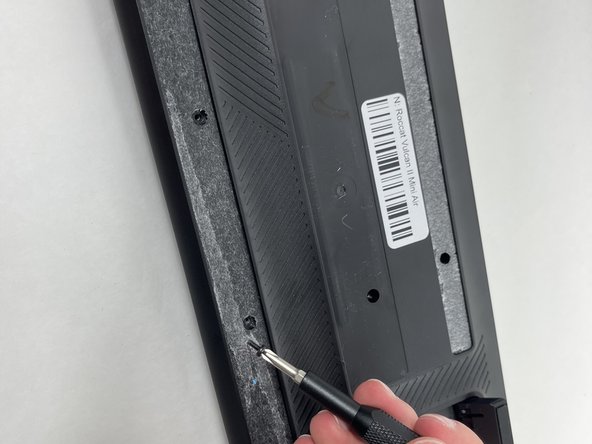
Flip your keyboard over so the bottom is facing up.
-
Use a Phillips #0 screwdriver to remove all of the screws from the back plate.
-
-
-
-
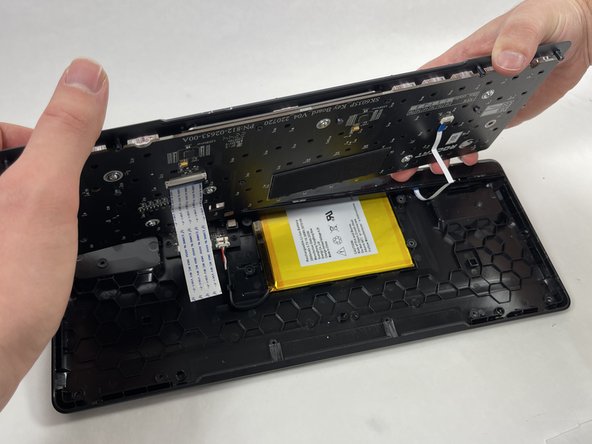
Gently lift the switch plate from the backplate, setting them next to each other with the ribbon cables facing upwards.
-
Use a spudger or a clean fingernail to flip up the locking flaps of the two ZIF connectors using the widest tool possible to avoid damaging the delicate hinge pins.
-
Use tweezers or your fingers to gently pull the cable out of its socket by the pull tab.
-






To reassemble your device, follow these instructions in reverse order.
İptal et: Bu kılavuzu tamamlamadım.
Bir başkası bu kılavuzu tamamladı.


Ekip

UMass Dartmouth, Team 3-3, Santin Fall 2024 UMass Dartmouth, Team 3-3, Santin Fall 2024 üyesi
UMASSD-SANTIN-F24S3G3
4 Üyeler
4 adet Kılavuz yazıldı
