Ana içeriğe geç
Onarım Topluluğuna Katılın - Hesap Oluşturun

Roku 4 Remote Control Motherboard Replacement

Neye ihtiyacın var

  1. Roku 4 Remote Control Motherboard Replacement, Remote Control Motherboard: adım 1, 1 resimden 1.
    • Place the remote control facing down on the table, so that the buttons are facing downwards.

    FixBot'a Sor

    Yorum Ekle

  2. Roku 4 Remote Control Motherboard Replacement: adım 2, 2 resimden 1. Roku 4 Remote Control Motherboard Replacement: adım 2, 2 resimden 2.
    • Remove the battery compartment cover from the back of the remote by sliding it outwards. This should reveal the batteries.

    FixBot'a Sor

    Yorum Ekle

  3. Roku 4 Remote Control Motherboard Replacement: adım 3, 2 resimden 1. Roku 4 Remote Control Motherboard Replacement: adım 3, 2 resimden 2.
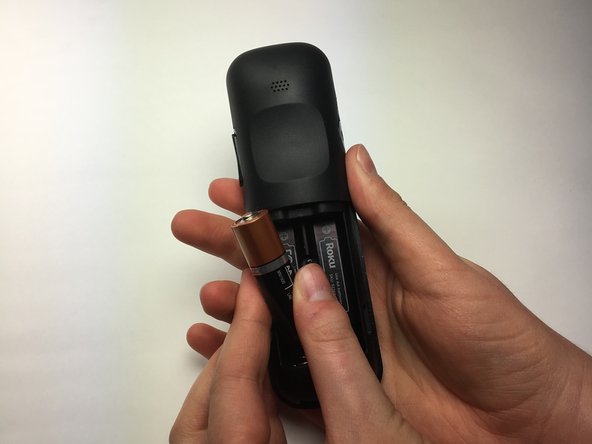
    • Remove the batteries from the battery compartment.

    FixBot'a Sor

    Yorum Ekle

  4. Roku 4 Remote Control Motherboard Replacement: adım 4, 1 resimden 1.
    • Turn the Phillips PH0 screwdriver counterclockwise to carefully remove the 6.9 mm screw located between both battery compartments .

    FixBot'a Sor

    Yorum Ekle

  5. Roku 4 Remote Control Motherboard Replacement: adım 5, 1 resimden 1.
    • Wedge a plastic opening tool into the seam between the top cover and bottom casing of the device to create a gap.

    • Prying open the remote is quite difficult and requires a large amount of force. Use caution to avoid breaking the device or hurting yourself.

    • Once you have created a gap large enough for your fingers to fit between, separate the top cover from the bottom plastic casing by pulling them apart gently.

    FixBot'a Sor

    Yorum Ekle

  6. Roku 4 Remote Control Motherboard Replacement: adım 6, 3 resimden 1. Roku 4 Remote Control Motherboard Replacement: adım 6, 3 resimden 2. Roku 4 Remote Control Motherboard Replacement: adım 6, 3 resimden 3.
    • Using your right thumb, lift up on the left side of the motherboard to remove it from the bottom plastic casing.

    FixBot'a Sor

    Yorum Ekle

Sonuç

To reassemble your device, follow these instructions in reverse order.

İptal et: Bu kılavuzu tamamlamadım.

2 farklı kişi bu kılavuzu tamamladı.

Hank Harrison

Üyelik tarihi: 03/26/17

476 İtibar

3 adet Kılavuz yazıldı

Ekip

Baylor, Team S5-G4, Williams Spring 2017 Baylor, Team S5-G4, Williams Spring 2017 üyesi

BU-WILLIAMS-S17S5G4

3 Üyeler

4 adet Kılavuz yazıldı

0Kılavuz Yorumları

Yorum Ekle

İstatistikleri Görüntüle:

Son 24 Saat: 4

Son 7 gün: 10

Son 30 gün: 37

Her zaman: 2,091