Ana içeriğe geç
Onarım Topluluğuna Katılın - Hesap Oluşturun

Samsung Captivate Camera Assembly Replacement

Neye ihtiyacın var

    1. Samsung Captivate Camera Assembly Replacement, Battery: adım 1, 1 resimden 1.
      • Remove the back cover by pressing on the bottom section of the phone and sliding the bottom piece downward.

      • Lift up the back cover.

      FixBot'a Sor

      Yorum Ekle

    2. Samsung Captivate Camera Assembly Replacement: adım 2, 1 resimden 1.
      • Place your finger on the bottom of the battery and lift to remove.

      FixBot'a Sor

      Yorum Ekle

    3. Samsung Captivate Camera Assembly Replacement: adım 3, 1 resimden 1.
      • Replace the old battery with the new one.

      FixBot'a Sor

      Yorum Ekle

    1. Samsung Captivate Camera Assembly Replacement, Rear Case: adım 4, 1 resimden 1.
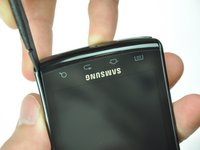
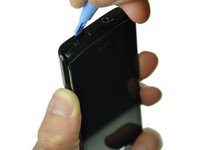
      • Insert the spudger underneath the bottom section of the phone.

      • Gently lift and push the spudger to slide the bottom section down to reveal two hidden screws.

      FixBot'a Sor

      Yorum Ekle

    2. Samsung Captivate Camera Assembly Replacement: adım 5, 1 resimden 1.
      • Remove the six 4.5mm #000 Phillips screws.

      FixBot'a Sor

      Yorum Ekle

    3. Samsung Captivate Camera Assembly Replacement: adım 6, 3 resimden 1. Samsung Captivate Camera Assembly Replacement: adım 6, 3 resimden 2. Samsung Captivate Camera Assembly Replacement: adım 6, 3 resimden 3.
      • Starting at a bottom corner, use the spudger to separate the rear case from the front display.

      • Move the spudger towards the top on both sides. The plastic opening tool is easier to use for this step.

      • Be careful when detaching the top. Free each side, stopping short of the center of the cover. Apply backward pressure on both corners with a finger applying pressure on the center, and slide the whole back cover toward the bottom of the device. Note: forcing the cover can result in cracked plastic.

      FixBot'a Sor

      Yorum Ekle

    4. Samsung Captivate Camera Assembly Replacement: adım 7, 1 resimden 1.
      • Separate the rear case from the phone.

      FixBot'a Sor

      Yorum Ekle

    1. Samsung Captivate Camera Assembly Replacement, Camera Assembly: adım 8, 1 resimden 1.
      • Use the spudger tool to pry up the chip labeled "NEC." This releases the chip.

      FixBot'a Sor

      Yorum Ekle

    2. Samsung Captivate Camera Assembly Replacement: adım 9, 1 resimden 1.
      • Gently lift the camera assembly out of the plastic housing.

      FixBot'a Sor

      Yorum Ekle

Sonuç

To reassemble your device, follow these instructions in reverse order.

İptal et: Bu kılavuzu tamamlamadım.

3 farklı kişi bu kılavuzu tamamladı.

Drew Bentz

Üyelik tarihi: 09/22/11

565 İtibar

5 adet Kılavuz yazıldı

Ekip

Cal Poly, Team 20-25, Maness Fall 2011 Cal Poly, Team 20-25, Maness Fall 2011 üyesi

CPSU-MANESS-F11S20G25

3 Üyeler

36 adet Kılavuz yazıldı

2Kılavuz Yorumları

Is this for the front facing camera

tracy mann - Yanıt Paylaş

No, this is for the rear facing camera. The Samsung Captivate does not have a front facing camera.

Will Budney - Yanıt Paylaş

Yorum Ekle

İstatistikleri Görüntüle:

Son 24 Saat: 2

Son 7 gün: 6

Son 30 gün: 36

Her zaman: 2,810